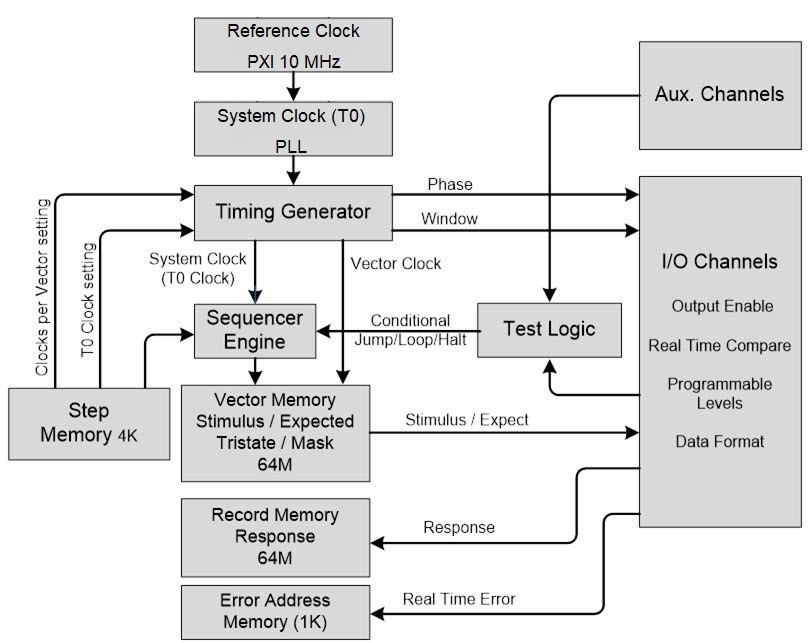
The figure below provides block diagram for the GX5296’s architecture:
Architecture Block Diagram
The system clock (T0) employs a programmable phase lock loop (PLL) frequency synthesizer. The reference clock for the Frequency Synthesizer uses the PXI 10 MHz clock.
Using the system clock as a basis, the Timing Generator block produces the Phase, Window, and Vector clock signals. In a Master/Slave configuration, a master reset is broadcast across the PXI Backplane (B/P) to the other board’s timing generators, to synchronize all timing generators. The System clock is used by the sequencer to start each phase and window along with incrementing the Vector and Record memories.
The Step Memory defines the order in which Vectors will be driven or sensed (recorded). This block provides the addressing to the Vector Memory and the Record Memory. The Step Memory also contains the T0 Clock period, Phase, Window, CPV (clocks per vector) and a Control statement for conditional jumping and looping. Programming of the sequencer requires that step addresses be contiguous.
The stimulus, expect, and Tri-State data for each vector and channel is stored in the Vector Memory.
The Record Memory stores individual channel error results or raw response data depending on the current Step’s record mode.
The test logic monitors Auxiliary Channels, Error signal, Channel Compare signals, and PXI triggers and provides the Sequencer Engine with input for its conditional logic.
The auxiliary I/O block offers a range of useful user and diagnostic output signals for user applications. The auxiliary I/O channels are not connected to any of the on-board memories, I.e. they cannot be used to capture or output any vector data. The auxiliary I/O channels can be set to one of the following modes using GtDio6xChannelSetMode() API:
● GTDIO6X_CHANNEL_MODE_DYNAMIC_IO: Setting any of the master’s 4 auxiliary I/O channels to Dynamic I/O Mode, the following output signals can be routed to the Aux channels via GtDio6xChannelSetAuxiliaryOutputSignal() API:
o Sequence Active.
o Vector Fail.
o Vector Clock.
o T0 CLK.
o Sequence Clock.
o PXI 10 MHz Clock.
o Record Active Status.
o Counter Active.
o Counted Loop.
o Load Loop Counter.
o Gosub Active.
o Last Sequence.
Note: Output voltage levels will be set according to the GtDio6xChannelSetSourceLevels() API.
● GTDIO6X_CHANNEL_MODE_DISABLED: Disable the specified Aux channel, the channel is in Hi-Z mode.
● GTDIO6X_CHANNEL_MODE_OUTPUT_LOW: Force a static logic low level on the output. The output voltage level low will be set according to the GtDio6xChannelSetSourceLevels() API.
● GTDIO6X_CHANNEL_MODE_OUTPUT_HIGH: Force a static logic high level on the output. The output voltage level high will be set according to the GtDio6xChannelSetSourceLevels() API.
● GTDIO6X_CHANNEL_MODE_PMU_FORCE_CURRENT: Force a current in PMU mode. The force current will be set according to the GtDio6xChannelSetPmuForcedCurrent() API.
● GTDIO6X_CHANNEL_MODE_PMU_FORCE_VOLTAGE: Force a voltage in PMU mode. The force voltage will be set according to the GtDio6xChannelSetPmuForcedVoltage() API.
The channel I/O block takes the Stimulus data, applies the data format and outputs the formatted data according to the phase timing. The resultant Drive and Enable signals go to the Channel Drivers (pin electronics).
The Response High and Response Low signals from the Receivers are examined and based on the window timing and capture mode, the response is analyzed with respect to the Expect data. The cumulative Error signal goes to the Test Logic block so it can be used for Jumping, Halting and Counting of Errors.
The I/O channels can be set to one of the following modes using GtDio6xChannelSetMode() API:
● GTDIO6X_CHANNEL_MODE_DYNAMIC_IO: Normal sequencer-controlled mode used when outputting vectors dynamically. Output voltage levels will be set according to the GtDio6xChannelSetSourceLevels() API
● GTDIO6X_CHANNEL_MODE_DISABLED: Disable the specified Aux channel, the channel is in Hi-Z mode.
● GTDIO6X_CHANNEL_MODE_OUTPUT_LOW: Force a static logic low level on the output. The output voltage level low will be set according to the GtDio6xChannelSetSourceLevels() API.
● GTDIO6X_CHANNEL_MODE_OUTPUT_HIGH: Force a static logic high level on the output. The output voltage level high will be set according to the GtDio6xChannelSetSourceLevels() API.
● GTDIO6X_CHANNEL_MODE_PMU_FORCE_CURRENT: Force a current in PMU mode. The force current will be set according to the GtDio6xChannelSetPmuForcedCurrent() API
● GTDIO6X_CHANNEL_MODE_PMU_FORCE_VOLTAGE: Force a voltage in PMU mode. The force voltage will be set according to the GtDio6xChannelSetPmuForcedVoltage() API.