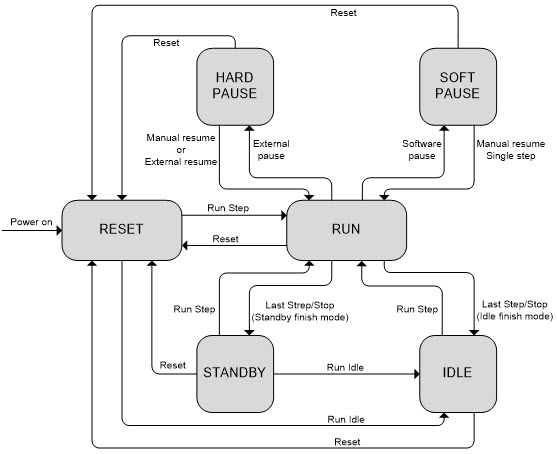
The GX5960 board has six basic operational states: Reset, Idle, Standby, Soft Pause, Hard Pause and Run. The figure below is a block diagram showing the relationship of these operational states.
GX5960 Operational States
When the sequencer is first powered, or goes through a Reset, it is in the Reset State. In this state, all real-time compare errors are cleared and the sequencer is ready to enter another state:
One of the unique features of the GX5960 is the Finish/Idle state. After the execution of a burst, the sequencer will enter the Idleor the Standby finishing state. The user can define the Finish/idle or Finish/standby state timing and vector(s) such that UUT stimulus can be maintained between vector bursts. A single vector can be specified so that the vector memory can be updated (Standby) or a group of vectors can be specified (Idle) during this state.
The user can disable the timing set phases/windows during the Finish/Idle state by setting Assert/Return and Open/Close values to zero. See GtDio6xSequencerSetFinishStep in the Functions Reference chapter for information.
The Idle State is a step that is designated by the software and used to repeat a series of vectors used to to maintain UUT stimulation. The Idle state can be entered when a run ends or is stopped manually by the user. The Idle state can be entered manually by the user prior to entering the Run State. When running, the Vector Memory is busy and cannot be accessed by the User. Use the Sequencer Reset to exit from the Idle State.
After the first run has occurred the sequencer will run the last Vector of the selected Standby Step. The Standby State is entered when the Run ends. It can only be stopped manually by issuing a Reset. The Standby State allows the user to maintain UUT stimulation between Digital Bursts. The standby Step can contain one or more vectors but only the last vector will be executed.
The Run State is the primary execution state. The Run State can be entered manually, by user command or through an external trigger. The sequencer will run through each Step and execute each Vector assigned to the respective Step. The Vector Memory is busy during this state and it cannot be accessed by the User.
The Soft Pause State is entered through manual intervention by the user. The different Software Pause modes can be set by the user to allow different behaviors to occur when a Software Pause is commanded by the user. During the Paused state, the last Vector is output statically on the I/O channels.
The Hard Pause State is entered through external triggering or handshaking signals. The Hard Pause State is similar to the Soft Pause State and is controlled by the current Pause Mode.