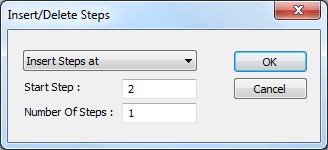
The following image shows the Insert/Delete Steps dialog:
Virtual Panel – Insert/Delete Steps dialog
Insert/Delete drop list box: have the following options:
● Insert Steps at: Insert the specified number of steps at the specified start step.
● Insert Steps after: Insert Steps after: Insert the specified number of steps after the specified start step.
● Insert Steps after last step: Insert Steps after last step: Insert the specified number of steps after the last step.
● Delete Steps: Delete Steps: Delete the specified number of steps at the specified start step.
Start Step edit box: Display/set the Start Step number.
Number of Steps edit box: Display/set the number of steps.