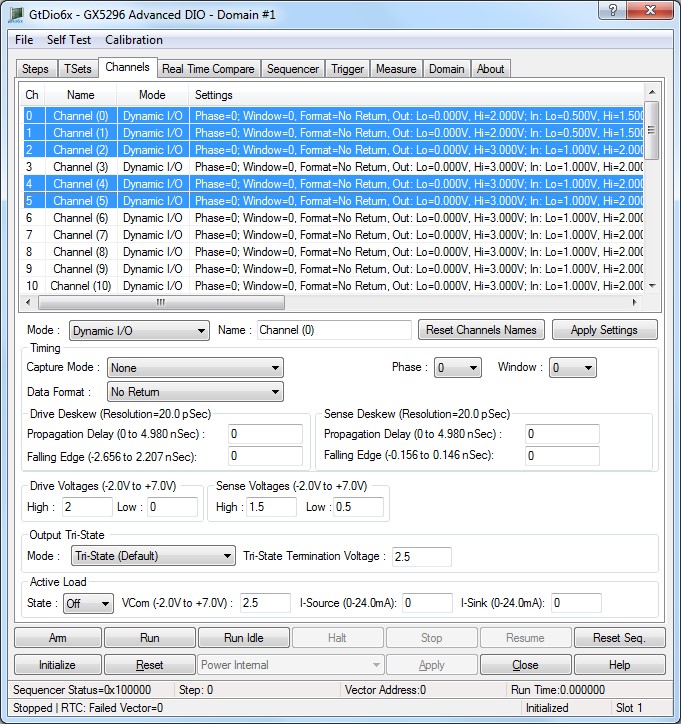
The panel's Channels tab is used to display and set the DIO domain board's channel settings as shown here:
Virtual Panel – Channels page
Channels list box: Displays the 0 based channel index of all the channels settings.
Mode drop list: Sets/displays the channels operation mode, values are:
0. Dynamic I/O:Normal sequencer-controlled mode used when outputting vectors dynamically. Output voltage levels will be set according to the GtDio6xChannelSetSourceLevels API.
1. Disabled Disable pin electronics.
2. Out Low: Force a static logic low level on the output. The output voltage level low will be set according to the GtDio6xChannelSetSourceLevels API.
3. Out High: Force a static logic high level on the output. The output voltage level high will be set according to the GtDio6xChannelSetSourceLevels API.
4. PMU Forced Current: Force a current in PMU mode. The force current will be set according to the GtDio6xChannelSetPmuForcedCurrentAPI.
5. PMU Forced Voltage: Force a voltage in PMU mode. The force voltage will be set according to the GtDio6xChannelSetPmuForcedVoltageAPI.
Relevant API functions: GtDio6xChannelSetName.
Name edit box: Sets/displays the channel names.
Relevant API functions: GtDio6xChannelSetMode.
Set Button: Apply settings.
Capture Mode list box: Sets/displays channel’s capture mode as follows:
0. None: Do not capture on the channel, no Real Time Compare errors can be generated from the channel.
1. Window Open Edge: Capture on the Window Open Edge Only (Edge Capture).
2. Window Close Edge: Capture on the Window Close Edge Only (Edge Capture).
3. Window Open: Capture throughout entire Window Range (Window Capture).
Relevant API functions: GtDio6xChannelSetParameters.
Phase list box: Sets/displays the channel’s phase selection as follows:
0. Step TSet0: channel’s Phase applied based on the step's Timing Set Index settings of first Phase in the specified Timing Set Memory Index.
1. Step TSet1: channel’s Phase applied based on the step's Timing Set Index settings of second Phase in the specified Timing Set Memory Index.
2. Step TSet2: channel’s Phase applied based on the step's Timing Set Index settings of third Phase in the specified Timing Set Memory Index
3. Step TSet3: channel’s Phase applied based on the step's Timing Set Index settings of fourth Phase in the specified Timing Set Memory Index.
Relevant API functions: GtDio6xChannelSetParameters.
Window list box: Sets/displays channel’s window selection as follows:
0. Step TSet0: channel’s Window applied based on the step's Timing Set Index settings of first Window in the specified Timing Set Memory Index.
1. Step TSet1: channel’s Window applied based on the step's Timing Set Index settings of second Window in the specified Timing Set Memory Index.
2. Step TSet2: channel’s Window applied based on the step's Timing Set Index settings of third Window in the specified Timing Set Memory Index.
3. Step TSet3: channel’s Window applied based on the step's Timing Set Index settings of fourth Window in the specified Timing Set Memory Index.
Relevant API functions: GtDio6xChannelSetParameters
Data Format list box: Sets/displays the channel’s format selection as follows:
0. No Return: No Return Data Format.
1. Return to Off (HiZ): Return to Off (HiZ) Data Format.
2. Return to Zero (Low): Return to Zero (Low) Data Format.
3. Return to One (High): Return to One (High) Data Format.
4. Return to Complement: Return to Complement Data Format.
5. Surround Complement: Surround Complement Data Format.
6. Force Zero (Low) Static Output: Force Zero (Low) Static Output.
7. Force One (High) Static Output: Force One (High) Static Output.
8. Force Off (HiZ): Force Off (HiZ).
9. Force Inverse Phase Output. During the Phase Assert, the Output driver goes from high to low level. During the Phase Return, the Output driver goes from low to high level.
10. Force Phase Output. During the Phase Assert, the Output driver goes from low to high level. During the Phase Return, the Output driver goes from high to low level.
Relevant API functions: GtDio6xChannelSetParameters.
Sets/displays the channel drive Propagation Delay and falling edge deskew delay. Propagation Delay value can be set form 0 to 4.980 nSec with resolution of 20.0pSec. The Falling Edge delay can be set from -2.656 to 2.207 nSec with resolution of 20.0pSec. The Falling Edge delay affects only the falling edge.
Sets/displays the channel sense Propagation Delay and falling edge deskew delay. Propagation Delay value can be set form 0 to 4.980 nSec with resolution of 20.0pSec. The Falling Edge delay can be set from -0.156 to 0.146 nSec with resolution of 20.0pSec. The Falling Edge deskew affects only the falling edge.
Relevant API functions: GtDio6xChannelSetSkew.
High edit box: Sets/displays the channel output driver high voltage value. The output driver high voltage corresponds to the logic high voltage settings with a range of -2V to 7.0V.
Low edit box: Sets/display the channel output driver low voltage. The output driver low voltage corresponds to the logic low voltage settings with a range of -2V to 7.0V.
Relevant API functions: GtDio6xChannelSetSourceLevels.
High edit box: Sets/displays the channel Input high voltage threshold, value can be -2V to 7.0V.
Low edit box: Sets/displays the channel Input low voltage threshold, value can be -2V to 7.0V.
Relevant API functions: GtDio6xChannelSetSenseLevels.
State list box: Sets/displays the sense channel load state:
0. Off: Disable channel load state.
1. On: Enable channel load state
Relevant API functions: GtDio6xChannelSetSenseLoadState.
VCom edit box: Sets/displays the channel’s constant current and commutating voltage values. Input active load sink and source currents and commutating voltage values can be programmed. Voltage range can be set from -2V to 7.0V.
Relevant API functions: GtDio6xChannelSetSenseLoadCommutatingVoltage.
I-Source edit box: Sets/displays the channel input source load currents. Input channel constant current source value is programmed in mA. The input channel constant current source value can be set from 0mA to 24mA with 0.3662 μA of resolution.
The input channel current source will force the specified constant current when the input voltage is above the high commutating voltage value.
Relevant API functions: GtDio6xChannelSetSenseLoadCurrent.
I-Sink edit box: Sets/displays the channel input sink load currents. Input channel constant current sink value is programmed in mA. The input channel constant current sink value can be set from 0mA to 24mA with 0.3662 μA of resolution.
The input channel current sink will force the specified constant current when the input voltage is below the low commutating voltage value.
Relevant API functions: GtDio6xChannelSetSenseLoadCurrent.
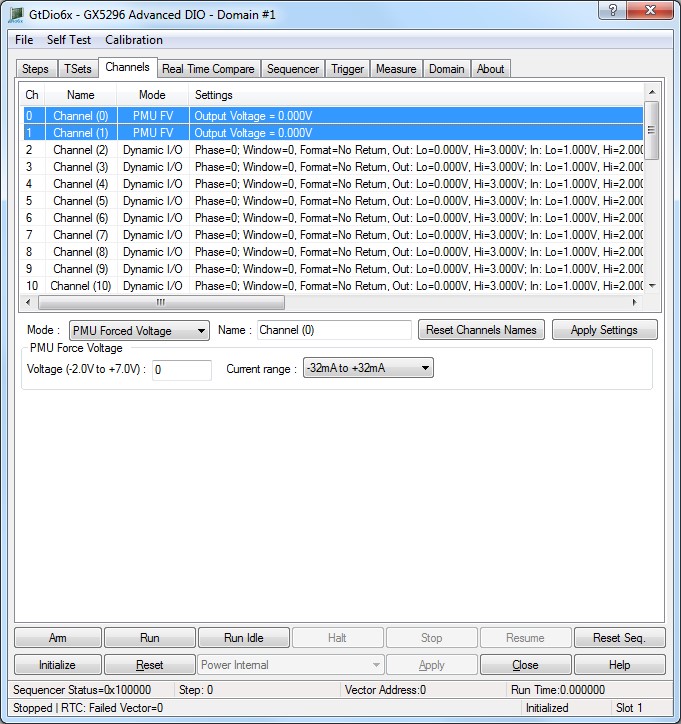
The panel Channels tab is used to display and set the DIO domain boards’ channel settings. The channels page PMU Force Voltage Controls is shown here:

Virtual Panel – Channels page PMU Force Voltage Controls
Channels list box: Displays the 0 based channel index of all the channel's settings.
Voltage edit box: Sets/displays the channel's forced voltage. The GX5296 Voltage range is -2V to 7.0V.
Relevant API functions: GtDio6xChannelSetPmuForcedVoltage.
Current Range list box: Sets/displays the channel current range. For the GX5296 there are 8 current ranges as follows:
0. -32mA to +32mA
1. -8mA to +8mA
2. -2mA to +2mA
3. -512uA to +512uA
4. -128uA to +128uA
5. -32uA to +32uA
6. -8uA to +8uA
7. -2uA to +2uA
Relevant API functions: GtDio6xChannelSetPmuForcedVoltage.
Use Ramp Function checkbox: when checked, the following controls are enabled and clicking on the “Apply settings” button will use the GtDio6xChannelSetPmuForcedVoltageRamp API. Ramping the PMU Force Voltage gradually over the specified time for the specified channels, to prevent over/under shoot of the channel’s output voltage.
Ramp Time (0-65535 uSec) edit box: Specify the time in uSec for the function to gradually ramp up/down the output Force Voltage. Ramp time can be 0-65535 uSec Relevant API functions: GtDio6xChannelSetPmuForcedVoltageRamp.
Ramp Mode dropdown list: list the mode to be used when ramping the PMU Force voltage settings. the voltage setting mode:
GTDIO6X_PMU_FV_SETUP_DEFAULT: Default, current range stays the same while ramping the output voltage, and nRampCurrentRange parameter is ignored.
GTDIO6X_PMU_FV_CHECK_FOR_OVER_CURRENT: Uses the specified nRampCurrentRange current range value while ramping up/down the output voltages to reduce output voltage over/under shoot. The nRampCurrentRange current range must be greater than nCurrentRange The user needs to make sure the DUT can handle higher currents. Transition current range value must be greater than nCurrentRange.
Relevant API functions: GtDio6xChannelSetPmuForcedVoltage Ramp.
Ramp Current Range list box: Sets/displays the ramp current range. For the GX5296, there are 8 current ranges as follows:
0. -32mA to +32mA
1. -8mA to +8mA
2. -2mA to +2mA
3. -512uA to +512uA
4. -128uA to +128uA
5. -32uA to +32uA
6. -8uA to +8uA
7. -2uA to +2uA;
Relevant API functions: GtDio6xChannelSetPmuForcedVoltageRamp.
The panel’s Channels tab is used to display and set the DIO domain boards’ channel settings, channel PMU settomgs. PMU Force Current Control is shown here:
Virtual Panel – Channels page Forced Current Controls
Channels list box: Displays the 0 based channel index of all the channels' settings.
Current edit box: Sets/display the channel forced current.
Relevant API functions: GtDio6xChannelSetPmuForcedCurrent.
Current Range list box: Sets/displays the channel current range. For the GX5296, there are 8 current ranges as follows:
0. -32mA to +32mA
1. -8mA to +8mA
2. -2mA to +2mA
3. -512uA to +512uA
4. -128uA to +128uA
5. -32uA to +32uA
6. -8uA to +8uA
7. -2uA to +2uA;
Relevant API functions: GtDio6xChannelSetPmuForcedCurrent.
VComHi edit box: Sets/displays the channel’s forced current commutating voltage (voltage clamp). The GX5296 High Commutating Voltage range for forced current is -2.0V to 7.0V.
VComLo edit box: Sets/display the channel’s forced current commutating voltage (voltage clamp). The GX5296 Low Commutating Voltage range for forced current voltage clamp is -2.0V to 7.0V.
Relevant API functions: GtDio6xChannelSetPmuForcedCurrentCommutatingVoltage.
The panel Channels tab is used to display and set the DIO domain boards’ channel settings. The four Mater’s Auxiliary channels page Controls is shown here:

Virtual Panel – Channels page four Master’s Auxiliary channels page Controls
Channels list box: Displays the 0 based channel index of all the channels settings.
Mode drop list box: Sets/displays the channels operation mode, values are:
0. Dynamic I/O: Normal sequencer-controlled mode used when outputting vectors dynamically. Output voltage levels will be set according to the GtDio6xChannelSetSourceLevels API.
1. Disabled: Disable pin electronics.
2. Out Low: Force a static logic low level on the output. The output voltage level low will be set according to the GtDio6xChannelSetSourceLevels API.
3. Out High: Force a static logic high level on the output. The output voltage level high will be set according to the GtDio6xChannelSetSourceLevels API.
4. PMU Forced Current: Force a current in PMU mode. The force current will be set according to the GtDio6xChannelSetPmuForcedCurrentAPI.
5. PMU Forced Voltage: Force a voltage in PMU mode. The force voltage will be set according to the GtDio6xChannelSetPmuForcedVoltageAPI.
Relevant API functions: GtDio6xChannelSetName.
Name edit box: Sets/displays the channel names.
Relevant API functions: GtDio6xChannelSetMode.
Set button: Apply settings.
Source drop list box: Sets/display the output signal routing of an auxiliary channel, this control is only valid when channel mode is Dynamic I/O, values are:
0. Sync 0 (GTDIO6X_AUX_OUTPUT_SYNC_PULSE_0).
1. Sync 1 (GTDIO6X_AUX_OUTPUT_SYNC_PULSE_1).
2. Sequence Active (GTDIO6X_AUX_OUTPUT_BURST_ACTIVE).
3. Sequence Flag 1 (GTDIO6X_AUX_OUTPUT_STEP_FLAG_0).
4. Sequence Flag 2 (GTDIO6X_AUX_OUTPUT_STEP_FLAG_1)
5. T0 CLK (GTDIO6X_AUX_OUTPUT_STEP_CLOCK).
6. Pattern Clock (GTDIO6X_AUX_OUTPUT_VECTOR_CLOCK).
7. Sequencer jump input (GTDIO6X_AUX_OUTPUT_JUMPI).
8. Raw Error channel comparators (GTDIO6X_AUX_OUTPUT_ERRIN).
9. Delayed Primary Sequencer Clock Input (GTDIO6X_AUX_OUTPUT_SEQCLKDI).
10. T0 CLK out (GTDIO6X_AUX_OUTPUT_T0CLKO).
11. SEQ CLK Out (GTDIO6X_AUX_OUTPUT_SEQCLKO).
12. Jump Out (GTDIO6X_AUX_OUTPUT_JUMPO).
13. SEQ CLK Data Out (GTDIO6X_AUX_OUTPUT_SEQCLKDO).
14. Record Active (GTDIO6X_AUX_OUTPUT_RECORD_ACTIVE).
15. PXI 10MHZ CLK (GTDIO6X_AUX_OUTPUT_PXI_CLK_10MHZ).
16. Jump Strobe (GTDIO6X_AUX_OUTPUT_JUMP_STROBE).
17. Accumulated FAIL (GTDIO6X_AUX_OUTPUT_FAIL).
18. Load Sequence Register GTDIO6X_AUX_OUTPUT_LOAD_SEQ_REG).
19. Load Loop Count (GTDIO6X_AUX_OUTPUT_LOAD_LOOP_COUNT).
20. Counter Active (GTDIO6X_AUX_OUTPUT_COUNTER_ACTIVE).
21. Clocks Per Pattern Done (GTDIO6X_AUX_OUTPUT_CPP_DONE).
22. Last Word (GTDIO6X_AUX_OUTPUT_LAST_WORD).
23. Gosub Active (GTDIO6X_AUX_OUTPUT_GO_SUB_ACTIVE).
24. Counted Loop (GTDIO6X_AUX_OUTPUT_COUNTED_LOOP).
25. Subroutine Return (GTDIO6X_AUX_OUTPUT_SUB_RETURN).
26. Last Sequence (GTDIO6X_AUX_OUTPUT_LAST_STEP).
27. Jump Trigger 0 (GTDIO6X_AUX_OUTPUT_JUMP_TRIG_0).
28. Jump Trigger 1 (GTDIO6X_AUX_OUTPUT_JUMP_TRIG_1).
29. Jump Trigger 2 (GTDIO6X_AUX_OUTPUT_JUMP_TRIG_2).
30. Jump Trigger 3 (GTDIO6X_AUX_OUTPUT_JUMP_TRIG_3).
31. Output disabled (GTDIO6X_AUX_OUTPUT_DISABLED).
32. Low voltage (GTDIO6X_AUX_OUTPUT_LOW_VOLTAGE).
33. High voltage (GTDIO6X_AUX_OUTPUT_HIGH_VOLTAGE).
34. PMU FI (GTDIO6X_AUX_OUTPUT_PMU_FI).
35. PMU FV (GTDIO6X_AUX_OUTPUT_PMU_FV).
State list box: Sets/displays the state of the output signal routing of an auxiliary channel, this control is only valid when channel mode is Dynamic I/O, values are:
0. Disabled: Output Signal is disabled.
1. Enabled: Output Signal is enabled.
2. Inverted: Output Signal is inverted.
Timing group box:
Data Format list box: Sets/displays the channel’s format selection as follows:
0. No Return: No Return Data Format.
1. Return to Off (HiZ): Return to Off (HiZ) Data Format.
2. Return to Zero (Low): Return to Zero (Low) Data Format.
3. Return to One (High): Return to One (High) Data Format.
4. Return to Complement: Return to Complement Data Format.
5. Surround Complement: Surround Complement Data Format.
6. Force Zero (Low) Static Output: Force Zero (Low) Static Output.
7. Force One (High) Static Output: Force One (High) Static Output.
8. Force Off (HiZ): Force Off (HiZ).
9. Force Inverse Phase Output. During the Phase Assert, the Output driver goes from high to low level. During the Phase Return, the Output driver goes from low to high level.
10. Force Phase Output. During the Phase Assert, the Output driver goes from low to high level. During the Phase Return, the Output driver goes from high to low level.
Relevant API functions: GtDio6xChannelSetParameters.
Drive Deskew group box:
Sets/displays the channel drive Propagation Delay and falling edge deskew delay. Propagation Delay value can be set from 0 to 4.980 nSec with resolution of 20.0pSec. The Falling Edge delay can be set from -2.656 to 2.207 nSec with resolution of 20.0pSec. The Falling Edge delay affects only the falling edge.
Sense Deskew group box:
Sets/displays the channel sense Propagation Delay and falling edge deskew delay. Propagation Delay value can be set from 0 to 4.980 nSec with resolution of 20.0pSec. The Falling Edge delay can be set from -0.156 to 0.146 nSec with resolution of 20.0pSec. The Falling Edge deskew affects only the falling edge.
Relevant API functions: GtDio6xChannelSetSkew.
Drive Voltages group box:
High edit box: Sets/displays the channel output driver high voltage value. The output driver high voltage corresponds to the logic high voltage settings with a range of -2V to 7.0V.
Low edit box: Sets/displays the channel output driver low voltage. The output driver low voltage corresponds to the logic low voltage settings with a range of -2V to 7.0V.
Relevant API functions: GtDio6xChannelSetSourceLevels .
Sense Voltages group box:
High edit box: Sets/displays the channel Input high voltage threshold, value can be -2V to 7.0V.
Low edit box: Sets/displays the channel Input low voltage threshold, value can be -2V to 7.0V.
Relevant API functions: GtDio6xChannelSetSenseLevels.
Active Load group box:
State list box: Sets/displays the sense channel load state:
0. Off: Disable channel load state.
1. On: Enable channel load state
Relevant API functions: GtDio6xChannelSetSenseLoadState.
VCom edit box: Sets/displays the channel’s constant current and commutating voltage values. Input active load sink and source currents and commutating voltage values can be programmed. Voltage range can be set from -2V to 7.0V.
Relevant API functions: GtDio6xChannelSetSenseLoadCommutatingVoltage.
I-Source edit box: Sets/displays the channel input source load currents. Input channel constant current source value is programmed in mA. The input channel constant current source value can be set from 0mA to 24mA with 0.3662 μA of resolution.
The input channel current source will force the specified constant current when the input voltage is above the high commutating voltage value.
Relevant API functions: GtDio6xChannelSetSenseLoadCurrent.
I-Sink edit box: Sets/displays the channel input sink load currents. The input channel constant current sink value is programmed in mA. The input channel constant current sink value can be set from 0mA to 24mA with 0.3662 μA of resolution.
The input channel current sink will force the specified constant current when the input voltage is below the low commutating voltage value.
Relevant API functions: GtDio6xChannelSetSenseLoadCurrent.