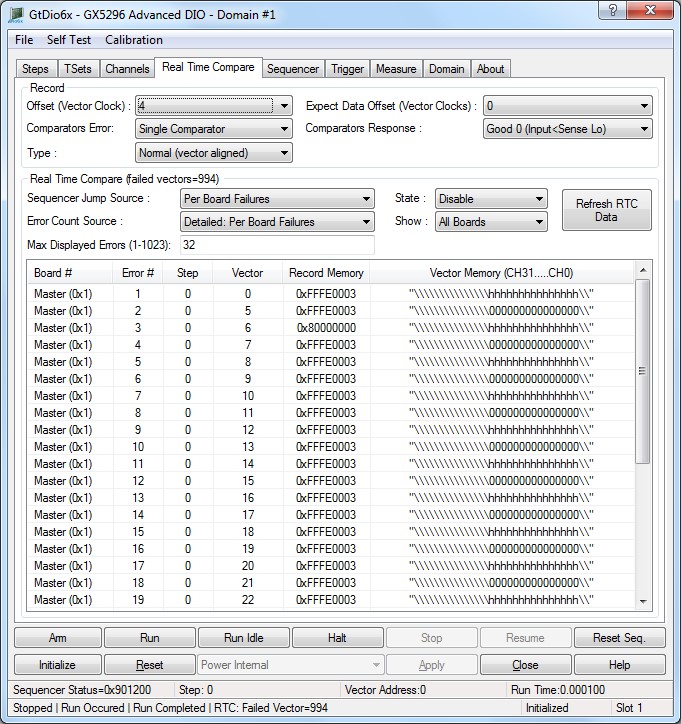
The panel Real Time Compare tab is used to change the DIO domain global settings as shown here:
Virtual Panel – Real Time Compare page
Offset (Clks) edit box list box: Sets/Displays the system clock offset (0-65534). The resolution is equal for the period of the T0 clock.
Relevant API functions: GtDio6xSequencerSetSystemClockExternal.
Stop Mode drop list box: Sets/Displays the sequencer stop mode. The stop mode determines what action a software generated stop or an external trigger will perform as follows:
0. Disabled: Stop Disabled, the stop signal will be ignored.
1. Next Vector: Stop at the next Vector. The stop signal can cause the current sequence's burst to terminate at the end of the next vector.
2. Loop: Break out of loop and continue to the next Step. The stop signal can cause the next jump to be ignored. Sequence execution will continue at the step following the jump step.
3. Step: Stop at the next Step. The stop signal can cause the current sequence's burst to terminate at the end of the sequence of a continuous or looped burst.
The stop modes determine if and how the sequencer will stop once it receives either a software or hardware stop command.
The GtDio6xTrigConfigSetStopTrigger API causes the sequencer to stop based on the current stop mode. Use the GtDio6xSequencerSetStopMode API to program the stop mode.
The GtDio6xSequencerStop API stops the sequencer based on the GtDio6xSequencerSetStopMode API selection. The sequencer standby or idle state will be active based on the GtDio6xSequencerSetRunCompletionMode API setting.
Note: calling GtDio6xSequencerStop API when the sequencer is not active latches the GtDio6xTrigConfigSetStopTrigger command until the sequencer is active.
Relevant API functions: GtDio6xSequencerSetStopMode.
Loop Counter drop list box: Sets/Displays the loop counter number as follows:
0. Loop Counter 0.
1. Loop Counter 1.
2. Loop Counter 2.
3. Loop Counter 3.
4. Loop Counter 4.
5. Loop Counter 5.
6. Loop Counter 6.
7. Loop Counter 7.
8. Loop Counter 8.
9. Loop Counter 9.
10. Loop Counter 10.
11. Loop Counter 11.
12. Loop Counter 12.
13. Loop Counter 13.
14. Loop Counter 14.
15. Loop Counter 15.
There are sixteen 16-bit loop counters. Each of the sixteen loop counters can be programmed to either reload its count or disable when the terminal count is reached.
For example, given the following sample loop sequence:
Step 1 Output vector 1 jump step 1 using LC0 count 2.
Step 2 Output vector 2 jump step 1 using LC1 count 3.
If both loop counters reload on terminal count, then the step order will be: 1, 1, 2, 1, 1, 2, 1, 1, 2, 1, 1, 2.
If counter 0 is set to disable, then the step order will be: 1, 1, 2, 1, 2, 1, 2, 1, 2.
Relevant API functions: GtDio6xSequencerSetLoopCounterMode.
Mode drop list box: Sets/Displays the loop counter mode, as follows:
0. Reload On Terminal Count: Reload on terminal count.
1. Disable On Terminal Count: Disable on terminal count.
There are sixteen 16-bit loop counters. Each of the sixteen loop counters can be programmed to either reload its count or disable when the terminal count is reached.
For example, given the following sample loop sequence:
Step 1 Output vector 1 jump step 1 using LC0 count 2.
Step 2 Output vector 2 jump step 1 using LC1 count 3.
If both loop counters reload on terminal count, then the step order will be: 1, 1, 2, 1, 1, 2, 1, 1, 2, 1, 1, 2.
If counter 0 is set to disable, then the step order will be: 1, 1, 2, 1, 2, 1, 2, 1, 2.
Relevant API functions: GtDio6xSequencerSetLoopCounterMode.
Record Mode drop list box: Sets/Displays the sequencer record parameters.
Sets the sequencer record mode. The sequencer record mode is used to select how the record memory is accessed when the sequence step disables the memory, values are:
0. Disabled: The contents of the record memory are unchanged when the step record mode is set to None (GTDIO6X_STEP_RECORD_MODE_DISABLED) or Count (GTDIO6X_STEP_RECORD_MODE_RTC_COUNT_ADDRESS), then the record memory will not be written.
1. Non-Error (0): The contents of the record memory are set to 0 (No Error) when the step record mode is set to None (GTDIO6X_STEP_RECORD_MODE_DISABLED) or Count (GTDIO6X_STEP_RECORD_MODE_RTC_COUNT_ADDRESS), then the record memory will not be written to.
The record mode is set for each step using the GtDio6xStepSetRecordMode function.
Relevant API functions: GtDio6xSequencerSetRecordParameters.
Expect Data Offset (Vector Clock) edit box: Sets/Displays the record data offset parameter. Used to compensate for round-trip driver/receiver delay and cabling delay to the UUT. Allows alignment of drive data with expect data. Resolution: 1 vector clock Range: 0-63 vector clocks. The record offset allows the user to shift the record signals (vector code expect data and window strobes) to accommodate system and UUT delay.
Offset (Vector Clock) edit box: Sets/Displays the record memory offset parameters. This value is used to align the acquired / record data to the correct vector location such that drive and sense / record vector are in alignment. Different vector rates will require different values. Resolution: 1 vector clock Range: 0-63 vector clocks. Relevant API functions: GtDio6xSequencerSetRecordOffset.
Type drop list box: Sets/Displays how the recorded data will be stored, as follows:
0. Normal (vector aligned): Data is recorded in the record memory with the same offset as the vector memory.
1. Indexed (sequential): Data is recorded sequentially starting at offset0. The record index memory stores information that allows the recorded data to be aligned with the vector data.
The record mode is set for each step using the GtDio6xStepSetRecordMode function.
Relevant API functions: GtDio6xSequencerSetRecordOffset.
Comparators Error drop list box: Sets/Displays the input comparator data mode. Allows the user to select how the response data will be evaluated for errors when the record mode is set to "Record Errors", as follows:
0. Dual Comparator: Use both good 1 and good 0 comparator levels (Dual threshold).
1. Single Comparator: Use only the good 1 comparator (Single threshold).
The record mode is set for each step using the GtDio6xStepSetRecordMode function.
Relevant API functions: GtDio6xSequencerSetRecordOffset.
Comparators Response drop list box: Sets/Displays the response comparators data mode, as follows:
0. Good 0 (Input<Sense Lo): Use good 0.
1. Good 1(Input>Sense Hi): Use good 1.
The record mode is set for each step using the GtDio6xStepSetRecordMode function.
Relevant API functions: GtDio6xSequencerSetRecordOffset.
Count Source drop list box: Sets/Displays the Real Time Compare Error Counter source, as follows:
0. Failed Vectors Per Board: Error counter source is board generated errors.
1. Failed Vectors in Domain: Error counter source is domain generated errors (default, after power).
2. Failed Vectors With E (Error) Flags Enabled Per Board: Error counter source is board generated errors from vectors with the test E Flag enabled. Note: E Flags are only available on the GX5961 and GX5964.
3. Failed Vectors With E (Error) Flags Enabled in Domain: Error counter source is domain generated errors from vectors with the test E Flag enabled. Note: E Flags are only available on the GX5961 and GX5964.
The Error Address Memory records up to 1023 real time compare errors. The source of the Error Counter can be selected using this function. Board wide or Domain wide errors can be recorded. Use the GtDio6xWriteVectorTestFlagsMemory API to set the vector Test flags. C Flags are only available on the GX5961 and GX5964.
If the Error Count Source is set to GTDIO6X_RTC_ERROR_COUNTER_SOURCE_BOARD or GTDIO6X_RTC_ERROR_COUNTER_SOURCE_DOMAIN then only qualified Vectors will be allowed to generate errors that will be recorded. (Errors generated from Vectors without the C flag will be disregarded in this case).
Relevant API functions: GtDio6xRealTimeCompareSetErrorCountSource.
Address Memory Source drop list box: Sets/Displays the Real Time Compare Error Address Memory, Error Address Memory source are:
0. Failed Vectors Per Board: Only locally (within a board) generated errors will be recorded.
1. Failed Vectors in Domain: Any error generated from any board in the domain will be recorded.
The Error Address Memory records up to 1023 real time compare errors. The source of the Error Address Memory can be selected using this function. Board wide or Domain wide errors can be recorded.
Relevant API functions: GtDio6xRealTimeCompareSetErrorAddressMemorySource.
Sequencer Jump Source drop list box: Sets/Displays the Real Time compare jump source. the error signal used to determine the jump PASS/FAIL state:
0. Failed Vectors Per Board: Board’s Real Time Compare failure will cause a jump.
1. Failed Vectors in Domain: Domain’s Real Time Compare failure will cause a jump.
Select if the Control Logic will use All Local Errors, All Domain Errors, Local Qualified.
Relevant API functions: GtDio6xRealTimeCompareSetJumpSource.
State drop list box: Sets/Displays the Real Time compare jump source Pass Valid Enable, as follows:
0. Disable: Do not use pass valid signal.
1. Enable: define the PASS as a VALID PASS, where no channel errors were detected but there must be at least one valid pattern expect code.
Select if the Control Logic will use All Local Errors, All Domain Errors, Local Qualified.
Relevant API functions: GtDio6xRealTimeCompareSetJumpSource.
Count Display drop list box: Sets/Displays the error count mode:
0. Domain Accumulated.
1. Per Board.
Timeout edit box: Sets/display the timeout is programmed in 10ns steps (may have an additional 10ns of error) with a range of 20ns to 42.949672970s.