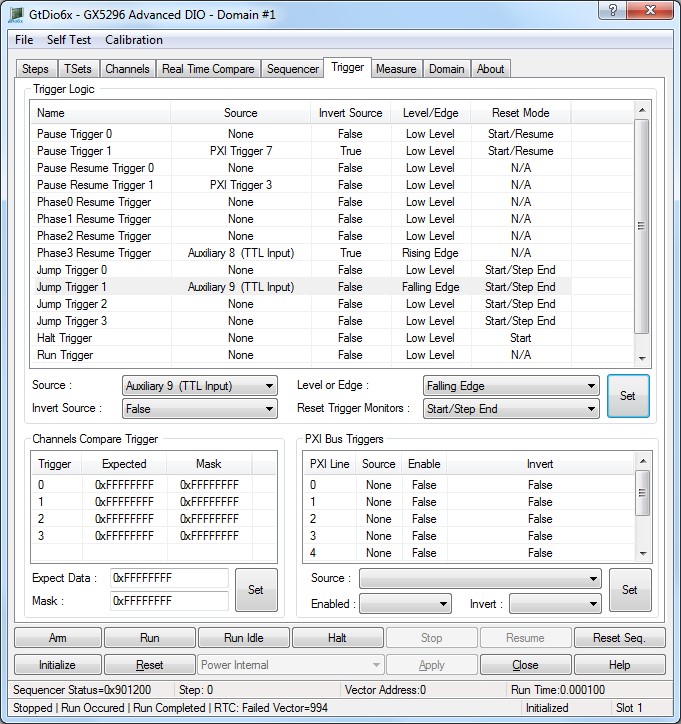
The panel Trigger tab is used to change the selected DIO domain board settings as shown here:
Virtual Panel – Trigger page
The following controls are shown in the Trigger page:
Trigger List: Displays the trigger sources as follows:
Pause Trigger 0 and Pause Trigger 1:
Trigger source drop list box: pause trigger settings.
0. None: No Signal is used as the pause resume trigger source.
1. Auxiliary 0: Auxiliary channel 0 used as the pause resume trigger source.
2. Auxiliary 1: Auxiliary channel 1 used as the pause resume trigger source.
3. Auxiliary 2: Auxiliary channel 2 used as the pause resume trigger source.
4. Auxiliary 3: Auxiliary channel 3 used as the pause resume trigger source.
5. Auxiliary 8: Auxiliary TTL Input channel 8 used as the pause resume trigger source.
6. Auxiliary 9: Auxiliary TTL Input channel 9 used as the pause resume trigger source.
7. Auxiliary 10: Auxiliary TTL Input channel 10 used as the pause resume trigger source.
8. Auxiliary 11: Auxiliary TTL Input channel 11 used as the pause resume trigger source.
9. Channel Compare 0: Channel Test Signal 0 used as the pause resume trigger source.
10. Local Bus 0: Resource used as the pause resume trigger source.
11. PXI Bus Trig 0 used as the pause resume trigger source.
12. PXI Bus Trig 1 used as the pause resume trigger source.
13. PXI Bus Trig 2 used as the pause resume trigger source.
14. PXI Bus Trig 3 used as the pause resume trigger source.
15. PXI Bus Trig 4 used as the pause resume trigger source.
16. PXI Bus Trig 5 used as the pause resume trigger source.
17. PXI Bus Trig 6 used as the pause resume trigger source.
18. PXI Bus Trig 7 used as the pause resume trigger source.
Invert Source drop list: Sets/Displays the inverted trigger inverter state as follows:
0. False: Disable signal inverter, do not modify input signal before testing.
1. True: Enable signal inverter, invert input signal before testing.
Level or Edge drop list: Sets/Displays the trigger test mode as follows:
0. Low Level Trigger when a low logic level is detected.
1. High Level: Trigger when a high logic level is detected.
2. Rising Edge: Trigger when a rising edge is detected.
3. Falling Edge: Trigger when a falling edge is detected.
Reset Trigger Monitors drop list box list box: Set/Displays the trigger reset level/edge mode as follows (common to both Pause Trigger 0 and Pause Trigger 1):
0. Start: Reset trigger only at the beginning of burst.
1. Start/Step End: Reset trigger at the beginning and end of each step.
2. Start/Resume: Reset trigger at the beginning of each step and when execution is resumed.
Relevant API functions: GtDio6xTrigConfigSetPauseResumeTrigger.
Pause Resume Trigger 0 and Pause Resume Trigger 1:
Trigger source drop list box: pause resume trigger settings.
0. None: No Signal is used as the pause resume trigger source.
1. Auxiliary 0: Auxiliary channel 0 used as the pause resume trigger source.
2. Auxiliary 1: Auxiliary channel 1 used as the pause resume trigger source.
3. Auxiliary 2: Auxiliary channel 2 used as the pause resume trigger source.
4. Auxiliary 3: Auxiliary channel 3 used as the pause resume trigger source.
5. Auxiliary 8: Auxiliary TTL Input channel 8 used as the pause resume trigger source.
6. Auxiliary 9: Auxiliary TTL Input channel 9 used as the pause resume trigger source.
7. Auxiliary 10: Auxiliary TTL Input channel 10 used as the pause resume trigger source.
8. Auxiliary 11: Auxiliary TTL Input channel 11 used as the pause resume trigger source.
9. Channel Compare 0: Channel Test Signal 0 used as the pause resume trigger source.
10. Local Bus 0: Resource used as the pause resume trigger source.
11. PXI Bus Trig 0 used as the pause resume trigger source.
12. PXI Bus Trig 1 used as the pause resume trigger source.
13. PXI Bus Trig 2 used as the pause resume trigger source.
14. PXI Bus Trig 3 used as the pause resume trigger source.
15. PXI Bus Trig 4 used as the pause resume trigger source.
16. PXI Bus Trig 5 used as the pause resume trigger source.
17. PXI Bus Trig 6 used as the pause resume trigger source.
18. PXI Bus Trig 7 used as the pause resume trigger source.
Invert Source drop list: Sets/Displays the inverted trigger inverter state as follows:
0. False: Disable signal inverter, do not modify input signal before testing.
1. True: Enable signal inverter, invert input signal before testing.
Level or Edge drop list: Sets/Displays the trigger test mode as follows:
0. Low Level Trigger when a low logic level is detected.
1. High Level: Trigger when a high logic level is detected.
2. Rising Edge: Trigger when a rising edge is detected.
3. Falling Edge: Trigger when a falling edge is detected.
Phase 0 Resume Trigger to Phase3 Resume Trigger:
Trigger source drop list box: phase resume trigger settings.
0. None: No Signal is used as the pause resume trigger source.
1. Auxiliary 0: Auxiliary channel 0 used as the pause resume trigger source.
2. Auxiliary 1: Auxiliary channel 1 used as the pause resume trigger source.
3. Auxiliary 2: Auxiliary channel 2 used as the pause resume trigger source.
4. Auxiliary 3: Auxiliary channel 3 used as the pause resume trigger source.
5. Auxiliary 8: Auxiliary TTL Input channel 8 used as the pause resume trigger source.
6. Auxiliary 9: Auxiliary TTL Input channel 9 used as the pause resume trigger source.
7. Auxiliary 10: Auxiliary TTL Input channel 10 used as the pause resume trigger source.
8. Auxiliary 11: Auxiliary TTL Input channel 11 used as the pause resume trigger source.
9. Channel Compare 0: Channel Test Signal 0 used as the pause resume trigger source.
10. Local Bus 0: Resource used as the pause resume trigger source.
11. PXI Bus Trig 0 used as the pause resume trigger source.
12. PXI Bus Trig 1 used as the pause resume trigger source.
13. PXI Bus Trig 2 used as the pause resume trigger source.
14. PXI Bus Trig 3 used as the pause resume trigger source.
15. PXI Bus Trig 4 used as the pause resume trigger source.
16. PXI Bus Trig 5 used as the pause resume trigger source.
17. PXI Bus Trig 6 used as the pause resume trigger source.
18. PXI Bus Trig 7 used as the pause resume trigger source.
Invert Source drop list: Sets/Displays the inverted inverter state as follows:
0. False: Disable signal inverter, do not modify input signal before testing.
1. True: Enable signal inverter, invert input signal before testing.
Level or Edge drop list: Sets/Displays the trigger test mode as follows:
0. Low Level Trigger when a low logic level is detected.
1. High Level: Trigger when a high logic level is detected.
2. Rising Edge: Trigger when a rising edge is detected.
3. Falling Edge: Trigger when a falling edge is detected.
Reset Trigger Monitors drop list box list box: Sets/Displays the trigger reset level/edge mode as follows (common to Jump Trigger 0 to Jump Trigger 3):
0. Start: Reset trigger only at the beginning of burst.
1. Start/Step End: Reset trigger at the beginning and end of each step.
2. Start/Resume: Reset trigger at the beginning of each step and when execution is resumed.
Relevant API functions: GtDio6xTrigConfigSetJumpTrigger.
Halt Trigger:
Trigger source drop list box:
0. None: No Signal is used as the pause resume trigger source.
1. Auxiliary 0: Auxiliary channel 0 used as the pause resume trigger source.
2. Auxiliary 1: Auxiliary channel 1 used as the pause resume trigger source.
3. Auxiliary 2: Auxiliary channel 2 used as the pause resume trigger source.
4. Auxiliary 3: Auxiliary channel 3 used as the pause resume trigger source.
5. Auxiliary 8: Auxiliary TTL Input channel 8 used as the pause resume trigger source.
6. Auxiliary 9: Auxiliary TTL Input channel 9 used as the pause resume trigger source.
7. Auxiliary 10: Auxiliary TTL Input channel 10 used as the pause resume trigger source.
8. Auxiliary 11: Auxiliary TTL Input channel 11 used as the pause resume trigger source.
9. Channel Compare 0: Channel Test Signal 0 used as the pause resume trigger source.
10. Local Bus 0: Resource used as the pause resume trigger source.
11. PXI Bus Trig 0 used as the pause resume trigger source.
12. PXI Bus Trig 1 used as the pause resume trigger source.
13. PXI Bus Trig 2 used as the pause resume trigger source.
14. PXI Bus Trig 3 used as the pause resume trigger source.
15. PXI Bus Trig 4 used as the pause resume trigger source.
16. PXI Bus Trig 5 used as the pause resume trigger source.
17. PXI Bus Trig 6 used as the pause resume trigger source.
18. PXI Bus Trig 7 used as the pause resume trigger source.
Invert Source drop list: Sets/Displays the inverted trigger state as follows:
0. False: Disable signal inverter, do not modify input signal before testing.
1. True: Enable signal inverter, invert input signal before testing.
Level or Edge drop list: Sets/Displays the trigger test mode as follows:
0. Low Level Trigger when a low logic level is detected.
1. High Level: Trigger when a high logic level is detected.
2. Rising Edge: Trigger when a rising edge is detected.
3. Falling Edge: Trigger when a falling edge is detected.
Reset Trigger Monitors drop list box list box: Sets/Displays the trigger reset level/edge mode as follows:
0. Start: Reset trigger only at the beginning of burst.
1. Start/Step End: Reset trigger at the beginning and end of each step.
2. Start/Resume: Reset trigger at the beginning of each step and when execution is resumed.
Relevant API functions: GtDio6xTrigConfigSetHaltTrigger.
Run Trigger: Set/Display the stop trigger settings.
Trigger source drop list box:
0. None: No Signal is used as the pause resume trigger source.
1. Auxiliary 0: Auxiliary channel 0 used as the pause resume trigger source.
2. Auxiliary 1: Auxiliary channel 1 used as the pause resume trigger source.
3. Auxiliary 2: Auxiliary channel 2 used as the pause resume trigger source.
4. Auxiliary 3: Auxiliary channel 3 used as the pause resume trigger source.
5. Auxiliary 8: Auxiliary TTL Input channel 8 used as the pause resume trigger source.
6. Auxiliary 9: Auxiliary TTL Input channel 9 used as the pause resume trigger source.
7. Auxiliary 10: Auxiliary TTL Input channel 10 used as the pause resume trigger source.
8. Auxiliary 11: Auxiliary TTL Input channel 11 used as the pause resume trigger source.
9. Channel Compare 0: Channel Test Signal 0 used as the pause resume trigger source.
10. Local Bus 0: Resource used as the pause resume trigger source.
11. PXI Bus Trig 0 used as the pause resume trigger source.
12. PXI Bus Trig 1 used as the pause resume trigger source.
13. PXI Bus Trig 2 used as the pause resume trigger source.
14. PXI Bus Trig 3 used as the pause resume trigger source.
15. PXI Bus Trig 4 used as the pause resume trigger source.
16. PXI Bus Trig 5 used as the pause resume trigger source.
17. PXI Bus Trig 6 used as the pause resume trigger source.
18. PXI Bus Trig 7 used as the pause resume trigger source.
Invert Source drop list: Sets/Displays the inverted trigger state as follows:
0. False: Disable signal inverter, do not modify input signal before testing.
1. True: Enable signal inverter, invert input signal before testing.
Level or Edge drop list: Sets/Displays the trigger test mode as follows:
0. Low Level Trigger when a low logic level is detected.
1. High Level: Trigger when a high logic level is detected.
2. Rising Edge: Trigger when a rising edge is detected.
3. Falling Edge: Trigger when a falling edge is detected.
Stop Trigger:
Trigger source drop list box:
0. None: No Signal is used as the pause resume trigger source.
1. Auxiliary 0: Auxiliary channel 0 used as the pause resume trigger source.
2. Auxiliary 1: Auxiliary channel 1 used as the pause resume trigger source.
3. Auxiliary 2: Auxiliary channel 2 used as the pause resume trigger source.
4. Auxiliary 3: Auxiliary channel 3 used as the pause resume trigger source.
5. Auxiliary 8: Auxiliary TTL Input channel 8 used as the pause resume trigger source.
6. Auxiliary 9: Auxiliary TTL Input channel 9 used as the pause resume trigger source.
7. Auxiliary 10: Auxiliary TTL Input channel 10 used as the pause resume trigger source.
8. Auxiliary 11: Auxiliary TTL Input channel 11 used as the pause resume trigger source.
9. Channel Compare 0: Channel Test Signal 0 used as the pause resume trigger source.
10. Local Bus 0: Resource used as the pause resume trigger source.
11. PXI Bus Trig 0 used as the pause resume trigger source.
12. PXI Bus Trig 1 used as the pause resume trigger source.
13. PXI Bus Trig 2 used as the pause resume trigger source.
14. PXI Bus Trig 3 used as the pause resume trigger source.
15. PXI Bus Trig 4 used as the pause resume trigger source.
16. PXI Bus Trig 5 used as the pause resume trigger source.
17. PXI Bus Trig 6 used as the pause resume trigger source.
18. PXI Bus Trig 7 used as the pause resume trigger source.
Invert Source drop list: Sets/Displays the inverted trigger state as follows:
0. False: Disable signal inverter, do not modify input signal before testing.
1. True: Enable signal inverter, invert input signal before testing.
Level or Edge drop list box list box: Sets/Displays the trigger test mode as follows:
0. Low Level Trigger when a low logic level is detected.
1. High Level: Trigger when a high logic level is detected.
2. Rising Edge: Trigger when a rising edge is detected.
3. Falling Edge: Trigger when a falling edge is detected.
Channels Compare Trigger List: Sets/Displays the four channel tests settings. Channel Compare Triggers are only available on Master board channels.
Expect Data edit box: Sets/Displays the channel test expect value. Each bit corresponds to a channel, Bit 0 of the expected value maps to the lowest channel of this sequencer and the last bit maps to the highest channel. E.g. Bit 0 - Channel 0 expected bit 31 - Channel 31.
A one represents a valid high test and a zero represent a valid low test.
The expected value is compared to the response high of the input channel.
Valid Range: 0-0xFFFFFFFF.
Relevant API functions: GtDio6xSequencerSetChannelsCompareTrigger
Mask edit box: Sets/Displays the channel test mask value. Each bit corresponds to a channel, Bit 0 of the mask value maps to the lowest channel of this sequencer and the last bit maps to the highest channel.
E.g. Bit 0 - Channel 0 mask, Bit 31 - Channel 31.
A one disables (masks) the comparison to the expected value and a zero enables the comparison.
Valid Range: 0-0xFFFFFFFF.
Relevant API functions: GtDio6xSequencerSetChannelsCompareTrigger.
PXI Bus Triggers list box: Sets/Displays the PXI Bus Triggers settings.
Source drop list box: Sets/Displays the PXI trigger line source as follows:
0. None: No Signal is used as the pause resume trigger source.
1. Auxiliary 0: Auxiliary channel 0 used as the pause resume trigger source.
2. Auxiliary 1: Auxiliary channel 1 used as the pause resume trigger source.
3. Auxiliary 2: Auxiliary channel 2 used as the pause resume trigger source.
4. Auxiliary 3: Auxiliary channel 3 used as the pause resume trigger source.
5. Auxiliary 8: Auxiliary TTL Input channel 8 used as the pause resume trigger source.
6. Auxiliary 9: Auxiliary TTL Input channel 9 used as the pause resume trigger source.
7. Auxiliary 10: Auxiliary TTL Input channel 10 used as the pause resume trigger source.
8. Auxiliary 11: Auxiliary TTL Input channel 11 used as the pause resume trigger source.
9. Pulse Generator: Pulse generator used as the PXI Bus trigger source.
10. Step out flag 0: The current Step’s output flag 0 used as the PXI Bus trigger source, see GtDio6xStepSetOutputFlag API (not supported for GX5296).
11. Step out flag 1: The current Step’s output flag 1 used as the PXI Bus trigger source, see GtDio6xStepSetOutputFlag API(not supported for GX5296).
12. Seq Sync output 1: The sequencer sync output 1 used as the PXI Bus trigger source, see GtDio6xSequencerSetSyncPulseSource and GtDio6xSequencerSetSyncPulseParameters API.
13. Seq Sync output 2: The sequencer sync output 1 used as the PXI Bus trigger source, see GtDio6xSequencerSetSyncPulseSource and GtDio6xSequencerSetSyncPulseParameters API.
14. Channel compare 0: Channel compare 0 used as the PXI Bus trigger source, see GtDio6xSequencerSetChannelsCompareTrigger and GtDio6xTrigConfigSetPxiTrigger API.
15. Channel compare 1: Channel compare 1 used as the PXI Bus trigger source, see GtDio6xSequencerSetChannelsCompareTrigger and GtDio6xTrigConfigSetPxiTrigger API.
16. Channel compare 2: Channel compare 2 used as the PXI Bus trigger source, see GtDio6xSequencerSetChannelsCompareTrigger and GtDio6xTrigConfigSetPxiTrigger API.
17. Channel compare 3: Channel compare 3 used as the PXI Bus trigger source, see GtDio6xSequencerSetChannelsCompareTrigger and GtDio6xTrigConfigSetPxiTrigger API.
18. Idle Step Running: Running the idle step used as the PXI Bus trigger source, see GtDio6xSequencerGetStatus API.
19. Sequencer Running: Sequencer is running used as the PXI Bus trigger source, see GtDio6xSequencerGetStatus API.
20. Error Pulse: The error pulse used as the PXI Bus trigger source.
21. Valid pass: Valid pass used as the PXI Bus trigger source.
22. Step reset settings: The current Step’s reset settings used as the PXI Bus trigger source.
23. Output Drivers disabled: Whenever the output drivers are disabled used as the PXI Bus trigger source, see GtDio6xSequencerGetStatus API.
24. Global reset: Global reset used as the PXI Bus trigger source.
The Local Triggers are used to synchronize events across a GX5960 Domain.
The user can also use the GtDio6xTrigConfigSetPxiTrigger API to synchronize events across a GX5960 Domain.
Relevant API functions: GtDio6xTrigConfigSetPxiTrigger.
Enable drop list box: Sets/Displays the trigger state as follows:
0. False: Disable PXI trigger.
1. True: Enable PXI trigger.
Relevant API functions: GtDio6xTrigConfigSetPxiTrigger.
Invert drop list box: Sets/Displays the PXI trigger inverter as follows:
0. False: Disable signal inverter.
1. True: Enable signal inverter, the source signal logic will be inverted before being sent to the Sequencer.
Relevant API functions: GtDio6xTrigConfigSetPxiTrigger.