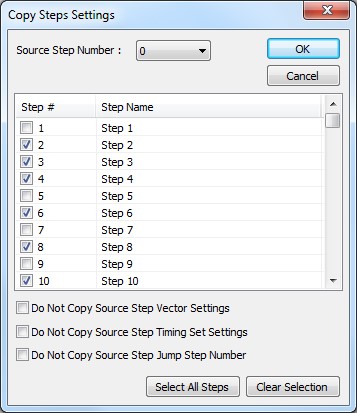
The following image shows the Copy Step dialog:
Virtual Panel – Copy Step Settings dialog
Source Step Number drop down list box: Display/sets the Source Step Number.
Step list box: Display/sets steps to paste the Source Step Number to.
Do Not Copy Source Step Vector Settings check box: when checked the Source Step Vector Settings will not be copied.
Do Not Copy Source Step Timing Set Settings check box: when checked the Source Step Timing Set Settings will not be copied.
Do Not Copy Source Step Jump Step Number check box: when checked the Source Step Jump Step Number Settings will not be copied.
Select All Steps button: Select all the steps in the Step list.
Clear Selection button: Clear the selection of all the steps in the Step list.