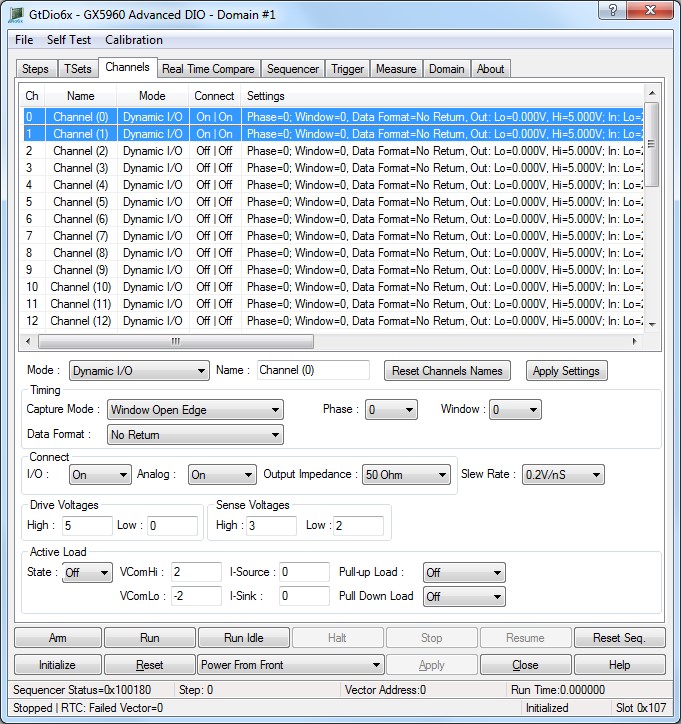
The panel Channels tab is used to display and set the DIO domain boards channels settings as shown here:
Virtual Panel – Channels page
Channels list box: Displays the 0 based channel index of all the channels settings.
Mode drop list: Sets/displays the channels operation mode, values are:
0. Dynamic I/O:Normal sequencer-controlled mode used when outputting vectors dynamically. Output voltage levels will be set according to the GtDio6xChannelSetSourceLevels API.
1. Disabled Disable pin electronics.
2. Out Low: Force a static logic low level on the output. The output voltage level low will be set according to the GtDio6xChannelSetSourceLevels API.
3. Out High: Force a static logic high level on the output. The output voltage level high will be set according to the GtDio6xChannelSetSourceLevels API.
4. PMU Forced Current: Force a current in PMU mode. The force current will be set according to the GtDio6xChannelSetPmuForcedCurrent API.
5. PMU Forced Voltage: Force a voltage in PMU mode. The force voltage will be set according to the GtDio6xChannelSetPmuForcedVoltage API.
6. Relevant API functions: GtDio6xChannelSetName.
Name edit box: Sets/displays the channels name.
Relevant API functions: GtDio6xChannelSetMode.
Set Button: Apply settings.
Capture Mode list box: Sets/display channel’s capture mode as follows:
0. None: Do not capture on the channel, no Real Time Compare errors can be generated from the channel.
1. Window Open Edge: Capture on the Window Open Edge Only (Edge Capture).
2. Window Close Edge: Capture on the Window Close Edge Only (Edge Capture).
3. Window Open: Capture throughout entire Window Range (Window Capture).
Relevant API functions: GtDio6xChannelSetParameters.
Phase list box: Sets/display the channel’s phase selection as follows:
0. Step TSet0: channel’s Phase applied based on the step's Timing Set Index settings of first Phase in the specified Timing Set Memory Index.
1. Step TSet1: channel’s Phase applied based on the step's Timing Set Index settings of second Phase in the specified Timing Set Memory Index.
2. Step TSet2: channel’s Phase applied based on the step's Timing Set Index settings of third Phase in the specified Timing Set Memory Index.
3. Step TSet3: : channel’s Phase applied based on the step's Timing Set Index settings of fourth Phase in the specified Timing Set Memory Index.
Relevant API functions: GtDio6xChannelSetParameters.
Window list box: Sets/display channel’s window selection as follows:
0. Step TSet0: channel’s Window applied based on the step's Timing Set Index settings of first Window in the specified Timing Set Memory Index.
1. Step TSet1: channel’s Window applied based on the step's Timing Set Index settings of second Window in the specified Timing Set Memory Index.
2. Step TSet2: channel’s Window applied based on the step's Timing Set Index settings of third Window in the specified Timing Set Memory Index.
3. Step TSet3: channel’s Window applied based on the step's Timing Set Index settings of fourth Window in the specified Timing Set Memory Index.
Relevant API functions: GtDio6xChannelSetParameters.
Data Format list box: Sets/display channel’s format selection as follows:
0. No Return: No Return Data Format.
1. Return to Off (HiZ): Return to Off (HiZ) Data Format.
2. Return to Zero (Low): Return to Zero (Low) Data Format.
3. Return to One (High): Return to One (High) Data Format.
4. Return to Complement: Return to Complement Data Format.
5. Surround Complement: Surround Complement Data Format.
6. Force Zero (Low) Static Output: Force Zero (Low) Static Output.
7. Force One (High) Static Output: Force One (High) Static Output.
8. Force Off (HiZ): Force Off (HiZ).
9. Force Inverse Phase Output. During the Phase Assert, the Output driver goes from high to low level. During the Phase Return, the Output driver goes from low to high level.
10. Force Phase Output. During the Phase Assert, the Output driver goes from low to high level. During the Phase Return, the Output driver goes from high to low level
Relevant API functions: GtDio6xChannelSetParameters.
I/O list box: Sets/display the channel connection state:
● Off: Disable the channel from the Front Panel I/O Connector (J8).
● On: Enable the channel from the Front Panel I/O Connector (J8).
Relevant API functions: GtDio6xChannelSetConnect.
Analog list box: Sets/display the state of the channel isolation relay to the Front Panel Analog I/O Connector.
● Off: Disable the channel’s to the Front Panel Analog I/O Connector (J6).
● On: Enable the channel’s to the Front Panel Analog I/O Connector (J6).
Relevant API functions: GtDio6xChannelSetAnalogConnection.
Output Impedance list box: Sets/display the channel output impedance:
● LowZ Low impedance (approximately 12Ohm) path.
● 50 Ohm: 50-Ohm path.
Relevant API functions: GtDio6xChannelSetSourceImpedance.
Slew Rate list box: Sets/displays the channel slew rate. Source rising slew rate values are 0.1V ns to 1.2V/ns. Each channel output has rising and falling slew rate capability with the following characteristics:
● Each output driver has a separate and independent adjustments for the rising and falling slew rate.
● Each output driver output stage has a programmable bias current to allow applications that require slower edge rates to consume less power.
● Separate and independent delay circuitry for each channel.
Channels output rising and falling slew rates can be read back and set dynamically at any time even while the DIO is running.
Relevant API functions: GtDio6xChannelSetSourceSlewRate.
High edit box: Sets/displays the channel output driver high voltage. Output driver high voltage corresponding to logic high voltage settings and range depends on supply rail voltages see comments for details.
Low edit box: Sets/displays the channel output driver low voltage. Output driver low voltage corresponding to a logic low voltage settings and range depends on supply rail voltages see comments for details.
Relevant API functions: GtDio6xChannelSetSourceLevels.
Sense Voltages group box:
High edit box: Sets/displays the channel Input high voltage threshold, value can be -16.0V to +16.0V and higher than Input low voltage threshold.
Low edit box: Sets/displays the channel Input low voltage threshold, value can be -16.0V to +16.0V and lower than Input high voltage threshold.
Relevant API functions: GtDio6xChannelSetSenseLevels .
State list box: Sets/displays the channel sense load state:
● Off: Disable channel load state.
● On: Enable channel load state.
Relevant API functions: GtDio6xChannelSetSenseLoadState .
VComHi edit box: Sets/displays the channel range input constant current commutating voltage. Input active load sink and source currents high commutating voltages value, voltage can be set from -16V to +16V.
Relevant API functions: GtDio6xChannelSetSenseLoadCommutatingVoltage.
VComLo edit box: Sets/displays the channel range input constant current commutating voltage. Input active load sink and source currents low commutating voltages value, voltage can be set from -16V to +16V.
Relevant API functions: GtDio6xChannelSetSenseLoadCommutatingVoltage.
I-Source edit box: Sets/displays the channel input source load currents. Input channel constant current source value in mA. Input channel constant current source value can be set from 0mA to 24mA with 0.3662 μA resolution.
The input channel current source forces the specified constant current to be active when the input voltage is above the high commutating voltage value.
Relevant API functions: GtDio6xChannelSetSenseLoadCurrent.
I-Sink edit box: Sets/displays the channel input sink load currents. Input channel constant current sink value in mA. Input channel constant current sink value can be set from 0mA to 24mA with 0.3662 μA resolution.
The input channel current sink forces the specified constant current to be active when the input voltage is below the low commutating voltage value.
Relevant API functions: GtDio6xChannelSetSenseLoadCurrent.
● PullUp Load list box: Sets/displays the channel input pull-up resistive loads Channels’ Input constant source and sink currents up to 24 mA – GtDio6xSetSenseLoadCurrent function.
● Maintain high impedance over a wide voltage.
● Separate high and low commutating voltages – GtDio6xSetSensetLoadCommutatingVoltage function.
● Channels’ Input Resistive load options - GtDio6xSetSenseLoadResistance function.
With independent high and low commutating voltages, the source and sink currents each have their own threshold voltage. If the voltage on the input, when the load is activated, is between the two commutating voltages, the load will remain in a high impedance state. The input resistive load is useful in applications with very low DUT output swings (where a traditional active load will not switch on and off completely or quickly) and also as a means of forcing the DUT to a known voltage when the DUT is in HiZ. NOTE: The source and sink currents should be programmed to 0 during normal operation of the resistive load. When the resistive load is placed in HiZ (GTDIO6X_RESISTIVE_LOAD_OPEN) it maintains a low leakage current when the input voltage is between the supply rails. Channels input pull-up and pull-down resistive loads can be read back and set dynamically at any time even while the DIO is running mode.
● Off
● 240 Ohm
● 290 Ohm
● 1KOhm
PullDown Load list box: Sets/displays the channel input pull down resistive loads. Each channel has an independent load with the following capabilities:
● Channels’ Input constant source and sink currents up to 24 mA – GtDio6xSetSenseLoadCurrent function.
● Maintain high impedance over a wide voltage.
● Separate high and low commutating voltages – GtDio6xSetSensetLoadCommutatingVoltage function.
● Channels’ Input Resistive load options - GtDio6xSetSenseLoadResistance function.
With independent high and low commutating voltages, the source and sink currents each have their own threshold voltage. If the voltage on the input, when the load is activated, is between the two commutating voltages, the load will remain in a high impedance state. The input resistive load is useful in applications with very low DUT output swings (where a traditional active load will not switch on and off completely or quickly) and also as a means of forcing the DUT to a known voltage when the DUT is in HiZ. NOTE: The source and sink currents should be programmed to 0 during normal operation of the resistive load. When the resistive load is placed in HiZ (GTDIO6X_RESISTIVE_LOAD_OPEN) it maintains a low leakage current when the input voltage is between the supply rails. Channels input pull-up and pull-down resistive loads can be read back and set dynamically at any time even while the DIO is running mode.
● Off
● 240 Ohm
● 290 Ohm
● 1KOhm
● Relevant API functions: GtDio6xChannelSetSenseLoadCurrent.
The panel Channels tab is used to display and set the DIO domain boards channels settings, channels page PMU Force Voltage Controls as shown here:

Virtual Panel – Channels page PMU Force Voltage Controls
Channels list box: Displays the 0 based channel index of all the channels settings.
PMU Force Voltage group box:
Voltage edit box: Sets/displays the channel forced voltage.
Relevant API functions: GtDio6xChannelSetPmuForcedVoltage.
Current Range list box: Sets/display the channel current range, ranges are -25mA to +25mA, and -200mA to +200mA.
Relevant API functions: GtDio6xChannelSetPmuForcedVoltage.
I/O list box: Sets/displays the channel connection state:
0. Off: Disable the channel from the Front Panel I/O Connector (J8).
1. On: Enable the channel from the Front Panel I/O Connector (J8).
Relevant API functions: GtDio6xChannelSetConnect.
Analog list box: Sets/displays the state of the channel isolation relay to the Front Panel Analog I/O Connector.
0. Off: Disable the channel’s to the Front Panel Analog I/O Connector (J6).
1. On: Enable the channel’s to the Front Panel Analog I/O Connector (J6).
Relevant API functions: GtDio6xChannelSetAnalogConnection.
The panel Channels tab is used to display and set the DIO domain boards channels settings, channels page PMU Force Current Controls as shown here:
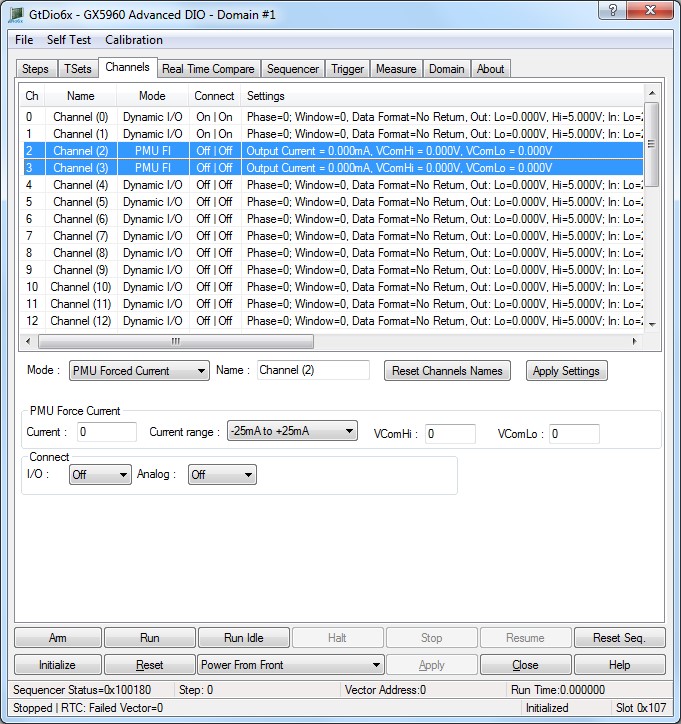
Virtual Panel – Channels page Forced Current Controls
Channels list box: Displays the 0 based channel index of all the channels settings.
PMU Force Current group box:
Current edit box: Sets/display the channel forced current
Relevant API functions: GtDio6xChannelSetPmuForcedCurrent
Current Range list box: Sets/displays the channel current range, ranges are -25mA to +25mA, and -200mA to +200mA
Relevant API functions: GtDio6xChannelSetPmuForcedCurrent
VComHi edit box: Sets/displays the channel forced current commutating voltage (voltage clamp). High Commutating Voltage for forced current voltage clamp.
VComLo edit box: Sets/displays the channel forced current commutating voltage (voltage clamp). Low Commutating Voltage for forced current voltage clamp.
Relevant API functions: GtDio6xChannelSetPmuForcedCurrentCommutatingVoltage
I/O list box: Sets/displays the channel connection state:
● Off: Disable the channel from the Front Panel I/O Connector (J8).
● On: Enable the channel from the Front Panel I/O Connector (J8).
Relevant API functions: GtDio6xChannelSetConnect.
Analog list box: Sets/displays the state of the channel isolation relay to the Front Panel Analog I/O Connector.
● Off: Disable the channel from the Front Panel Analog I/O Connector (J6).
● On: Enable the channel from the Front Panel Analog I/O Connector (J6).
Relevant API functions: GtDio6xChannelSetAnalogConnection.
The panel Channels tab is used to display and set the DIO domain boards channels settings, channels page Auxiliary Controls as shown here:
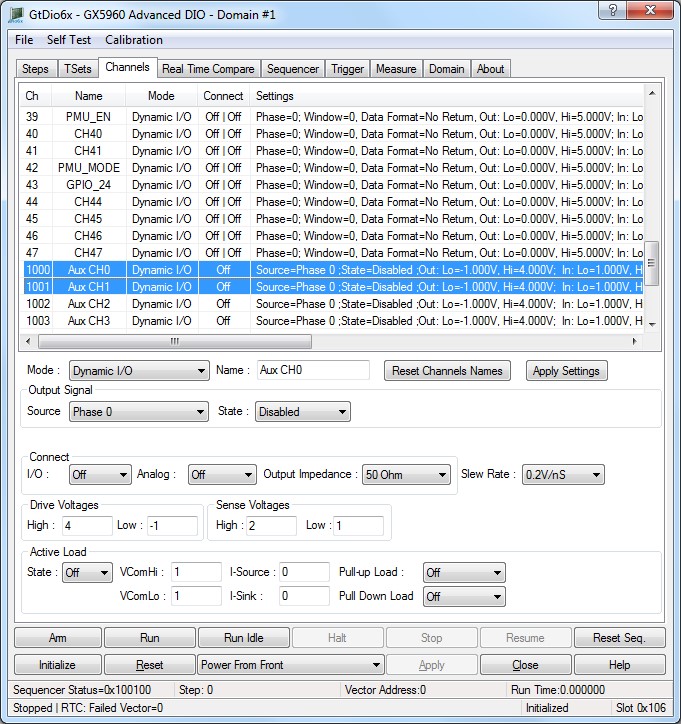
Virtual Panel – Channels page Auxiliary Controls
Channels list box: Displays the 0 based channel index of all the channels settings.
Output Signal group box:
Source drop list: Sets/displays the output signal routing of an auxiliary channel:
● Phase 0 - 3.
● Window 0 – 3.
● WaveForm 1-4.
● Sync1-2.
● Idle Active.
● Sequence Active.
● CH1 Good 1.
● Ch1 Good 0.
● Ch32 Good 1.
● Ch32 Good 0.
● Aux1-4 Input.
● Sequence Flag 1-2.
● T0 Clock.
● Pattern Clock.
● Sequence Clock In.
● Jump In.
● Raw Error.
● Sequence ClockD in.
● T0 Clock Out.
● Sequence Clock Out.
● Jump Out.
● Sequence ClockD Out.
● Pulse Generator.
● Record Active.
● PXIClk.
● Frequency Synthesizer.
● Jump Strobe.
● Int Error.
● Ext Error.
● High.
● Pass.
● Fail.
● COND Enable.
● BERR Enable.
● LoadSeq Register.
● Load Loop Count.
● Counter Active.
● CPV Done.
● Last Word.
● Burst Count Done.
● Loop Count Done.
● GoSub Active.
● Counted Loop.
● Sub Return.
● Return Flag.
● Last Seq.
● Jump Test 1-4.