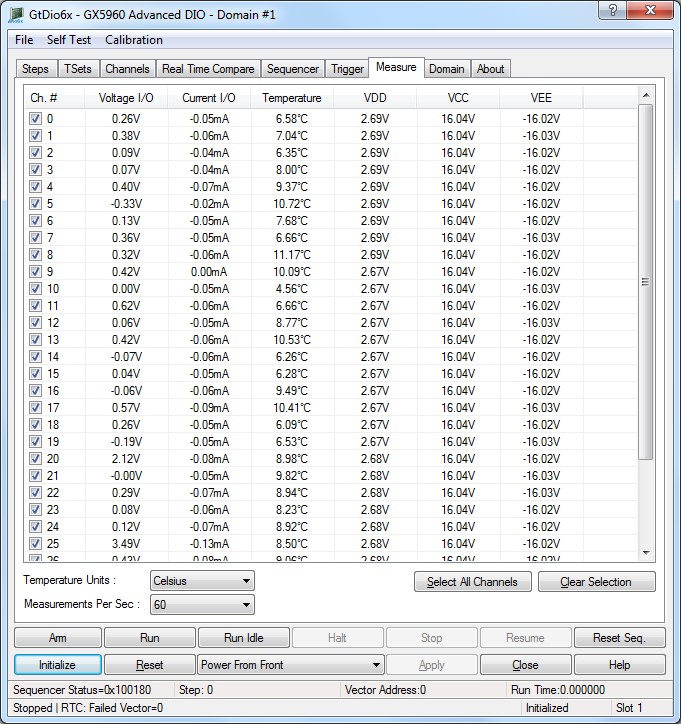
The panel Measure tab is used to display the DIO domain boards channels measurements as shown here:
Virtual Panel – Measure page
The following controls are shown in the Measure page:
Measure list box: Displays the channel settings.
● Ch: Displays the 1 based channel index.
● Temperature: Displays the pin electronics die temperature in Celsius.
● VDD: Displays the VDD Voltage. This voltage supplies the pin electronics logic levels.
● VCC: Displays the voltage detected on the high rail.
● VEE: Displays the voltage detected on the low rail.
● Voltage I/O: Displays the voltage detected on the I/O Channel.
● Current: Displays the current output of the I/O Channel.
Relevant API functions: GtDio6xMeasure.
Temperature Units drop list box: Sets/display the temperature units of the temperature measurements, values are:
● Celsius.
● Fahrenheit.
Measurements Per Sec drop list box: Sets/display the Measurements Per Sec, the larger the number the measures will be faster but with less accuracy, values are:
● 20
● 40
● 50
● 60
● 80
● 100
● 250
● 500
Relevant API functions: GtDio6xMeasure.