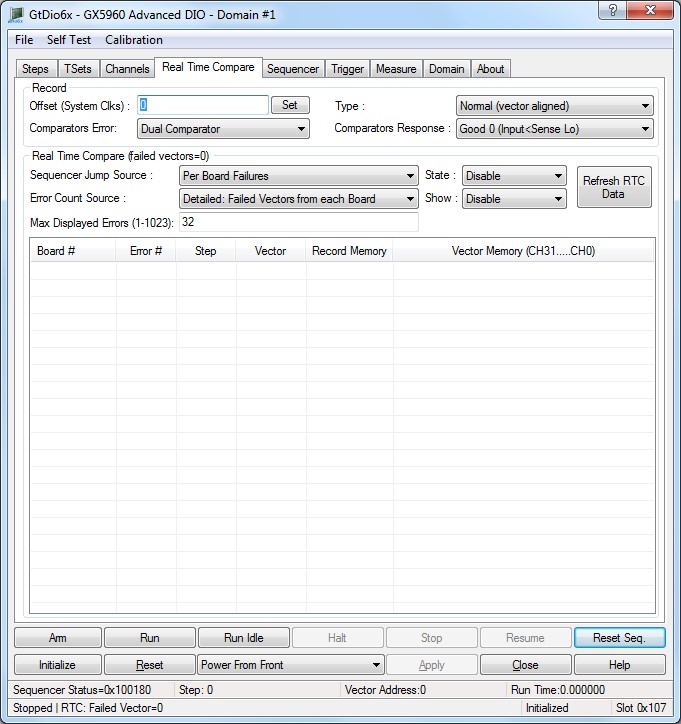
The panel Real Time Compare tab is used to change the DIO domain global settings as shown here:
Virtual Panel – Real Time Compare page
Offset (System Clks) edit box: Sets/Displays the record memory offset parameters. Used to compensate for round-trip driver/receiver delay and also cabling delay to the UUT. Can also be used to allow windows to effectively close at the end of the T0Cycle. Resolution: 1 master clock Range: 0-63 master clocks. The record offset allows the user to shift the record signals (vector code expect data and window strobes) to accommodate system and UUT delay. The record offset resolution is the master clock period.
Relevant API functions: GtDio6xSequencerSetRecordOffset.
Type drop list box: Sets/Displays how the recorded data will be stored, as follows:
0. Normal (vector aligned): Data is recorded in the record memory with the same offset as the vector memory.
1. Indexed (sequential): Data is recorded sequentially starting at offset0. The record index memory stores information that allows the recorded data to be aligned with the vector data.
The record mode is set for each step using the GtDio6xSetSequenceRecordMode function.
The Record Offset should be set to approximately 20-30 master clock periods to compensate for internal system delay.
Relevant API functions: GtDio6xSequencerSetRecordOffset.
Comparators Error drop list box: Sets/Displays the input comparator data mode. Allows the user to select how the response data will be evaluated for errors when the record mode is set to "Record Errors", as follows:
0. Dual Comparator: Use both good 1 and good 0 comparator levels (Dual threshold).
1. Single Comparator: Use only the good 1 comparator (Single threshold).
The record mode is set for each step using the GtDio6xSetSequenceRecordMode function.
The Record Offset should be set to approximately 20-30 master clock periods to compensate for internal system delay.
Relevant API functions: GtDio6xSequencerSetRecordOffset.
Comparators Response drop list box: Sets/Displays the response comparators data mode, as follows:
0. Good 0 (Input<Sense Lo): Use good 0.
1. Good 1(Input>Sense Hi): Use good 1.
The record mode is set for each step using the GtDio6xSetSequenceRecordMode function.
The Record Offset should be set to approximately 20-30 master clock periods to compensate for internal system delay.
Relevant API functions: GtDio6xSequencerSetRecordOffset.
Count Source drop list box: Sets/Displays the Real Time Compare Error Counter source, as follows:
0. Failed Vectors Per Board: Error counter source is board generated errors.
1. Failed Vectors in Domain: Error counter source is domain generated errors (default, after power).
2. Failed Vectors With E (Error) Flags Enabled Per Board: Error counter source is board generated errors from vectors with the test E Flag enabled.
3. Failed Vectors With E (Error) Flags Enabled in Domain: Error counter source is domain generated errors from vectors with the test E Flag enabled.
The Error Address Memory records up to 1023 real time compare errors. The source of the Error Counter can be selected using this function. Board wide or Domain wide errors can be recorded. Furthermore, vectors can be marked with the C (Error) flag in order to qualify them for inclusion in the Error Counter source. Use the GtDio6xWriteVectorTestFlagsMemory API to set the vector Test flags.
If the Error Count Source is set to GTDIO6X_RTC_ERROR_COUNTER_SOURCE_BOARD or GTDIO6X_RTC_ERROR_COUNTER_SOURCE_DOMAIN then only qualified Vectors will be allowed to generate errors that will be recorded. (Errors generated from Vectors without the C flag will be disregarded in this case).
Relevant API functions: GtDio6xRealTimeCompareSetErrorCountSource.
Address Memory Source drop list box: Sets/Displays the Real Time Compare Error Address Memory, Error Address Memory source are:
0. Failed Vectors Per Board: Only locally (within a board) generated errors will be recorded.
1. Failed Vectors in Domain: Any error generated from any board in the domain will be recorded.
2. Failed Vectors With E (Error) Flags Enabled Per Board: Only locally generated errors from vectors with the E Flag set will be recorded.
3. Failed Vectors With E (Error) Flags Enabled in Domain Any error generated from any board in the domain form vectors with the E Flag set will be recorded.
The Error Address Memory records up to 1023 real time compare errors. The source of the Error Address Memory can be selected using this function. Board wide or Domain wide errors can be recorded. Furthermore, vectors can be marked with the E Test flag in order to qualify them for inclusion in the Error Address Memory. Use the GtDio6xWriteVectorTestFlagsMemory API to set the vector Test flags.
If the Error Address Memory Source is set to GTDIO6X_RTC_ADDRESS_MEMORY_SOURCE_BOARD or GTDIO6X_RTC_ADDRESS_MEMORY_SOURCE_DOMAIN then only qualified Vectors will be allowed to generate errors that will be recorded. (Errors generated from Vectors without the E flag will be disregarded in this case).
Relevant API functions: GtDio6xRealTimeCompareSetErrorAddressMemorySource.
Sequencer Jump Source drop list box: Sets/Displays the Real Time compare jump source. the error signal used to determine the jump PASS/FAIL state:
0. Failed Vectors Per Board: Board’s Real Time Compare failure will cause a jump.
1. Failed Vectors in Domain: Domain’s Real Time Compare failure will cause a jump.
2. Failed Vectors With C Flags Enabled per Board: Board’s Real Time Compare failure from vectors with the C (condition) Flag enabled will cause a jump.
3. Failed Vectors With C Flags Enabled in Domain: Domain’s Real Time Compare failure from vectors with the C (condition) Flag enabled will cause a jump.
Select if the Control Logic will use All Local Errors, All Domain Errors, Local Qualified.
Errors, or Domain Qualified Errors (see GtDio6xWriteVectorTestFlagsMemory) to take action (to determine the jump PASS/FAIL state).
Relevant API functions: GtDio6xRealTimeCompareSetJumpSource.
State drop list box: Sets/Displays the Real Time compare jump source Pass Valid Enable, as follows:
0. Disable: Do not use pass valid signal.
1. Enable: define the PASS as a VALID PASS, where no channel errors were detected but there must be at least one valid pattern expect code.
Select if the Control Logic will use All Local Errors, All Domain Errors, Local Qualified.
Errors, or Domain Qualified Errors (see GtDio6xWriteVectorTestFlagsMemory) to take action (to determine the jump PASS/FAIL state).
Relevant API functions: GtDio6xRealTimeCompareSetJumpSource.
Count Display drop list box: Sets/Displays the error count mode:
0. Domain Accumulated.
1. Per Board.