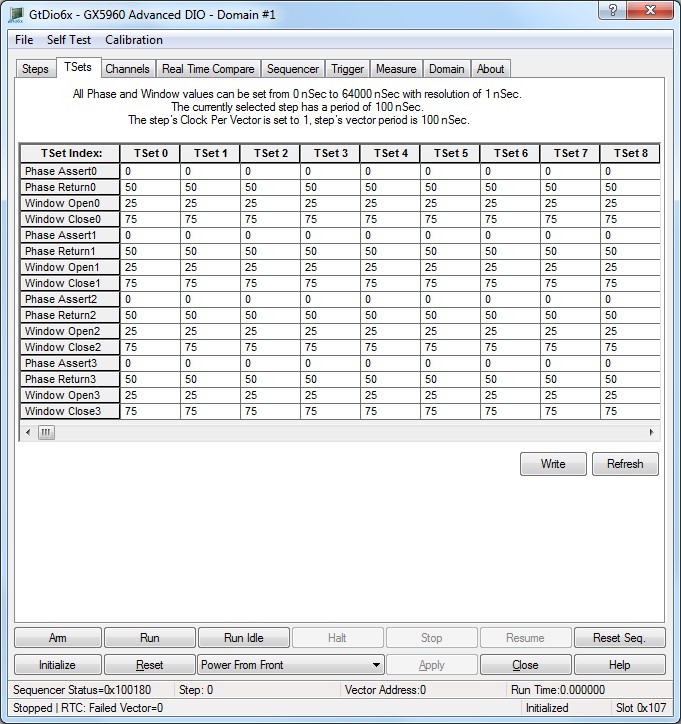
The Timing Set Index Editor is used to view and edit all 256 Timing Sets. Each cell represents the timing information for a particular timing set. Each timing set is composed of 4 pairs of phase assert, phase return, window open, and window close parameter. The resolution of the entered value is equal to half of the period of the master clock frequency. For example, if the master clock source is set to the internal 500MHz clock, a 1 entered in a cell within the Timing Set Editor Grid would represent 1ns of time. The Master Clock Source can be set in the Sequencer page.
Virtual Panel –Timing Set Editor Window
The following controls are shown in the Timing Set Editor page:
Timing Set Editor Grid: This is the primary control to view and edit the timing set memory. The indexed timing set memory is divided into 256 sets of 4 groups each. Each group contains a Phase Assert, Phase Return, Window Open and Window Close time value. The resolution of the time value is ½ of the period of the master clock. In the default case of the master clock source being set to the internal 500 MHz clock, the resolution will be 1nS ((1/2)*(1/500*10^6)).
Write button: Write the timing set data from the grid control to the timing memory.
Read button: Read the timing set memory and show in the vector editor.
Relevant API functions: GtDio6xTimingSetMemoryWriteData and GtDio6xTimingSetMemoryReadData.