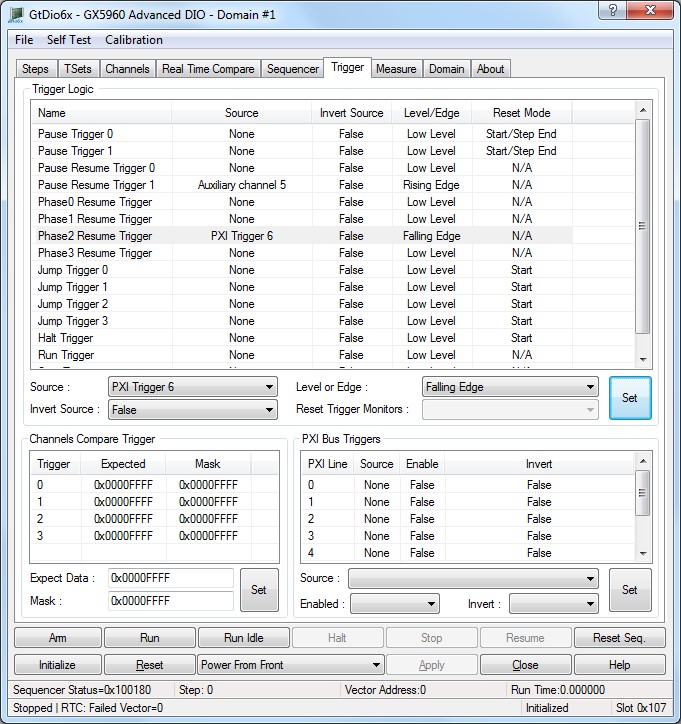
The panel Trigger tab is used to change the selected DIO domain board settings as shown here:
Virtual Panel – Trigger Page
The following controls are shown in the Trigger page:
Trigger Logic group box:
Trigger List: Displays the trigger sources as follows:
Pause Trigger 0 and Pause Trigger 1:
Trigger source drop list box: pause trigger settings.
0. None: No Signal is used as the pause resume trigger source.
1. Auxiliary channel 0: Auxiliary channel 0 used as the pause resume trigger source.
2. Auxiliary channel 1: Auxiliary channel 1 used as the pause resume trigger source.
3. Auxiliary channel 2: Auxiliary channel 2 used as the pause resume trigger source.
4. Auxiliary channel 3: Auxiliary channel 3 used as the pause resume trigger source.
5. Auxiliary channel 4: Auxiliary channel 4 used as the pause resume trigger source.
6. Auxiliary channel 5: Auxiliary channel 5 used as the pause resume trigger source.
7. Auxiliary channel 6: Auxiliary channel 6 used as the pause resume trigger source.
8. Auxiliary channel 7: Auxiliary channel 7 used as the pause resume trigger source.
9. Auxiliary channel 8: Auxiliary channel 8 used as the pause resume trigger source.
10. Auxiliary channel 9: Auxiliary channel 9 used as the pause resume trigger source.
11. Auxiliary channel 10: Auxiliary channel 10 used as the pause resume trigger source.
12. Auxiliary channel 11: Auxiliary channel 11 used as the pause resume trigger source.
13. Channel compare 0: Channel Test Signal 0 used as the pause resume trigger source.
14. Local Bus 0: Resource used as the pause resume trigger source.
15. PXI Bus Trig 0 used as the pause resume trigger source.
16. PXI Bus Trig 1 used as the pause resume trigger source.
17. PXI Bus Trig 2 used as the pause resume trigger source.
18. PXI Bus Trig 3 used as the pause resume trigger source.
19. PXI Bus Trig 4 used as the pause resume trigger source.
20. PXI Bus Trig 5 used as the pause resume trigger source.
21. PXI Bus Trig 6 used as the pause resume trigger source.
22. PXI Bus Trig 7 used as the pause resume trigger source.
Invert Source drop list: Set/Displays the trigger inverter state as follows:
0. False: Disable signal inverter, do not modify input signal before testing.
1. True: Enable signal inverter, invert input signal before testing.
Level or Edge drop list: Set/Displays the trigger test mode as follows:
0. Low Level Trigger when a low logic level is detected.
1. High Level: Trigger when a high logic level is detected.
2. Rising Edge: Trigger when a rising edge is detected.
3. Falling Edge: Trigger when a falling edge is detected.
Reset Trigger Monitors drop list box list box: Set/Displays the trigger reset level/edge mode as follows (common to Pause Trigger 0 and Pause Trigger 1):
0. Start: Reset trigger only at the beginning of burst.
1. Start/Step End: Reset trigger at the beginning and end of each step.
2. Start/Resume: Reset trigger at the beginning of each step and when execution is resumed.
Relevant API functions: GtDio6xTrigConfigSetPauseResumeTrigger.
Pause Resume Trigger 0 and Pause Resume Trigger 1:
Trigger source drop list box: pause resume trigger settings.
0. None: No Signal is used as the pause resume trigger source.
1. Auxiliary channel 0: Auxiliary channel 0 used as the pause resume trigger source.
2. Auxiliary channel 1: Auxiliary channel 1 used as the pause resume trigger source.
3. Auxiliary channel 2: Auxiliary channel 2 used as the pause resume trigger source.
4. Auxiliary channel 3: Auxiliary channel 3 used as the pause resume trigger source.
5. Auxiliary channel 4: Auxiliary channel 4 used as the pause resume trigger source.
6. Auxiliary channel 5: Auxiliary channel 5 used as the pause resume trigger source.
7. Auxiliary channel 6: Auxiliary channel 6 used as the pause resume trigger source.
8. Auxiliary channel 7: Auxiliary channel 7 used as the pause resume trigger source.
9. Auxiliary channel 8: Auxiliary channel 8 used as the pause resume trigger source.
10. Auxiliary channel 9: Auxiliary channel 9 used as the pause resume trigger source.
11. Auxiliary channel 10: Auxiliary channel 10 used as the pause resume trigger source.
12. Auxiliary channel 11: Auxiliary channel 11 used as the pause resume trigger source.
13. Channel compare 0: Channel Test Signal 0 used as the pause resume trigger source.
14. Local Bus 0: Resource used as the pause resume trigger source.
15. PXI Bus Trig 0 used as the pause resume trigger source.
16. PXI Bus Trig 1 used as the pause resume trigger source.
17. PXI Bus Trig 2 used as the pause resume trigger source.
18. PXI Bus Trig 3 used as the pause resume trigger source.
19. PXI Bus Trig 4 used as the pause resume trigger source.
20. PXI Bus Trig 5 used as the pause resume trigger source.
21. PXI Bus Trig 6 used as the pause resume trigger source.
22. PXI Bus Trig 7 used as the pause resume trigger source.
Invert Source drop list: Set/Displays the trigger inverter state as follows:
0. False: Disable signal inverter, do not modify input signal before testing.
1. True: Enable signal inverter, invert input signal before testing.
Level or Edge drop list: Set/Displays the trigger test mode as follows:
0. Low Level Trigger when a low logic level is detected.
1. High Level: Trigger when a high logic level is detected.
2. Rising Edge: Trigger when a rising edge is detected.
3. Falling Edge: Trigger when a falling edge is detected.
Phase0 Resume Trigger to Phase3 Resume Trigger:
Trigger source drop list box: phase resume trigger settings.
0. None: No Signal is used as the pause resume trigger source.
1. Auxiliary channel 0: Auxiliary channel 0 used as the pause resume trigger source.
2. Auxiliary channel 1: Auxiliary channel 1 used as the pause resume trigger source.
3. Auxiliary channel 2: Auxiliary channel 2 used as the pause resume trigger source.
4. Auxiliary channel 3: Auxiliary channel 3 used as the pause resume trigger source.
5. Auxiliary channel 4: Auxiliary channel 4 used as the pause resume trigger source.
6. Auxiliary channel 5: Auxiliary channel 5 used as the pause resume trigger source.
7. Auxiliary channel 6: Auxiliary channel 6 used as the pause resume trigger source.
8. Auxiliary channel 7: Auxiliary channel 7 used as the pause resume trigger source.
9. Auxiliary channel 8: Auxiliary channel 8 used as the pause resume trigger source.
10. Auxiliary channel 9: Auxiliary channel 9 used as the pause resume trigger source.
11. Auxiliary channel 10: Auxiliary channel 10 used as the pause resume trigger source.
12. Auxiliary channel 11: Auxiliary channel 11 used as the pause resume trigger source.
13. Channel compare 0: Channel Test Signal 0 used as the pause resume trigger source.
14. Local Bus 0: Resource used as the pause resume trigger source.
15. PXI Bus Trig 0 used as the pause resume trigger source.
16. PXI Bus Trig 1 used as the pause resume trigger source.
17. PXI Bus Trig 2 used as the pause resume trigger source.
18. PXI Bus Trig 3 used as the pause resume trigger source.
19. PXI Bus Trig 4 used as the pause resume trigger source.
20. PXI Bus Trig 5 used as the pause resume trigger source.
21. PXI Bus Trig 6 used as the pause resume trigger source.
22. PXI Bus Trig 7 used as the pause resume trigger source.
Invert Source drop list: Set/Displays the trigger inverter state as follows:
0. False: Disable signal inverter, do not modify input signal before testing.
1. True: Enable signal inverter, invert input signal before testing.
Level or Edge drop list: Set/Displays the trigger test mode as follows:
0. Low Level Trigger when a low logic level is detected.
1. High Level: Trigger when a high logic level is detected.
2. Rising Edge: Trigger when a rising edge is detected.
3. Falling Edge: Trigger when a falling edge is detected.
Jump Trigger 0 to Jump Trigger 3:
Trigger source drop list box: jump trigger settings.
0. None: No Signal is used as the pause resume trigger source.
1. Auxiliary channel 0: Auxiliary channel 0 used as the pause resume trigger source.
2. Auxiliary channel 1: Auxiliary channel 1 used as the pause resume trigger source.
3. Auxiliary channel 2: Auxiliary channel 2 used as the pause resume trigger source.
4. Auxiliary channel 3: Auxiliary channel 3 used as the pause resume trigger source.
5. Auxiliary channel 4: Auxiliary channel 4 used as the pause resume trigger source.
6. Auxiliary channel 5: Auxiliary channel 5 used as the pause resume trigger source.
7. Auxiliary channel 6: Auxiliary channel 6 used as the pause resume trigger source.
8. Auxiliary channel 7: Auxiliary channel 7 used as the pause resume trigger source.
9. Auxiliary channel 8: Auxiliary channel 8 used as the pause resume trigger source.
10. Auxiliary channel 9: Auxiliary channel 9 used as the pause resume trigger source.
11. Auxiliary channel 10: Auxiliary channel 10 used as the pause resume trigger source.
12. Auxiliary channel 11: Auxiliary channel 11 used as the pause resume trigger source.
13. Channel compare 0: Channel Test Signal 0 used as the pause resume trigger source.
14. Local Bus 0: Resource used as the pause resume trigger source.
15. PXI Bus Trig 0 used as the pause resume trigger source.
16. PXI Bus Trig 1 used as the pause resume trigger source.
17. PXI Bus Trig 2 used as the pause resume trigger source.
18. PXI Bus Trig 3 used as the pause resume trigger source.
19. PXI Bus Trig 4 used as the pause resume trigger source.
20. PXI Bus Trig 5 used as the pause resume trigger source.
21. PXI Bus Trig 6 used as the pause resume trigger source.
22. PXI Bus Trig 7 used as the pause resume trigger source.
Invert Source drop list: Set/Displays the trigger inverter state as follows:
0. False: Disable signal inverter, do not modify input signal before testing.
1. True: Enable signal inverter, invert input signal before testing.
Level or Edge drop list: Set/Displays the trigger test mode as follows:
0. Low Level Trigger when a low logic level is detected.
1. High Level: Trigger when a high logic level is detected.
2. Rising Edge: Trigger when a rising edge is detected.
3. Falling Edge: Trigger when a falling edge is detected.
Reset Trigger Monitors drop list box list box: Set/Displays the trigger reset level/edge mode as follows (common to Jump Trigger 0 to Jump Trigger 3):
0. Start: Reset trigger only at the beginning of burst.
1. Start/Step End: Reset trigger at the beginning and end of each step.
2. Start/Resume: Reset trigger at the beginning of each step and when execution is resumed.
Relevant API functions: GtDio6xTrigConfigSetJumpTrigger.
Halt Trigger:
Trigger source drop list box:
0. None: No Signal is used as the pause resume trigger source.
1. Auxiliary channel 0: Auxiliary channel 0 used as the pause resume trigger source.
2. Auxiliary channel 1: Auxiliary channel 1 used as the pause resume trigger source.
3. Auxiliary channel 2: Auxiliary channel 2 used as the pause resume trigger source.
4. Auxiliary channel 3: Auxiliary channel 3 used as the pause resume trigger source.
5. Auxiliary channel 4: Auxiliary channel 4 used as the pause resume trigger source.
6. Auxiliary channel 5: Auxiliary channel 5 used as the pause resume trigger source.
7. Auxiliary channel 6: Auxiliary channel 6 used as the pause resume trigger source.
8. Auxiliary channel 7: Auxiliary channel 7 used as the pause resume trigger source.
9. Auxiliary channel 8: Auxiliary channel 8 used as the pause resume trigger source.
10. Auxiliary channel 9: Auxiliary channel 9 used as the pause resume trigger source.
11. Auxiliary channel 10: Auxiliary channel 10 used as the pause resume trigger source.
12. Auxiliary channel 11: Auxiliary channel 11 used as the pause resume trigger source.
13. Channel compare 0: Channel Test Signal 0 used as the pause resume trigger source.
14. Local Bus 0: Resource used as the pause resume trigger source.
15. PXI Bus Trig 0 used as the pause resume trigger source.
16. PXI Bus Trig 1 used as the pause resume trigger source.
17. PXI Bus Trig 2 used as the pause resume trigger source.
18. PXI Bus Trig 3 used as the pause resume trigger source.
19. PXI Bus Trig 4 used as the pause resume trigger source.
20. PXI Bus Trig 5 used as the pause resume trigger source.
21. PXI Bus Trig 6 used as the pause resume trigger source.
22. PXI Bus Trig 7 used as the pause resume trigger source.
Invert Source drop list: Set/Displays the trigger inverter state as follows:
0. False: Disable signal inverter, do not modify input signal before testing.
1. True: Enable signal inverter, invert input signal before testing.
Level or Edge drop list: Set/Displays the trigger test mode as follows:
0. Low Level Trigger when a low logic level is detected.
1. High Level: Trigger when a high logic level is detected.
2. Rising Edge: Trigger when a rising edge is detected.
3. Falling Edge: Trigger when a falling edge is detected.
Reset Trigger Monitors drop list box list box: Set/Displays the trigger reset level/edge mode as follows:
0. Start: Reset trigger only at the beginning of burst.
1. Start/Step End: Reset trigger at the beginning and end of each step.
2. Start/Resume: Reset trigger at the beginning of each step and when execution is resumed.
Relevant API functions: GtDio6xTrigConfigSetHaltTrigger.
Run Trigger: Set/Display the stop trigger settings.
Trigger source drop list box:
0. None: No Signal is used as the pause resume trigger source.
1. Auxiliary channel 0: Auxiliary channel 0 used as the pause resume trigger source.
2. Auxiliary channel 1: Auxiliary channel 1 used as the pause resume trigger source.
3. Auxiliary channel 2: Auxiliary channel 2 used as the pause resume trigger source.
4. Auxiliary channel 3: Auxiliary channel 3 used as the pause resume trigger source.
5. Auxiliary channel 4: Auxiliary channel 4 used as the pause resume trigger source.
6. Auxiliary channel 5: Auxiliary channel 5 used as the pause resume trigger source.
7. Auxiliary channel 6: Auxiliary channel 6 used as the pause resume trigger source.
8. Auxiliary channel 7: Auxiliary channel 7 used as the pause resume trigger source.
9. Auxiliary channel 8: Auxiliary channel 8 used as the pause resume trigger source.
10. Auxiliary channel 9: Auxiliary channel 9 used as the pause resume trigger source.
11. Auxiliary channel 10: Auxiliary channel 10 used as the pause resume trigger source.
12. Auxiliary channel 11: Auxiliary channel 11 used as the pause resume trigger source.
13. Channel compare 0: Channel Test Signal 0 used as the pause resume trigger source.
14. Local Bus 0: Resource used as the pause resume trigger source.
15. PXI Bus Trig 0 used as the pause resume trigger source.
16. PXI Bus Trig 1 used as the pause resume trigger source.
17. PXI Bus Trig 2 used as the pause resume trigger source.
18. PXI Bus Trig 3 used as the pause resume trigger source.
19. PXI Bus Trig 4 used as the pause resume trigger source.
20. PXI Bus Trig 5 used as the pause resume trigger source.
21. PXI Bus Trig 6 used as the pause resume trigger source.
22. PXI Bus Trig 7 used as the pause resume trigger source.
Invert Source drop list: Set/Displays the trigger inverter state as follows:
0. False: Disable signal inverter, do not modify input signal before testing.
1. True: Enable signal inverter, invert input signal before testing.
Level or Edge drop list: Set/Displays the trigger test mode as follows:
0. Low Level Trigger when a low logic level is detected.
1. High Level: Trigger when a high logic level is detected.
2. Rising Edge: Trigger when a rising edge is detected.
3. Falling Edge: Trigger when a falling edge is detected.
Stop Trigger:
Trigger source drop list box:
0. None: No Signal is used as the pause resume trigger source.
1. Auxiliary channel 0: Auxiliary channel 0 used as the pause resume trigger source.
2. Auxiliary channel 1: Auxiliary channel 1 used as the pause resume trigger source.
3. Auxiliary channel 2: Auxiliary channel 2 used as the pause resume trigger source.
4. Auxiliary channel 3: Auxiliary channel 3 used as the pause resume trigger source.
5. Auxiliary channel 4: Auxiliary channel 4 used as the pause resume trigger source.
6. Auxiliary channel 5: Auxiliary channel 5 used as the pause resume trigger source.
7. Auxiliary channel 6: Auxiliary channel 6 used as the pause resume trigger source.
8. Auxiliary channel 7: Auxiliary channel 7 used as the pause resume trigger source.
9. Auxiliary channel 8: Auxiliary channel 8 used as the pause resume trigger source.
10. Auxiliary channel 9: Auxiliary channel 9 used as the pause resume trigger source.
11. Auxiliary channel 10: Auxiliary channel 10 used as the pause resume trigger source.
12. Auxiliary channel 11: Auxiliary channel 11 used as the pause resume trigger source.
13. Channel compare 0: Channel Test Signal 0 used as the pause resume trigger source.
14. Local Bus 0: Resource used as the pause resume trigger source.
15. PXI Bus Trig 0 used as the pause resume trigger source.
16. PXI Bus Trig 1 used as the pause resume trigger source.
17. PXI Bus Trig 2 used as the pause resume trigger source.
18. PXI Bus Trig 3 used as the pause resume trigger source.
19. PXI Bus Trig 4 used as the pause resume trigger source.
20. PXI Bus Trig 5 used as the pause resume trigger source.
21. PXI Bus Trig 6 used as the pause resume trigger source.
22. PXI Bus Trig 7 used as the pause resume trigger source.
Invert Source drop list: Set/Displays the trigger inverter state as follows:
0. False: Disable signal inverter, do not modify input signal before testing.
1. True: Enable signal inverter, invert input signal before testing.
Level or Edge drop list box list box: Set/Displays the trigger test mode as follows:
0. Low Level Trigger when a low logic level is detected.
1. High Level: Trigger when a high logic level is detected.
2. Rising Edge: Trigger when a rising edge is detected.
3. Falling Edge: Trigger when a falling edge is detected.
Channels Compare Trigger List: Sets/Displays the four channel tests settings. Compare Triggers are only available on Master board channels. The last channel for the GX5961 Master is channel 15, the last channel for GX5964 Master is channel 31.
Expect Data edit box: Sets/Displays the channel test expect value. Each bit corresponds to a channel, Bit 0 of the expected value maps to the lowest channel of this sequencer and the last bit maps to the highest channel. E.g. Bit 0 - Channel 0 expect, Bit 15 Channel 15 for GX5961 or Bit 31 - Channel 31 for GX5961.
A one represents a valid high test and a zero represent a valid low test.
The expect value is compared to the response high of the input channel.
Valid Range: 0-0xFFFFFFFF for the GX5964 or 0-0xFFFF for the GX5961.
Relevant API functions: GtDio6xSequencerSetChannelsCompareTrigger.
Mask edit box: Sets/Displays the channel test mask value. Each bit corresponds to a channel, Bit 0 of the mask value maps to the lowest channel of this sequencer and the last bit maps to the highest channel.
E.g. Bit 0 - Channel 0 mask, Bit 15 Channel 15 for GX5961 or Bit 31 - Channel 31 for GX5961.
A one disable (masks) the comparison to the expect value and a zero enables the comparison.
Valid Range: 0-0xFFFFFFFF for the GX5964 or 0-0xFFFF for the GX5961.
Relevant API functions: GtDio6xSequencerSetChannelsCompareTrigger.
PXI Bus Triggers group box:
PXI Bus Triggers list box: Sets/Displays the PXI Bus Triggers settings.
Source drop list box: Sets/Displays the PXI trigger line source as follows:
0. None: No Signal is used as the PXI Bus trigger source.
1. Auxiliary channel 0: Auxiliary channel 0 used as the PXI Bus trigger source.
2. Auxiliary channel 1: Auxiliary channel 1 used as the PXI Bus trigger source.
3. Auxiliary channel 2: Auxiliary channel 2 used as the PXI Bus trigger source.
4. Auxiliary channel 3: Auxiliary channel 3 used as the PXI Bus trigger source.
5. Auxiliary channel4: Auxiliary channel 4 used as the PXI Bus trigger source.
6. Auxiliary channel5: Auxiliary channel 5 used as the PXI Bus trigger source.
7. Auxiliary channel 6: Auxiliary channel 6 used as the PXI Bus trigger source.
8. Auxiliary channel 7: Auxiliary channel 7 used as the PXI Bus trigger source.
9. Auxiliary channel 8: Auxiliary channel 8 used as the PXI Bus trigger source.
10. Auxiliary channel 9: Auxiliary channel 9 used as the PXI Bus trigger source.
11. Auxiliary channel 10: Auxiliary channel 10 used as the PXI Bus trigger source.
12. Auxiliary channel 11: Auxiliary channel 11 used as the PXI Bus trigger source.
13. Pulse Generator: Pulse generator used as the PXI Bus trigger source.
14. Step out flag 0: The current Step’s output flag 0 used as the PXI Bus trigger source, see GtDio6xStepSetOutputFlag API.
15. Step out flag 1: The current Step’s output flag 1 used as the PXI Bus trigger source, see GtDio6xStepSetOutputFlag API.
16. Seq Sync output 1: The sequencer sync output 1 used as the PXI Bus trigger source, see GtDio6xSequencerSetSyncPulseSource and GtDio6xSequencerSetSyncPulseParameters API.
17. Seq Sync output 2: The sequencer sync output 1 used as the PXI Bus trigger source, see GtDio6xSequencerSetSyncPulseSource and GtDio6xSequencerSetSyncPulseParameters API.
18. Channel compare 0: Channel compare 0 used as the PXI Bus trigger source, see GtDio6xSequencerSetChannelsCompareTrigger API.
19. Channel compare 1: Channel compare 1 used as the PXI Bus trigger source, see GtDio6xSequencerSetChannelsCompareTrigger API.
20. Channel compare 2: Channel compare 2 used as the PXI Bus trigger source, see GtDio6xSequencerSetChannelsCompareTrigger API.
21. Channel compare 3: Channel compare 3 used as the PXI Bus trigger source, see GtDio6xSequencerSetChannelsCompareTrigger API.
22. Idle Step Running: Running the idle step used as the PXI Bus trigger source, see GtDio6xSequencerGetStatus API.
23. Sequencer Running: Sequencer is running used as the PXI Bus trigger source, see GtDio6xSequencerGetStatus API.
24. Error Pulse: The error pulse used as the PXI Bus trigger source.
25. Valid pass: Valid pass used as the PXI Bus trigger source.
26. Step reset settings: The current Step’s reset settings used as the PXI Bus trigger source.
27. Output Drivers disabled: Whenever the output drivers are disabled used as the PXI Bus trigger source, see GtDio6xSequencerGetStatus API.
28. Global reset: Global reset used as the PXI Bus trigger source.
The Local Triggers are used to synchronize events across a GX5960 Domain.
The user can also use the GtDio6xTrigConfigSetPxiTrigger API to synchronize events across a GX5960 Domain.
Relevant API functions: GtDio6xTrigConfigSetLocalBusTriggerSource.
Invert drop list box: Sets/Displays the Local trigger inverter as follows:
0. False: Disable signal inverter.
1. True: Enable signal inverter, the source signal logic will be inverted before being sent to the Sequencer.
Relevant API functions: GtDio6xTrigConfigSetLocalBusTriggerSource.