The following paragraphs describe the steps required to program the boards.
The GTDIO6X driver supports two device drivers HW which are used to initialize, identify and control the board. The user can use the GtDio6xInitialize to initialize the board‘s driver using HW. The following describes the two different methods used to initialize:
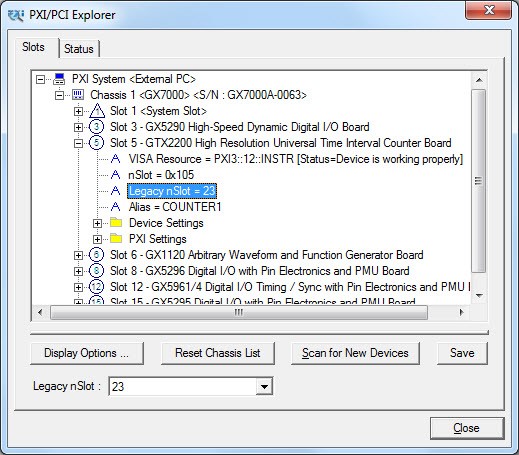
Marvin Test’s Solutions HW – This is the default device driver that is installed by the GTDIO6X driver. To initialize and control the board using the HW use the GtDio6xInitialize(nSlot, pnHandle, pnStatus) function. The function initializes the driver for the board at the specified PXI slot number (nSlot) and returns boards handle The PXI/PCI Explorer applet in the Windows Control Panel displays the PXI slot assignments. You can specify the nSlot parameter in the following way:
A combination of chassis number (chassis # x 256) with the chassis slot number, e.g. 0x105 for chassis 1 and slot 5. The chassis number can be set by the PXI/PCI Explorer applet.
Legacy nSlot is used by earlier version of HW. The slot number contains no chassis number and can be changed using the PXI/PCI Explorer applet: 23 in this example.
PXI/PCI Explorer
The GtDio6xInitialize function returns a handle that is required by other driver functions in order to program the board. This handle is usually saved in the program as a global variable for later use when calling other functions. The initialize functions do not change the state of the board or its settings.
The Reset function sets the board to a known default state. A reset is usually performed after the board is initialized. See the Function Reference for more information regarding the reset function.
All the GTDIO6X functions return status - pnStatus - in the last parameter. This parameter can be later used for error handling. The status is zero for success status or less than zero for errors.