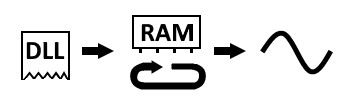
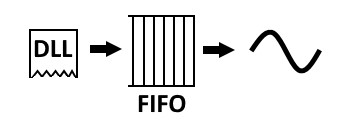
The GX1632e feature two mechanisms for Arbitrary Waveform Generation. If the data in a pattern is known completely before the waveform is needed, the data can be loaded to a RAM. When triggered, will continuously output the data looping through the samples until the waveform generator is disarmed. If the data in the pattern is generated ‘on-the-fly’ or if the RAM is too small to fit all of the data at once, the streaming option is a better option and the on-board FIFO will be used to stream the waveform.
The following figure shows loading a waveform to the RAM:
GX1632e Waveform Generation
The 8GB RAM is divided into 64 kB ‘buckets’. During the setup phase of waveform generation, a corresponding bucket within your PCs RAM is allocation and the two memory regions are linked for DMA data transmission during the streaming phase. These buckets contain 16384 samples or 16kS. Each group is allocated its own buckets and can be allocation any power of 2, up to 128: 1, 2, 4, 8, 16, 32, 64, or 128. Once streaming begins, you must update all of your allocated buckets to receive an interrupt.
Configure the ARB and the number of buckets to allocate to each group that we will output the waveform from. (GxAoArbSetGroupClock, GxAoArbSetGroupChannels). The bucket size allocated must be larger than the intended waveform size.
Setup the callback procedure (GxAoArbSetupStreamingInterrupt). The callback procedure will be used to acknowledge that the start and stop markers were successfully found and this step confirms that bucket size is allocated properly.
Transfer data to the board’s RAM. (GxAoArbWriteWaveform)
To start waveform playback from the RAM, enable group streaming. (GxAoArbEnableGroupStreaming)
When the waveform playback is completed, it should be turned off (GxAoArbEnableGroupStreaming) and disarmed. (GxAoArbDisableStreamingInterrupt)
The following figure shows streaming a waveform:
GX1632e Streaming Waveform Generation
Configure the ARB and the number of buckets to allocate to each group that we will output the waveform from. (GxAoArbSetGroupClock, GxAoArbSetGroupChannels). The bucket size allocated determines the amount of data that we will write with each subsequent write to the FIFO.
Setup the callback procedure (GxAoArbSetupStreamingInterrupt). The callback procedure will be used to signal the user that the FIFO RAM is ready for more data once the streaming has started. This step also confirms that bucket allocation was successful.
Write some data to the FIFO RAM. (GxAoArbWriteStreaming)
To start waveform playback from the RAM, enable group streaming. (GxAoArbEnableGroupStreaming)
When the waveform playback is completed, it should be turned off (GxAoArbEnableGroupStreaming) and disarmed. (GxAoArbDisableStreamingInterrupt)
When using HW 4.9.7 or newerr versions, DMA buffers allocated to PXI instruments is automatically set to 8 segments. To utilize the full functionality of the GX1632e, this allocation should be set to 256. If the allocation is insufficient, you may receive an error with the following code and description:
"-45, Unable to allocate DMA physical memory"
To change the memory allocation:
Open PXI/PCI Explorer
Right-click on the PXI System tree view on the Slots page to open a context menu.
Select Settings...
Change the Max DMA buffers value to 256 and click OK.
Restart your PC.
By default, a board uses an internal clock generated by dividing the 100 MHz PXIe clock signal. GX1632e can have their waveform generation synchronized by switching this to utilize another external clock source. Available external clock signals include the PXI trigger bus lines, the PXI STAR trigger, PXIe STAR A or STAR B, or one of the DIO channels accessible from the GX1632e front connector. (GxAoArbSetGroupClockEx).
When a card is configured in the leader role, it will output a pulse on the specified signal line while the Arb is streaming. Available output sources are PXI trigger lines, the PXI STAR trigger line or the PXIe STAR C trigger line. By synchronizing followers to different clock sources and using leader boards to generate signals on different bus lines, you can create multiple parallel domains of GX1632Es. (GxAoArbSetGroupClockRole).