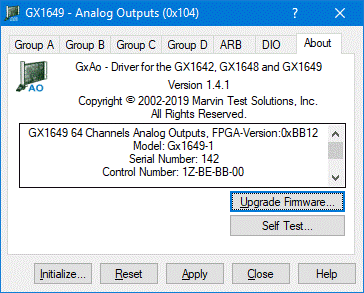
Clicking on the About tab will show the About page as shown in the figure below:
GX164X Virtual Panel – About Page
The top part of the About page displays the version and copyright of the GXAO driver. The bottom part displays the board summary, including the EEPROM version, the board Revision, the FPGA version, the board serial number and the calibration time. The About page also contains a button Upgrade Firmware… button used to upgrade the board FPGA. This button may be used only when the board requires upgrade as directed by Marvin Test Solutions' support. The upgrade requires a firmware file (.jam) that is written to the board FPGA. After the upgrade is complete you must shut down the computer to recycle power to the board in order for the new firmware to be used.
The Self Test… button starts the board self-test function. Make sure to make sure the J6 front connector is disconnected before running the self-test. The self-test checks the output voltage for each group’s channels and runs a memory test on each ARB Memory (Group A to Group D) as well as the DIO memories (Output, Input, and Direction).