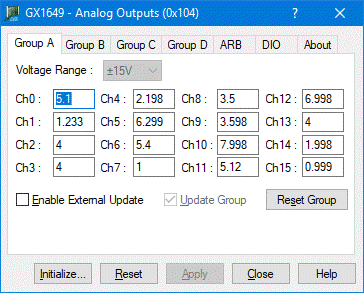
The following picture shows the Group A page followed by explanation of each one of the controls displayed on the page:
GX164X Virtual Panel – Group A page
Voltage Range Dropdown list: Select/display the group voltage range.
Ch 0-15 Edit Boxes: Each channel is displayed with an edit box for displaying the loaded voltage value. The value is updated continuously until the user types a new value to set. Clicking on the Apply button (or the Enter key) will load the board with the modified values and if the Update Group is checked will also output the new DAC values. After the Apply was pressed the panel will resume updating and display the board loaded values continuously.
Update Group Check Box: When checked (default), clicking on the Apply button the group’s channels will load and update the DACs to output the new values. When unchecked, clicking on the Apply button the group’s channels will only be loaded, and the DAC output will not change.
Enable External Update: When checked the specified group can be updated by the group's external input line, when unchecked the group’s external input line is disabled.
Reset Group Button: Sets all the group's channels to zero volts, set voltage range to 0-10V and disables the External Update.