.jpg "GX1034 Virtual Panel (Initialized)")
After the board is initialized, the panel is enabled and will display the current setting of the board. The following picture shows the Setup page settings:
GX1034 Virtual Panel (Initialized)
The following controls are shown in the Setup page:
Function Settings: Sets/displays the connected standards (connections and settings will only take place after pressing the Apply button).
Not Connected: All standards disconnected from the output.
4-Wire Resistors: when selected, allows connection to one of the 4-wire 1W, 10W and 100W resistors values. Actual value displayed is the measured resistor value, as was recorded at calibration time.
2-Wire Resistors: when selected, allows connection to one of the 2-wire 1W, 10W and 100W, 1WK, 10WK, 100WK, 1WM and 10WM resistor values. Actual value displayed is the measured resistor value, as was recorded at calibration time.
Positive VDC: when selected allows connection to one of the DC voltage +9.0V, +0.9V, +0.09V and +0.009V values. Actual value displayed is the value that was recorded and stored in the EEROM at calibration time.
Negative VDC: when selected allows connection to one of the DC voltage --9.0V, -0.9V, -0.09V and -0.009V values. Actual value displayed is the value that was recorded and stored in the EEROM at calibration time.
AC: when selected allows connection to one of the AC voltage +3.5VAC, 0.35VAC, 0.035VAC and 0.0035VAC values. Actual value displayed is the value recorded and stored in the EEROM at calibration time. It also enables selection of the 100Hz, 1KHz, 10KHz, 100KHz, 50Hz, 60Hz or 400Hz frequency.
TTL Clock: when selected displays/sets the Clock Divider value and the actual divided output frequency (the function will not be connected until pressing the Apply button).
Measure Voltage: when checked disconnects any currently connected standard and the Output Current Source if currently checked. Allows voltage measurements of on the output connector.
Output Current Source (0-19.9mA): when checked disconnects any currently connected standards and the Measure Voltage if currently checked. Allows user to set the Output Current Source from 0 to 19.9mA
Temperature Units: Sets/displays temperature units for Celsius or Fahrenheit.
On Board Ref Clock To PXI Ref Clock: When connected the internal 10MHz clock will drive the PXI backplane clock.
Clicking on the About tab will show the About page as shown in the figure below:
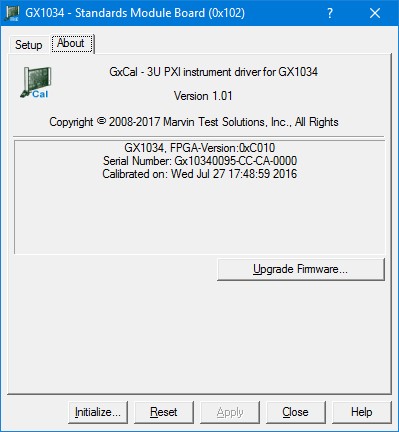
GX1034 Virtual Panel – About Page
The following controls are shown in the About page:
The top part of the About page displays version and copyright of the GXCAL driver. The bottom part displays the board summary.
The About page also contains a button Upgrade Firmware… used to upgrade the board FPGA. This button maybe used only when the board requires upgrade as directed by Marvin Test Solutions support. The upgrade requires a firmware file (.jam) that is written to the board FPGA. After the upgrade is complete, you must shut down the computer to recycle power to the board.