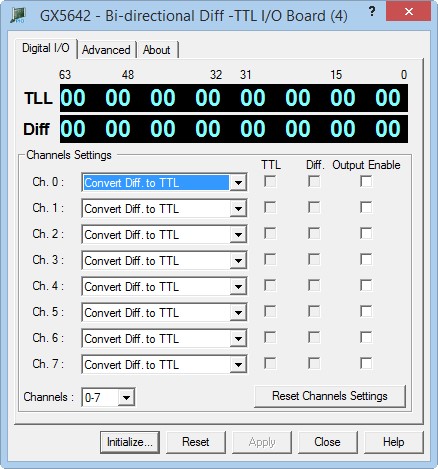
After the board is initialized the panel is enabled and will display the current setting of the board. The following picture shows the Digital I/O page settings:
GX5642 Virtual Panel – Digital I/O page
The following controls are shown in the Digital I/O page:
Channel Settings drop-down box (Channels 0+8n - 7+8n): Selects the mode settings, conversion or static I/O, and data port direction, input or output, for each channel.
Port Value display area: Displays data values of each channel for the TTL and Differential ports. The value is displayed in hexadecimal. The right two digits correspond to byte 0 and the left two digits to byte 7. Bytes 0-3 represent Group 1 and bytes 4-7 represent Group 2.
Channels drop-down box (Channels 0+8n - 7+8n): Selects the group of 8 channels that is currently being shown on the Digital I/O page. All changes MADE to the settings will apply to this range of channels.
Channel Settings drop-down box (Channels 0+8n - 7+8n): Selects the mode settings, conversion or static I/O, and data port direction, input or output, for each channel.
TTL Data checkbox (Channels 0+8n - 7+8n): A checked box represents a logical 1 and an unchecked box represents a logical 0 for the respective Differential I/O channel. The checkbox will only be active if the channel's output is enabled and the Differential port is set to output. Otherwise it provides a read back of the channel's logic state.
Differential RS-422 Data checkbox (Channels 0+8n - 7+8n): A checked box represents a logical 1 and an unchecked box represents a logical 0 for the respective Differential I/O channel. The checkbox will only be active if the channel's output is enabled and the Differential port is set to output. Otherwise it provides a read back of the channel's logic state.
Output Enable checkbox (Channels 0+8n - 7+8n): This checkbox represents the current output state of the I/O channel. A checked box indicates that the channel's output is enabled and an unchecked box indicates that the channel's output is disabled.
Reset Channel Settings: Resets the currently selected I/O Channels mode to Conversion Mode, direction to input, data to 0, and Output to Disabled.