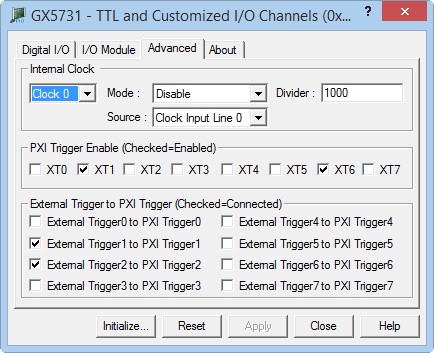
Clicking on the Advanced tab will show the Advanced page as shown in the figure below::
GX5731 Virtual Panel – Advanced Page
The following controls are shown in the Advanced page:
Internal Clock drop down box: Selects the internal clock that its settings are displayed in the Source and Divider controls.
Internal Clock Mode drop down box: Sets/display the Internal Clock Mode, Enable or Disable. The Clock will not be start until enabled.
Internal Clock Divider edit box: Sets/display the selected clock divider. Type a number between 1 to 0x1000000 (16,777,216). This number will be used to divide the Clock the input from the clock source.
Internal Clock Source drop down box: Sets/display the source that is used as an input to the selected internal clock.
PXI Trigger Enable: Enable (checked) or disable (unchecked) the specified PXI Trigger.
External Trigger to PXI Trigger: Connect (checked) or disconnect (unchecked) the specified External Trigger line to PXI Trigger line.