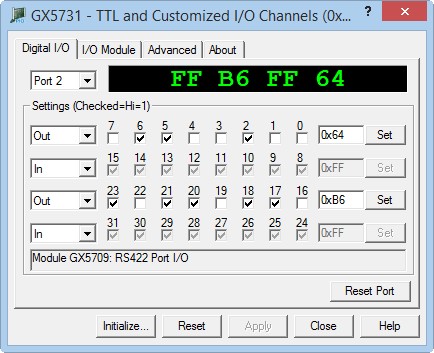
After the board is initialized the panel is enabled and will display the current setting of the board. The following picture shows the Digital I/O page settings:
GX5731 Virtual Panel – Digital I/O page
The following controls are shown in the Digital I/O page:
Port drop-down box (Ports 0 – 6): Selects a port to display its current settings in this page. All other controls in this page show the selected port settings.
Port Value display area: Used to display the current selected port value. The value is displayed in hexadecimal. The right two digits correspond to byte # 0 and the left two digits to byte # 3.
Reset Port button: Resets the current selected port. Clicking on the button will set all the port groups to input mode.
Port Direction drop-down boxes (Byte0-3): Displays the current port’s direction each check box represents 8 channels: Byte 0 for channels 0-7, Byte1 for 8-15, Byte2 16-23 and Byte3 for24-31.
Channel Value check boxes (0-31): Displays the current port channels state. If the channel box is checked the channel is in Hi state. The check boxes display the current state and are used to change the channel state when in output mode. The checkbox are in read-only (disabled) when the channel in input.
Byte Value edit box (Byte0-3): Displays the ports byte in hexadecimal. When the byte is in the output direction, you may type a value directly in hexadecimal (prefix with 0x) or decimal and press the Set button to set the value to the output channels. These controls are disabled when the byte in input direction.
Set button: Sets the value in the adjacent edit box to the output byte channels. This control is enabled only when the byte is in output direction.