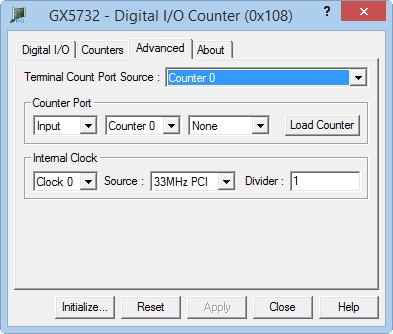
Clicking on the Advanced tab will show the Advanced page as shown in the figure below:
GX5732 Virtual Panel – Advanced Page
The following controls are shown in the Advanced page:
Terminal Count Port Source drop-down box:
Counter Port Direction drop-down box: The Counter Port direction. Select Input or Output direction.
Counter Port Counter drop-down box: The counter connected to the Counter Port. Select None or Counter 0 to 3.
Counter Port Load Control Source drop-down box: Displays the counter Load Control Source. Possible selections are: None or User Line 0 to 5. When a User Line is selected the Counter port will load when the line signal changes.
Load Counter button: Loads the counter with value stored in the Counter Port. This control is only visible when the Counter port is in Input mode.
Internal Clock drop down box: Selects the internal clock that its settings are displayed in the Source and Divider controls.
Internal Clock Source drop down box: The source that is used as an input to the selected internal clock. This can be the 2 on board clocks 10 and 33MHz or User Lines 0 to 5.
Divider edit box: The clock divider. Type a number between 1 to 0xFFFFFFFF. This number will be used to divide the Clock the input from the clock source.