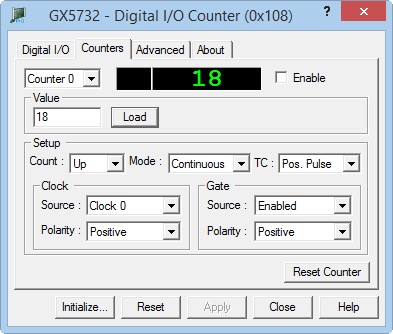
Clicking on the Counters tab will show the Counters page as shown in the figure below:
GX5732 Virtual Panel – Counters Page
The following controls are shown in the Counters page:
Counter drop-down box (0-3): Selects a counter to display its current settings in this page. All other controls in this page show the selected counter settings.
Counter Value display area: Displays the counter value decimal value (0-255) and the counter terminal state. If the counter terminal state is overflow, the Ovr is shown.
Enable check box: Enables (checked) or disable the counter operation.
Value edit box: The value to load to the counter. Set the value in decimal or hexadecimal (prefix with 0x) and press the load button.
Load button: Loads a value to the counter.
Mode drop-down box: Displays the counter modes: Continuous or One-Shot. In continuous mode when the counter overflows and reaches 0 or 255 (depends if it counts down or up) the counter continues to counts starting with 255 or 0 accordingly.
Counts drop-down box: Displays weather the counter counts up incrementing its value by 1or down (decrementing by 1).
TC drop-down box: Displays the action performed by the counter when the counter got to overflow state. Possible values are: Positive pulse, negative Pulse, Low to High or High to low signals.
Clock Source drop-down box: Specifies the counter clock polarity used to increment or decrement its value. Selections can be: Internal clock 0 or 1 or User line 0 to 5.
Clock Polarity drop-down box: Specifies the counter clock source used to increment or decrement its value. Selections can be: Positive or Negative. When Positive the counter counts when the clock changes from low to high. When negative the counter counts when the clock changes from high to low.
Gate Source drop-down box: Specifies the counter gate source mode. The gate is used to control when the counter is enable. Possible values are: Enabled, Carryout and user line 0 to 5. When enabled the counter always enabled. When Carryout is selected, the counter is enabled when the carry signal from another counter changes to high.
Gate Polarity drop-down box: Specifies the counter gate source mode. The gate is used to control when the counter is enable. Possible values are: Positive or Negative. When Positive the counter counts when the gate changes from low to high. When negative the counter counts when the gate changes from high to low.
Reset Counter button: Resets the current counter. This will set the Value source to software