.jpg "GX3116e Virtual Panel (Initialized)")
After the board is initialized, the panel is enabled and will display the current setting of the board. The panel caption will show the board address (0x105 in this example).
The following figure shows the Setup page settings after the board was initialized when channel 1 is selected and set to constant voltage mode:
GX3116e Virtual Panel (Initialized)
The following figure shows the Setup page settings when Channel 1 is selected and set to constant Voltage mode:
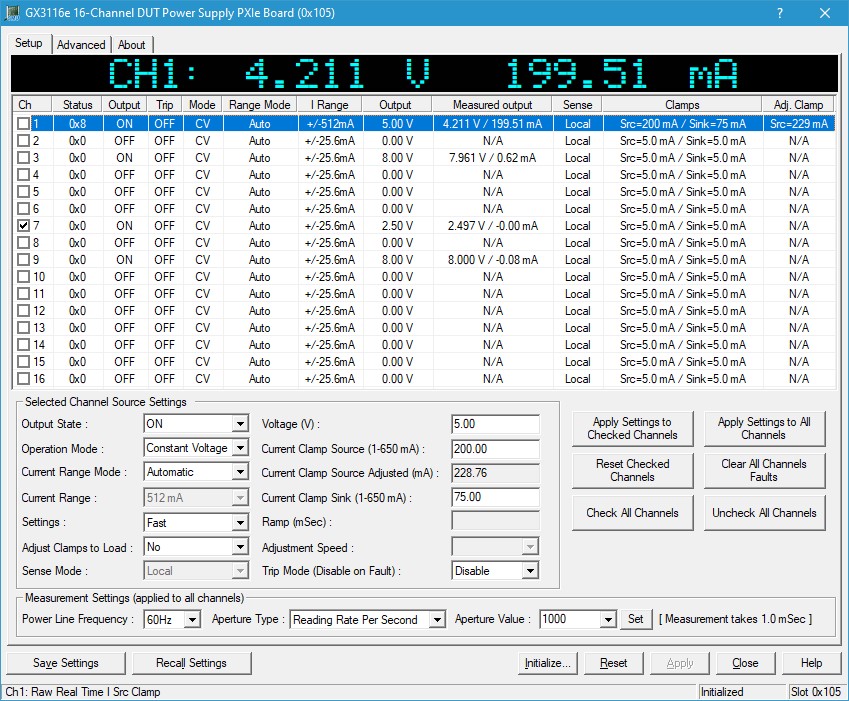
GX3116e Virtual Panel
The following controls are shown in the Setup page:
Channels settings list control: Display all 16 channels settings and measuring the output voltage and currents if the channel output is ON. The first column display the channels numbers with a check box, whenever the use checks a channel, the buttons on the bottom right will apply. Whenever the used click and select any of the 16 channels that channel’s settings will be displayed in the Selected “Channel Source Settings Group Box”.
Column Name |
Description |
Ch |
Board’s channel number. When clicking the “Apply Settings to Checked Channels” all settings in the “Selected Channel Source Settings Group Box” will be applied to all checked channels. |
Status |
Displays the channel’s source status register reading, using the GxSmuGetStatusRegisterChannel() API. |
Output |
Displays the channel’s source output state, OFF or ON, using the GxSmuSourceGetOutputState() API. |
Trip |
Displays the channel’s source Trip mode, Off or ON, using the GxSmuSourceGetTripMode() API. |
Mode |
Displays the channel’s source operation mode, Constant Voltage (CV), or Constant Current (CI), using the GxSmuSourceGetMode() API |
I Range Mode |
Displays the channel’s source current range mode settings, Auto or User, using the GxSmuSourceGetRangeMode() API. |
I Range |
Displays the channel’s source current range settings, can be one of the following: +/-512 mA, +/-25.6 mA, or +/-2.56 mA, using the GxSmuSourceGetCurrentRange () API. |
Output |
Displays the channel’s source output settings of voltage if in CV GxSmuSourceGetVoltage() API, or current if in CI using the GxSmuSourceGetCurrent() API. |
Measured Output |
Displays the channel’s source measured output voltages and currents if the channel is enabled, using the GxSmuMeasureString() API. |
Sense |
Displays the channel’s source sense mode, sense mode can be local or remote, using the GxSmuSourceGetSenseMode() API. |
Clamps |
Displays the channel’s source clamps settings, in constant voltage displays the source and sink clamps using the GxSmuSourceGetCurrnetClamps() API., in constant current it displays the high and low voltage clamps using the GxSmuSourceGetVoltageClamps() API. |
Adj. Clamp |
Displays the channel’s source adjusted clamp value, using the GxSmuSourceAdjustClampUnderLoad() API. |
Output State dropdown list: Set/display the channel’s output state, output state can be set to ON or OFF, using the GxSmuSourceSetOutputState() API.
Operation Mode dropdown list: Set/display the channel’s operation mode. Operation mode can be set to Constant Voltage or Constant Current, using the GxSmuSourceSetMode() API.
Current Range Mode dropdown list: Set/display the channel’s current range setting mode. The current range setting mode can be Automatic or User Defined. In Automatic mode, the current range will automatically be set to match the current limit sink source values using the GxSmuSourceSetRangeMode() API.
Current (mA) edit box: Set/display the channel’s output current value. Voltage can be set from -2.0V to +10.5V.
Current Range dropdown list: Set/display the channel’s current range, using the GxSmuSourceSetCurrentRange () API. There are 3 current ranges as follows:
1. GX3116_SOURCE_CURRENT_RANGE_512MA: Source Current Range +/-512mA
2. GX3116_SOURCE_CURRENT_RANGE_25_POINT_6MA: Source Current Range +/-25.6mA (default after reset).
3. GX3116_SOURCE_CURRENT_RANGE_2_POINT_56MA: Source Current Range +/-2.56mA
Current Clamp High (V) edit box: Set/display the channel’s source current clamp. Source current clamp can be set based on the current range, using the GxSmuSourceSetCurrentClamps() API.
Current Clamp Low (V) edit box: Set/display the channel’s sink current clamp. Sink current clamp can be set based on the current range, using the GxSmuSourceSetCurrentClamps() API.
Settings dropdown list: Set/display the channel’s source settings mode, user can select between Fast (all settings will be applied immodestly), or Ramp. When selecting the Ramp option the Ramp (mSec) Edit box is enabled, and the user can specify how much time the output voltage or currents will be set gradually in that time frame to prevent any over/under shoot, using GxSmuSourceSetConstantVoltage() API if the channel is in constant Voltage and GxSmuSourceSetConstantCurrent() API if the channel is in constant current.
Adjust Clamp to Load dropdown list: Set/display the channel’s source Clamp adjustment settings. The user can select between no or yes to adjust the clamp values. If the user select Yes, the Adjustment Speed drop down list is enabled, and the user can select how fast the adjustment will take, fast, moderate, or Slow, the Adj. Clamp column will display the actual clamp value that is required in order to achieve the specific current clamp, using the GxSmuSourceAdjustClampUnderLoad() API.
Sense Mode dropdown list: Set/display the channel’s source voltage sense mode, sense mode are local and remote, using the GxSmuSourceSetSenseMode() API..
Trip Mode dropdown list: Set/display the channel’s trip mode, trip mode can be disable or enable, when trip mode is enabled, whenever the channels’ output current limit (sink or source) will heat the limit the channel’s output will be disabled. The used will need to check the channel and click on the “Clear Checked Channels Faults” button to clear the fault, using the GxSmuSourceSetTripMode() API.
Apply Settings to Checked Channels button: Apply the same settings as the currently selected channel’s setting are to all checked channels.
Apply Settings to All Channels button: Apply the same settings as the currently selected channel’s setting are to all channels.
Clear All Channels Faults button: Clear all faults, over current limit, over voltage limit and over temperature, to all checked channels.
Clear Checked Channels Faults button: Clear all faults, over current limit, over voltage limit and over temperature, to all channels, using GxSmuClearFaults() API.
Reset Checked Channels button: Reset all checked channels to default, using the GxSmuSourceResetChannel() API.
Reset All Channels button: Reset all channels to default, using the GxSmuSourceResetChannel() API.
Power Line Frequency dropdown list: Set/display the measurement Power Line Frequency list, supported frequencies are 60Hz, 50Hz, and 400Hz, using the GxSmuMeasureSetPowerLineFrequency() API.
Aperture Type dropdown list: Set/display the measurement aperture type. Aperture type can be either Reading Per Second, or Power Line Cycles, using the GxSmuMeasureSetParamters() API.
Aperture Value Edit Box: Set/display the measurement aperture value, using the GxSmuMeasureSetParamters() API.