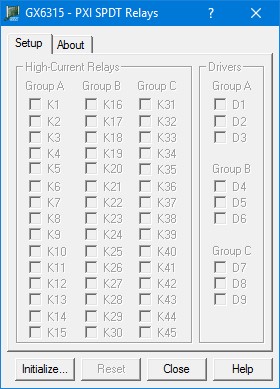
The GX6315 includes a virtual panel program, which enables full utilization of the various configurations and controlling modes. To fully understand the front panel operation, it is best to become familiar with the functionality of the board. To open the virtual panel application, select GX6315 Panel from the Marvin Test Solutions, GXSW menu under the Start menu. The GX6315 virtual panel opens as shown here:
GX6315 Virtual Panel
The following controls are shown:
Initialize Opens the Initialize Dialog (see Initialize Dialog paragraph) in order to initialize the board driver. The current settings of the selected counter will not change after calling initialize. The panel will reflect the current settings of the counter after the Initialize dialog closes.
Reset: Resets all relays to an open state and sets panel parameters to the default state.
Close: Closes (exits) the GX6315 panel.
Help: Opens the GX6315 on-line help window.
The Initialize dialog initializes the driver for the selected counter board. The counter settings will not change after initialize is called. Once initialize, the panel will reflect the current settings of the counter.
The Initialize dialog supports two different device drivers that can be used to access and control the board:
1. Use Marvin Test Solutions’ HW – this is the device driver installed by the setup program and is the default driver. When selected, the Slot Number list displays the available counter boards installed in the system and their slots. The chassis, slots, devices and their resources are also displayed by the HW resource manager, PXI/PCI Explorer applet that can be opened from the Windows Control Panel. The PXI/PCI Explorer can be used to configure the system chassis, controllers, slots and devices. The configuration is saved to PXISYS.INI and PXIeSYS.INI located in the Windows folder. These configuration files are also used by VISA. The following figure shows the slot number 0x104 (chassis 1 Slot 4). This is the slot number argument (nSlot) passed by the panel when calling the driver Gx6315Initialize function used to initialize driver with the specified board. Slot Number list displays the available counter boards installed in the system and their slots. The chassis, slots, devices and their resources are also displayed by the HW resource manager, PXI/PCI Explorer applet that can be opened from the Windows Control Panel. The PXI/PCI Explorer can be used to configure the system chassis, controllers, slots and devices. The configuration is saved to PXISYS.INI and PXIeSYS.INI located in the Windows folder. These configuration files are also used by VISA. The following figure shows the slot number 0x104 (chassis 1 Slot 4). This is the slot number argument (nSlot) passed by the panel when calling the driver Gx6315Initialize function used to initialize driver with the specified board.
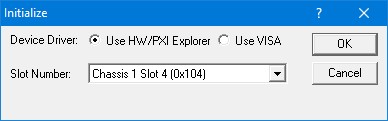
Initialize Dialog Box using Marvin Test Solutions’ HW driver
2. Use VISA – this is a third party device driver usually provided by National Instrument (NI-VISA). When selected, the Resource list displays the available boards installed in the system and their VISA resource address. The chassis, slots, devices and their resources are also displayed by the VISA resource manager, Measurement & Automation (NI-MAX) and in Marvin Test Solutions PXI/PCI Explorer. The following figure shows PXI9::13::INSTR as the VISA resource (PCI bus 9 and Device 13). This is VISA resource string argument (szVisaResource) passed by the panel when calling the driver Gx6315InitializeVisa function to initialize the driver with the specified board.
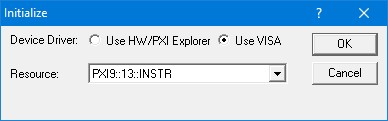
Initialize Dialog Box using VISA resources
After the board is initialized the panel is enabled and will display the current setting of the board. The following picture shows the Group page settings:
.jpg "GX6315 Virtual Panel (Initialized)")
GX6315 Virtual Panel (Initialized)
The following controls are shown in the Group page:
Relays Group Box (Relays K1 – K45): Displays the current relay setting (closed or open). When a box is checked, the relay is closed. Similarly, unchecked boxes mean relays are open.
Drivers Group Box Display Area (Driver Relays D1 – D9): Displays the current drivers’ settings (closed or open). When a box is checked, the relay driver is closed.
Clicking on the About tab will show the About page as shown in the figure below:
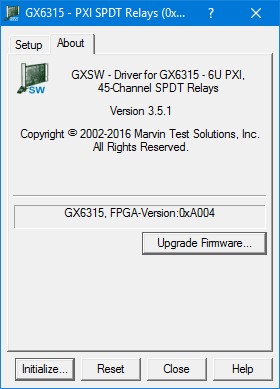
GX6315 Virtual Panel – About Page
The top part of the About page displays version and copyright of the GX6315 driver. The bottom part displays the board summary and the FPGA version. The About page also contains a button Upgrade Firmware… used to upgrade the board FPGA. This button maybe used only when the board requires upgrade as directed by Marvin Test Solutions support. The upgrade requires a firmware file (.jam) that is written to the board FPGA. After the upgrade is complete you must shut down the computer to recycle power to the board.