 command from the context menu.
In this section, you will create an I/O Table called SetFunctionVAC. The SetFunctionVAC changes the DMM measurement mode to measure in Volts AC. Instead of repeating the steps to create the previous I/O Table, you will use the clipboard commands to duplicate the SetFunctionVDC I/O Table. Then, you will modify the I/O Table and the Output operation to the VAC functionality.
Note: You need to create the SetFunctionVDC table before completing this exercise. For more information, see Creating a SetFunctionVDC I/O Table.
1. Right-click
on SetFunctionVDC and select the Copy
command from the context menu.
2. Right-click
again on the SetFunctionVDC and select the Paste
 command from
the context menu. A dialog box displays as shown here:
command from
the context menu. A dialog box displays as shown here:
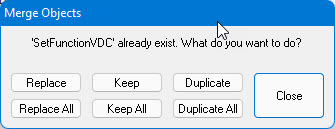
3. Click on the Duplicate button. A new I/O Table is created and named SetFunctionVDC1.
4. Select the SetFunctionVDC1 I/O Table and rename it to SetFunctionVAC. (Use the F2 key if you need to.)
5. Type the following description for this table in the description view: Sets the measurement function to VAC. (Hint: you can just edit VDC to VAC.)
6. Select
the Output operation, open the properties window and change the argument
to display:
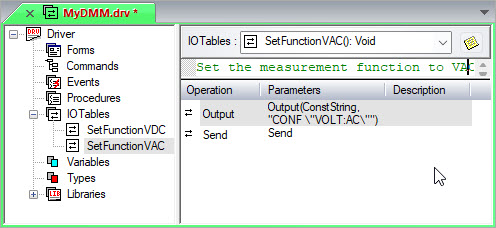
CONF "VOLT:AC"
When done, the I/O Tables view should be as shown below:
If desired, you could now create additional I/O Tables for all the DMM's measurement modes such as current (IAC and IDC), resistance (2-wire and 4-wire), frequency, etc.