 from the context menu. The DLL procedure
property page displays. Type the procedure name: Gx6138Initialize
and check the Public checkbox.
Set the description to: Initializes the
driver for the board at the specified base address.
from the context menu. The DLL procedure
property page displays. Type the procedure name: Gx6138Initialize
and check the Public checkbox.
Set the description to: Initializes the
driver for the board at the specified base address.Declaring procedure in a DLL is divided into two steps. The first step is to define the procedure name and return value. The second step is to define the procedure parameters. In most cases, the parameters are described in C programming language, that require you to translate the C types mentioned in the header file to ATEasy data type.
In general, C and ATEasy types are very similar in the name of the types and in internal representation of the type. Here are some guidelines:
● C pointers can be converted to VAR parameters. For example the C data type short * can be converted to ATEasy data type VAR Short. If no pointer is used, use the ATEasy VAL parameter.
● Arrays and Strings are pointers in both C and in ATEasy. You can use both VAL and VAR. For example char * (or LPSTR) can be VAL String or VAR String. You should use VAR if you plan to change the string and reflect the change to the caller. When declaring VAL, ATEasy creates a copy of the variable and passes it to the DLL procedure. Calling with VAR is faster.
1. Right-click on the Procedure below the GXSW Library in the tree of the document view and select Insert Procedure Below . A new procedure is inserted.
2. Right-click
on the new procedure. Select Properties
from the context menu. The DLL procedure
property page displays. Type the procedure name: Gx6138Initialize
and check the Public checkbox.
Set the description to: Initializes the
driver for the board at the specified base address.
3. Right-click on GX6138Initialize and select Insert Parameter Below . A new parameter is inserted.
4. Rename the parameter to nSlot. The new parameter has a type of VAL Short – this matches the C Type SHORT.
5. Repeat steps three and four for the pnHandle and pnStatus parameter. Their parameter type must be change to VAR since they are declared as LPSHORT (short *). At this point, the procedure is declared and can be used.
6. Repeat steps one through five for each of the procedures. You can use Copy and Paste, or Drag and Drop to expedite your work. Make sure the string parameters are defined as VAR since they return a value. You can use the Gx6138.drv driver as a reference or for copying the procedures defined there instead of typing them.
At this point, the DLL procedures are defined and ready to use. Your DLL procedures view should look similar to this:
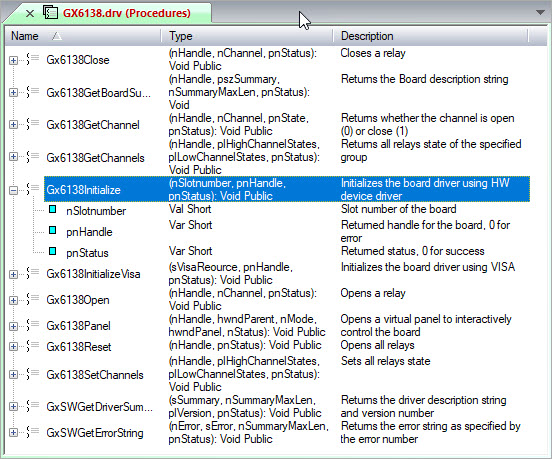
As you can see, the DLL procedures and their parameters are documented. This is used when the user uses the procedure.