To display these options, select Options... from the Tools menu and select the Other tab.
This option will cause the IDE to always call the Driver/System OnInit, OnEnd, OnInitSystem and OnEndSystem events before starting to run a new project, or unloading a project that was run before. This option ensure that when you run code in DoIt! mode (FormIt!, LoopIt! also) the system and drivers are initialized.
The option was added for ATEasy v6.0/7.0 builds (136c/142c), prior to these version users would use the Reset button prior to running code to initialize the system and drivers. Default: Unchecked, The option is set to False for backward compatibility and is recommended to set it to True. Version 8 includes also a new driver property Driver Properties Window - General that have similar functionality as this option.
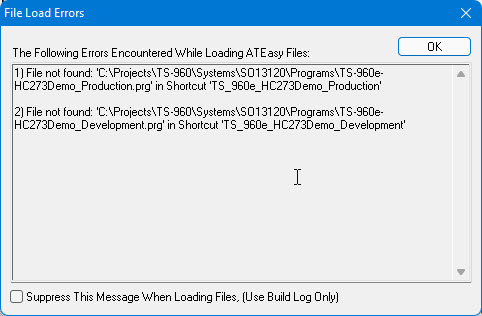
This option when unchecked, causes the ATEasy Load Errors Dialog to be displayed when ATEasy loads files (e.g. when ATEasy opens a workspace file) and errors such as missing ActiveX/,Net library or missing workspace file is encountered. The dialog displays an accumulated errors occurred while loading files and it replaces the error message box that was displayed for each error that encountered during file loading in older version of ATEasy. Default: Unchecked.
The following is an example of the File Load Errors Dialog:
Checking this check box in the Options dialog or in the dialog itself, causes ATEasy to not prompt with this dialog. The errors are appended to the ATEasy Build Log Window in any case.
When opening a file form Windows Explorer that is associated with ATEasy (i.e. .prg), open the file in a new IDE instance. If the option is not checked and the IDE is open, the file will be added to the current IDE workspace. Default: Unchecked.
When checked and the user start to run a project from the IDE, the whole project is checked for syntax errors (similar to Build). If error are found, the application will not start and the build log will display the errors found. Default: Unchecked.
When checked, ATEasy IDE, when launched, will check and notify if newer version or build of ATEasy is available for download than the current version or build. Default: Checked.