, and then drag it within your form to size the control.
There are several ways to allow a user to interact with a test program. One of the simplest is the AButton control, which the user clicks to perform actions. To place the AButton control in your form, click on the control in the toolbar , and then drag it within your form to size the control.
The AButton control's appearance can be customized to display simple text instructions or a picture image to help the user understand its function. The test programmer can place code in the button's OnClick() event to perform any desired action.
The AButton control can be customized using the Properties window. The Caption property is on the Control tab of the Properties window. By setting the Caption property, you can set the label that will appear on the button.
From ATEasy v6, new support for multiple lines text and word wrap for the Caption property is automatically applied; that is, if the button height is big enough to include multi line text, it will be displayed as multi line, otherwise it will be displayed in a single line as truncated. This also applied for ARadioButton, ACheckBox.
You can also set the shape of the button, the alignment of the button text, and the width of the bevel and border. On the Picture tab, you can set a picture to go along with the text, or to replace the button text altogether.
There are several ways to press a button at run time:
Use a mouse to click on the button.
Move the focus to the button by pressing the TAB key, and then choose the button by pressing the SPACEBAR or ENTER. For more information on focus, see Form Focus.
If the button has a text label, press an access key (ALT+ the underlined letter) displayed on the face of the button.
Invoke the AButton's click event in code:
btnTest.OnClick()
If the AButton is the default button for the form, pressing ENTER chooses the button, even if you change the focus to a different control other than a command button. At design time, you specify a default command button by setting that button's Default property to True.
If the command button is the default Cancel button for the form, then pressing ESC chooses the button, even if you change the focus to another control. At design time, you specify a default Cancel button by setting that button's Cancel property to True.
All these actions invoke the OnClick() event procedure.
|
|
|
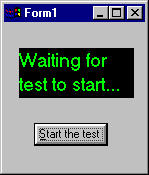
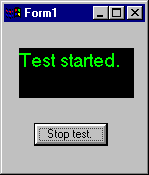
In this example of the OnClick event for abtn1, the form has a button with a caption, "Start the test." When the button is clicked, the message in the label changes to "Test started," and the button caption changes to "Stop test."
Procedure btnTest.OnClick(): Void Public
{
if lblMsg.Caption = "Waiting for test to start..." then
lblMsg.Caption = "Test started."
btnTest.Caption = "Stop test"
! Code to start test here.
else
lblMsg.Caption = "Waiting for test to start..."
btnTest.Caption = "Start the test"
! Code to stop test here.
endif
}
For more information on the properties of the AButton control, see AButton.