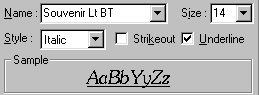
Property Name
The Property Name is always set to "Fonts" in the Font page. (Some controls -- for example, AChart -- may have more than one Property Name, from which you can make a selection.)
Name
A selected font Name is the active font face for the form. The active font face is inherited (used) by many form controls and the DrawText command.
During design time, most ATEasy form controls inherit the form's active font as they are added to the form. A form control will continue to use the form's active font until a specific font is assigned to the control. Once a form control has been assigned a specific font, it is not affected by further changes to fhe form's active font face.
Note: Third-party controls may or may not use the form's active font.
During run time, DrawText normally uses the form's current active font. If the Courier New font is used early in the design phase and is later changed to Souvenir Lt BT, all of the DrawText commands will use Souvenir Lt BT—unless they are specifically overridden by program code that changes the DrawText font.
|
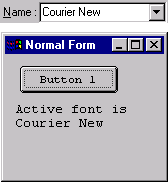
For example, the font for Button 1 is set at design time to Courier New.
The text drawn below Button 1 is created during run time with two DrawText commands which use the form's current active font, Courier New.
|
|
|
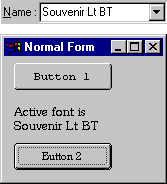
During design time, the form's active font is changed to Souvenir Lt BT and a new button is added to the form.
Button 2 inherits and uses the form's current active font, Souvenir Lt BT.
Button 1 continues to use Courier New.
During run time, the DrawText commands use the form's current active font, Souvenir Lt BT.
|
|
If further changes are made to the form's active font, Button 2 and DrawText will use the new font, but Button 1 will continue to use Courier New.
|

|
The Name drop-down list box displays a list of installed fonts on your computer.
|
Note: If you select a font name on your development computer that is not on the production computer, Windows will substitute fonts when the program executes.
Style
|
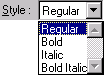
Font Style alows you to select one of four font styles.
|
|
Size
Font Size provides two ways to select the size of a font.
The unit of measure for fonts is points. There are 72 points per inch so a 12-point font size would be 1/6 of an inch high.
Strikeout
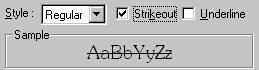
The Strikeout font modifier draws a horizontal line through the text.
Underline
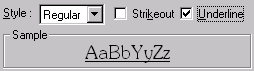
The Underline font modifier draws a horizontal line below the text.
Sample
The Sample display shows an example of the current font. The properties include the font Name, Size, Style, and modifiers Strikeout and Underline.