
See Providing Form Help for additional background information.
Enter the path and file name of your help file.
HTMLHelp example: \help\prog_name.chm
WinHelp example: \help\prog_name.hlp
Enter a numeric ID. This ID is used by the help system to display a specific help topic. The example below uses a topic ID format of ABBCC where the numbers A, B, and C represent the organization of the Help file.
|
HelpContextID |
Topic |
|
10101 |
Book1, Section 01, Topic 01 |
|
10102 |
Book1, Section 01, Topic 02 |
|
10201 |
Book1, Section 02, Topic 01 |
Topic ID numbers are completly arbitrary. The above topic numbers could have been assigned 4,197, and 14. Most help authoring programs have a method of matching topic ID numbers to specific help topics. Consult your help authoring documentation for specific details on using topic IDs for context-sensitive help.
Enter a numeric ID. This ID is used by the Help system to display a specific help topic.
If an external file is not used, the What's This topic data is entered into the form property and the WhatsThisHelpID is not used.
If an external file is used, the WhatsThisHelpText is left blank and the WhatsThisHelpID is used to retrieve the Help text.

The tag is used as a general purpose string variable.
Note: The scope and the lifetime of the tag variable is the same as the scope and lifetime of the form. If you wish to access the tag variable outside of the form, declare the form as public. The lifetime of the tag variable is the same as the form. When the form is deleted from memory, the tag variable can no longer be accessed.
The form and each of its controls have a tag field that can be used to hold text strings. Assume you are working with a form with three form controls, a text box and two buttons. The form tag field is initialized to "No name entered" and the text box tag field is initialized to "Enter your name." These initial values are displayed when the form is opened.

A name is entered into the text field and the Save Name button is clicked. The following image shows the updated form.

This is the code used to display the current tag values:
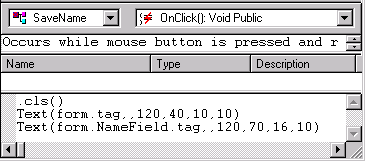
This is the code used to copy the data entered into the TextBox (form.NameField.text) to the TextBox tag field (form.NameField.tag):
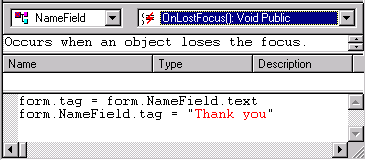
The OnLostFocus( ) event was selected as the triggering event to save the text field because this event occurs when the user has finished entering text and has started some other operation.