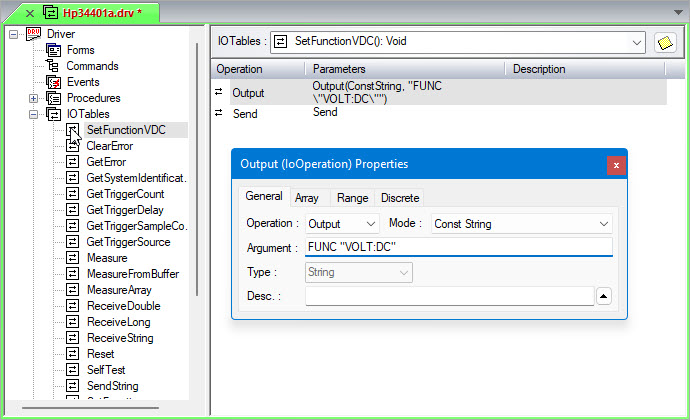
This example sends a string that instructs Digital Multimeter (DMM) to change its measurement mode:
1. Create a new I/O Table as explained in Creating I/O Tables and name it "SetFunctionVDC."
2. Define two operations directing the DMM driver to change its measurement mode:
Create an Output operation. Through the General page of the Output properties, enter FUNC "VOLT:DC" in the Argument field. Make sure the Mode selection is at Const String. If you want, you can add a description in the Desc field such as "Sets the DMM to VDC Measurement Mode." For information on the Output operation properties, see Output Properties General Page. The Properties window will look similar to the following:
Create a Send operation as well. Do not change any properties. For information on Send operation properties, see Send Properties.
Repeat this process to create another I/O Table called SetFuncVAC. The procedure is identical, except use the following string in the Argument edit box:
FUNC "VOLT:AC"
The I/O Table view now contains the following:
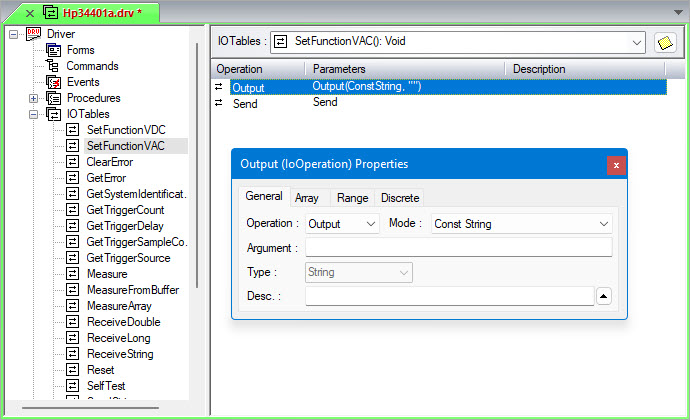
You can now create additional I/O Tables for all the DMM's measurement modes such as current (IAC and IDC), resistance (2-wire and 4-wire), frequency, and other DMM functions.