 Execute Command (Build Menu) Execute Command (Build Menu)
Use this command to run the EXE file that was created by running the Build command.
When you build an application, you are building all files in a project into an application that is an EXE or DLL file. The generated file runs outside of the ATEasy development environment.
The EXE/DLL file is specified in the Project properties page. You can see the file name of the by viewing the Properties page for your project. FIle name can have absolute path or relative to the project file path:
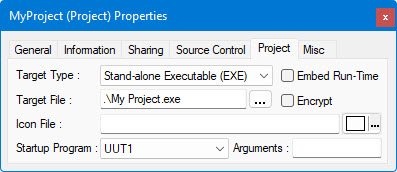
If you select the Execute command, but no EXE file exists, ATEasy does an automatic Build first. The Build will compile the application and create the EXE file. Then ATEasy runs the EXE file.
For information on building the project, see Build (Build Menu).