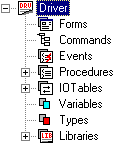
The Driver module, showed below, provides a way to control an individual instrument in a test system. Drivers are used as interfaces between ATEasy applications and instrumentation or external devices. Although drivers often represent individual instruments, that is not always the case. You can have drivers for external libraries such as mathematical or statistical processing, a test executive, or a profiling driver.
Drivers map logical addressing to the physical addressing of the system and instruments. Logical addressing ensures driver portability from one system to another. Logical addressing also allows the substitution of a different interface or instrument without changing the test program code. The only thing that has to be changed is the configuration of the driver.
Drivers are self-contained and portable. They can be moved from one System to another. That is why it is recommended that within a driver, you should not use programming elements – for example, procedures, forms, variables, and commands – from other drivers. Using programming elements from other drivers would create dependencies, making the driver not fully portable.
To specify the range of supported interfaces and default settings for a driver, see the Driver Properties window. To select an interface configuration for that driver to use, see the Driver Shortcut Properties window.