 has a little arrow and the driver
  does not have one.
The difference between a driver shortcut, seen in the workspace window, and the driver itself, seen in the document view, is that visually the driver shortcut has a little arrow and the driver does not have one.
The driver shortcut points to a driver in the active project and is based on the configuration of the device. The driver shortcut contains the name used to identify the driver in the application (usually it uses the driver default name unless that name is taken), the selected interface being used in the system, and the address of the device.
The driver configuration information can be changed in the Driver Shortcut Properties window, which is illustrated below.
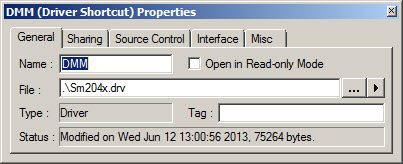
On the other hand, the driver is based on the instrument or the device and describes the device default name and supported interfaces.
Changes made to the driver shortcut are saved in the System module while changes made to the driver will be saved in the driver file.