Using IVI Drivers
|
Version 5
|
ATEasy provides built in support for all of IVI (Interchangeable Virtual Instrument) classes/drivers that the IVI foundation http://www.ivifoundation.org created and released. ATEasy allows to create ATEasy drivers for all IVI drivers. Also see IVI Divers. ATEasy greatly simplifies the use and programming of IVI-C by providing ATEasy IVI drivers that provides automatic initialization, error and exception support, code completion and more.
Here are steps required to use one of IVI drivers for a particular manufacturer IVI driver,
-
Install the manufacturer IVI driver that you want to use, for example Hp34401a Multi-meter.
-
Install an IVI configuration utility such as National Instruments Measurement & Automation Explorer - this is needed to set the instrument Logical Name. Please see below for Setting Logical Name (it is to achieve interchangeability of Instruments).
-
Insert ATEasy IVI driver using the IVI Driver Wizard. Here you want to set the Logical Name and other initial settings.
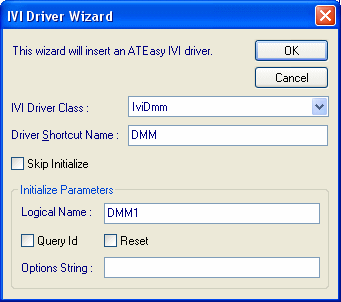
When it is done, ATEasy will create an ATEasy driver, IviDmm.drv and its driver shortcut parameters:
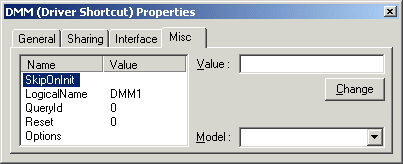
Notice that ATEasy set the Logical Name in the Driver Shortcut Parameter list.
-
Now you are ready to use the driver in the ATEasy code - see examples below.
IVI Driver Architecture - what happens when an IVI function is called
When ATEasy calls an IVI DMM dll function, it calls in turn hp34401a dll function. Via IVI engine and VISA IO library, the Instrument will respond:
ATEasy IVI Driver -> IVI Generic Driver -> Manufacturer IVI Driver -> IVI Engine -> VISA -> Instrument
An example with Hp34401a Digital Multimeter:
IviDmm.drv -> IviDmm.dll -> hp34401a_32.dll->Instrument
The following block diagram will further illustrate the architecture of IVI system:
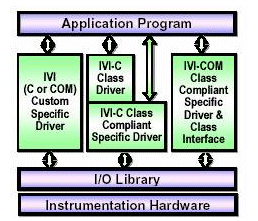
where Application Program is the ATEasy test Program.
Setting Logical Name in the IVI Configuration Utility
Here we are going to show you with National Instruments Measurement & Automation Explorer:
First create the Logical Name that you are going to use via:
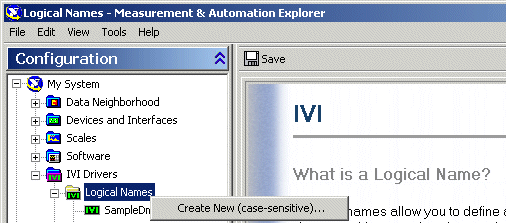
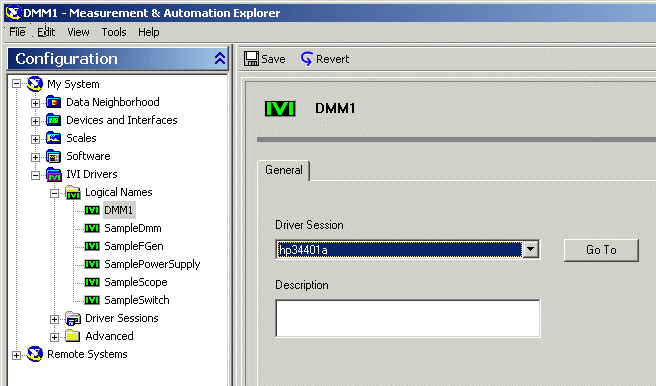
Now after create the logical name, "DMM1", specify Driver session - specific manufacturer's IVI driver you installed:
Example of Using the ATEasy IVI Drivers
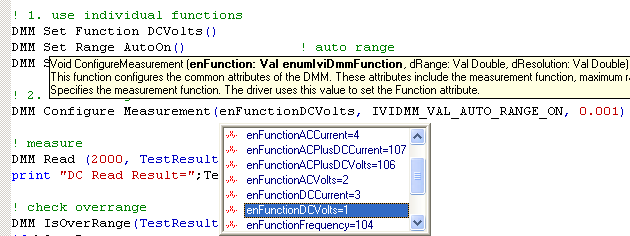
ATEasy (in its Drivers directory) provides several examples for the various IVI classes; the IVI workspace file Ivi.wsp contains these examples:
Interchangeability of Instruments
The IVI drivers were designed to allow instrument interchangeability and currently several vendors support and publish these drivers. The drivers offer same functions and parameters to different instruments of the same type (i.e. DMM) from different vendors. For example, it allows you to replace Agilent DMM 34401 with a Keithley 2000n in your system without changing your code.