I/O Modules are mounted on either GT515X or Carrier boards. When mounted, component sides of the module daughter card and motherboard face each other.
All modules have two opposing headers and two mounting holes located diagonally opposite. Headers and mounting holes match mating headers and mounting holes on the DIO or Carrier motherboard.
In order to mount an I/O Module, partially insert the two module headers into the mating headers on the motherboard. Next, insert the two nylon spacers using the screws and nuts provided; then press the module firmly into the header and tighten. The mounting hardware provides alignment and rigidity.
Note: Some I/O modules can be oriented with connectors reversed. This can cause a power short that will prevent the computer from powering up. Mounting holes align only when the module is oriented correctly. Always use mounting hardware to assure correct module orientation.
An I/O module is installed at the factory when GT5150 or GT5151 is purchased. The GT5910 TTL I/O Module is the default.
GT5150 and GT5151 boards require an I/O Module daughter card for any UUT. The I/O Modules provide drive current, termination and special functions, like non-TTL logic family signal level conversion.
GT25/50-DIO boards connect UUTs at moderate current TTL levels. I/O modules can be used for additional load handling capability or other I/O functions as described below.
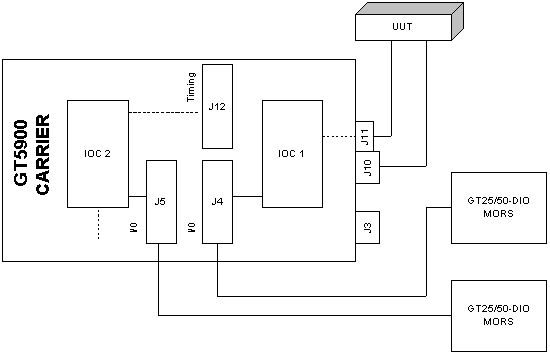
GT25/50-DIO boards cannot host I/O modules directly. Instead, a GT5900 ISA Carrier board, which hosts up to two I/O modules, is inserted between the DIO board and the UUT (the figure GT5900 Carrier Configuration). A Carrier with two mounted I/O modules serves two DIO boards, or up to 64 UUT channels (connector pins).
In other configurations, I/O Module number 1 (IOC1 in Figure GT5900 Carrier Configuration) can also interface to a GT25/50 Timing module through a dedicated header, J12, or to a GT5150 Timing Module at connector J3.
In the figure above, J3 is used only for a GT5150 Timing module (GT5150). J4 and J5 are headers for GT25/50-DIO connections.
A GT5150 Master board hosts one I/O module for data signals. Its Timing module provides native TTL voltage levels that are not handled by its I/O module. Timing signals are available at the end bracket connector. Non-TTL timing I/O can be handled by an off-board I/O module. The Carrier provides a host for this off-board I/O module. The Carrier has a dedicated VHD connector for this purpose that cables to the Timing Module’s connector on the GT5150 end bracket.
|
Caution - Turn off power before installing. Do not attempt to insert or remove any board into a powered host. Such action will void warranties |
The following general precautions should be observed:
1. Follow instructions concerning discharging static electricity above.
2. Turn off power and wait at least 30 seconds before installing.
3. Make certain there is sufficient clearance and a suitable ISA backplane connector to receive the board.
4. Unpack the board. Do not drop or handle it roughly. Hold it only by its edge (like a photo negative).
5. Prepare and configure the board or card as specified in the following sections. Mount any daughter card on the host ISA board as required.
6. Install the ISA board or host in an ISA slot. Do not force it. Make certain it is properly seated.
7. Tighten the mounting screws as required.
