The GC2200/GTX2200 measures the frequency of input signals using reciprocal counting and time interpolation. The two primary benefits for using these methods are improved accuracy and reduced measurement time. Fast measurements with high accuracy permit greater knowledge of the stability of a signal. For example, given a test frequency of 10 kHz, a basic “direct count” counter will resolve 1 Hz using a one second measurement time. In contrast, the GC2210/GTX2210 can resolve 0.1 Hz using a 1-millisecond measurement time, and the GC2220/GC2230/GTX2220/GTX2230 will resolve 0.001 Hz in 1 millisecond. The GC2200/GTX2200 computes the drift rate, mean, and peak to peak jitter of the signal in the same time a conventional counter measures “Frequency” alone
Frequency can be measured on either of the two signal inputs, referred to as Channel A and Channel B. The software supports channel swapping, which allows two signals to be monitored without moving cables or using a signal multiplexer. GC2210/GC2210/GTX2210 measures signal frequencies ranging from DC to 225 MHz. The GC2220/GTX2220 Channel A has a wider bandwidth and measures frequencies from DC to 1.3GHz and GC2230/GTX2230 DC to 2GHz.
The user must specify the period over which the signal frequency is to be measured. This interval is traditionally referred to as the “gate time”. Gate time provides the user a way to control the measurement parameters. First, longer measurement times increase the number of significant digits in the result and increase the potential accuracy. Second, the gate time defines the averaging time of the measurement. A long gate time is useful if the AVERAGE frequency is of interest, while a series of measurements taken with short gate times can indicate the short-term stability or jitter of the source. The GC2200/GTX2200 allows the gate time to be set over a range of 250 micro sec to 3200 seconds.
Because of the measurement technique used, very low frequency signals will modify the actual measurement interval. In frequency mode, the minimum measurement time is one signal period: for example, it takes at least 100 milliseconds to measure a 10 Hz signal, no matter how short the selected gate time. Furthermore, the measurement interval is converted to an integral number of signal periods. For example, with a 10 Hz signal and a gate time specification of 0.1 seconds, the actual measurement time could be either 0.1 or 0.2 seconds. The uncertainty can be eliminated simply by selecting a gate time where no ambiguity could exist: e.g. 0.01 seconds would ensure a one period measurement and 0.15 seconds would guarantee a 2 period measurement. Finally, there may be a significant dead time (up to 1 period) between initiation by the gate and the start of a measurement since that measurement must begin at a period boundary. These effects are mostly of concern to designers of automatic test systems, where unexpected variation in measurement time can cause confusion or malfunction to the test program.
Frequency, Fast Frequency and Period modes can be armed for precise control over the measurement interval starting point. This is especially useful if the signal to be measured is a burst signal or it is frequency modulated. Although Armed Frequency allows the beginning of the gate interval to be defined, the end of the measurement interval is defined by the specified gate time; it cannot be set by the arming signal. For more information see the “Arming” section.
Frequency allows the GC2220/GC2230/GTX2220/GTX2230 to acquire up to 1400/sec theoretical measurements and around real 1100/sec measurements or better. The maximum number of measurements depends on the CPU speed, system configuration and number application running at the background. See the GxCntReadMeasurementArray function on how to achieve high number of measurements. For best results the counter settings should as follows:
The Gate time needs to be set to the minimum (250usec).
The channel Trigger Level Mode should be set to Fixed.
The channel Trigger Level should be set to fixed value, e.g. 0.5V.
The channel Prescale Mode should be turned off.
The GC2200/GTX2200 will pre-scale a signal over 10MHz. Because the GC2200/GTX2200 utilizes reciprocal counting measurement techniques, pre-scaling does NOT cause a reduction in resolution. The counter determines the need for pre-scaling just before each frequency or period measurement. There are some situations, however, where the user should explicitly turn pre-scaling “OFF”. For example, during high-speed data acquisition, the extra time required to automatically test the signal can reduce the maximum sample rate. Pre-scaling can be disabled if the signal will be less than 10 MHz. Enable the prescale function for any signal above 10MHz It is also possible to fool the automatic selection process, if the signal frequency varies dramatically over the gate time. Manual selection, based on the maximum expected frequency, ensures correct operation. Note that the only “problem” with pre-scaling is that a minimum of four signal periods must be measured. When the input signal is below about 10 kHz, pre-scaling makes the measurement time significantly longer than specified by the gate time.
If an application requires that frequency resolution and accuracy be maximized, care should be used in “conditioning” the input signals. Any noise (amplitude, frequency, or phase) associated with the signal will affect the measured stability. In fact, large amplitude “spikes” can produce very erroneous results, providing they exceed the hysteresis of the input trigger circuits. If application problems are encountered, check the input signal carefully with a scope. A low pass filter can often eliminate false triggering due to impulse noise and reduce jitter caused by high frequency interference or wideband noise. The GC2200/GTX2200 has a filter that can eliminate erroneous results caused by large amplitude “spikes” for input frequencies less than 20KHz. See the section titled Filtering for more information about using the Filter function.
“Ground” noise between the source and the counter can also contribute to increased measurement jitter and the solution is usually better grounding or some method of isolating the different signal grounds.
Some applications require that frequency measurements begin at very precisely defined times. This control can be provided by measurement arming. See the section titled Arming for more information about using the Armed Frequency function.
A special “Fast Frequency” mode of the GC2200/GTX2200 provides frequency measurements using a very short measurement interval (minimum gate time in the standard mode is 250 s). The shorter measurement interval permits substantially faster data acquisition. In Fast Frequency, gate time is not a fixed interval, but a fixed number of signal periods; four periods. Fast Frequency measurement mode ignores the gate time setting. Measurement resolution for Fast Frequency mode is best with low frequency signals since the resolution is proportional to the gate time.
Note: While the Fast Frequency mode exists in the GC2210/GTX2210, it has little value because of the lower resolution of the GC2210/GTX2210.
Fast Frequency allows the GC2220/GC2230/GTX2220/GTX2230 to acquire up to 2300/sec theoretical measurements and around real 1400/sec measurements or better. The maximum number of measurements depends on the CPU speed, system configuration and number application running at the background. See the GxCntReadMeasurementArray function on how to achieve high number of measurements. For best results the counter settings should as follows:
The Gate time needs to be set to the minimum (250usec).
The channel Trigger Level Mode should be set to fixed.
The channel Trigger Level should be set to fixed value, e.g. 0.5V.
Of even greater importance, Fast Frequency allows the counter to used for characterization of very rapid frequency transitions, as found in voltage-controlled oscillators or phase locked loops.
Frequency, Fast Frequency and Period modes can be armed for precise control over the measurement interval starting point. This is especially useful if the signal to be measured is a burst signal or it is frequency modulated. Although Armed Frequency allows the beginning of the gate interval to be defined, the end of the measurement interval is defined by the specified gate time; it cannot be set by the arming signal. For more information see the “Arming” section.
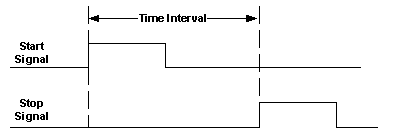
Time Interval is defined as the elapsed time between events on the “start” input channel and events on the “stop” input channel. Time Interval has additional settings to determine whether A or B is the start. An “event” can be defined through the channel slope and trigger level settings. An event edge may be either a positive or negative transition of the input signal. The trigger level determines where along the transition the event is valid. The figure below illustrates the Time Interval concept:
Time Interval
Signal swapping allows the user to define either input channel as the start or stop. This function minimizes setup changes in bench top applications, and reduces the need for signal multiplexers in test systems.
All timing functions utilize the time interpolation measurement technique, resulting in a single shot resolution of 10 nanoseconds for the GC2210/GTX2210, and 100 picoseconds for the GC2220/GC2230/GTX2220/GTX2230: this is equivalent to a conventional counter with a 100 MHz or 10 GHz clock rate respectively. The term “single shot” means that only one measurement needs to be made: no averaging is necessary to achieve the stated resolution. Averaging can be used to reduce jitter caused by variations in the input interval and jitter caused by the measurement circuits.
In the Time Interval measurements can be both “start” armed and “stop” armed for maximum flexibility. See the section on Arming below.
Sometime measurement situations are complicated by the presence of multiple “stop” events. For example, contact “bounce” can prevent an ill equipped counter from measuring the pulling time of a relay, since the interval will always end on the stop event generated by the first bounce. The GTX2200 can utilize a special mode to disable or “hold off” measurement completion to ease such difficult measurement setups.
Time Interval with Delay mode provides this capability through an internal, digitally generated, “hold off”. The user through a dialog box controls the duration of the hold off . A time interval with delay measurement begins like a standard measurement except that the stop event is disabled. As soon as the start event is recognized, the programmed delay begins. When the delay interval elapses, completion is enabled and the next stop event terminates the measurement.
The hold off interval can be specified from 20 ms to 3200 seconds. Digital generation of the delay interval means that long delays will be very accurate; it also means, however, that the actual hold off period can vary from one measurement to another by a few microseconds, due to clock synchronization uncertainty.
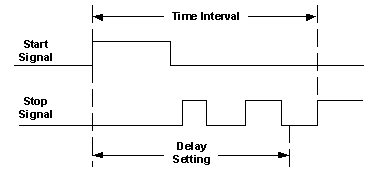
Time Interval with Delay
The signal period is measured in exactly the same way as the signal frequency, described above. The period is simply the reciprocal of the frequency, since Period = 1/Frequency.
Frequency, Fast Frequency and Period modes can be armed for precise control over the measurement interval starting point. This is especially useful if the signal to be measured is a burst signal or it is frequency modulated. Although Armed Frequency allows the beginning of the gate interval to be defined, the end of the measurement interval is defined by the specified gate time; it cannot be set by the arming signal. For more information see the “Arming” section.
Period allows the GC2220/GC2230/GTX2220/GTX2230 to acquire up to 1400/sec theoretical measurements and around real 1100/sec measurements or better. The maximum number of measurements depends on the CPU speed, system configuration and number application running at the background. See the GxCntReadMeasurementArray function on how to achieve high number of measurements. For best results the counter settings should as follows:
The Gate time needs to be set to the minimum (250usec).
The channel Trigger Level Mode should be set to fixed.
The channel Trigger Level should be set to fixed value, e.g. 0.5V.
The channel Prescale Mode should be turned off.
Some applications require that the signal period be measured over exactly one Pace. In Single Period mode, the GC2200/GTX2200 configures the internal measurement logic to perform a time interval. As in time interval mode, resolution is fixed at 10 nanoseconds for GC2210/GTX2210, and at 100 picoseconds for GC2220/GC2230/GTX2220/GTX2230. Note that the specifications require a signal period greater than 25 nanoseconds for this mode.
Although the auto calibration process of the GC2200/GTX2200 minimizes errors, single period will produce results that are less accurate than the conventional period mode. Period mode is superior since it averages errors over multiple signal Paces. For example, if a 1 MHz signal (1 s period) is measured over a 1 second interval using Period mode, approximately 10 nanoseconds (GC2210/GTX2210), or 100 picoseconds (GC2220/GC2230/GTX2220/GTX2230) error is distributed over 1 million events, for an average error of 10 femtoseconds (10-15 second) for the GC2210/GTX2210, or 100 attoseconds (10-18 second) for the GC2220/GC2230/GTX2220/GTX2230. However, in single period, the same total error must be distributed over a single event.
Ratio mode determines the ratio between the signal frequency on one input channel and the signal frequency on the second input channel. As in frequency mode, the measurement is performed during a user definable interval or gate time: longer gate times produce higher resolution results. Signal swapping allows the user to select either A/B or B/A, depending on preference, without swapping cables and reconfiguring the input controls.
AutoRatio, a function unique to the GC2200/GTX2200, removes the setup constraints and uncertainty commonly associated with this function, as implemented on other counters. The GC2200/GTX2200 tests the input signals and automatically selects the internal connections that maximize resolution. If necessary, the measurement results are automatically converted to the format requested by the operator (e.g. A/B or B/A). (Other counters provide optimum performance only when the result is a ratio > 1.000)
Note that only one of the input signals may exceed 25 MHz in Ratio or AutoRatio modes. Furthermore, AutoRatio should not be used when signal frequencies drop below 400 Hz.
The Totalize function allows events on one input channel to be counted for a period of time determined by manual keyboard inputs, program statements, or events on the second input channel. In contrast to most other universal counters, the data is accurately reported on EVERY read command. On other counters, the ±1 count accuracy specification applies only to data read out following gate closure, or at periods when no events are being accumulated.
For maximum flexibility, the GC2200/GTX2200 provides three variations of the Totalize mode. In the “manual” mode the host computer application will explicitly open the count gate, close the count gate, or reset the count to zero. The manual mode provides the most convenient control of counting, but does not allow precise timing.
Gated Totalize is a “gated” mode that allows a second input signal to open and close the gate on user specified signal transitions. After the gate closes, the measurement data is held until explicitly reset by the host computer application, such as the software front panel.
The input slopes control the gating interval for Gated Totalize mode. Selecting same slopes for the start and stop (e.g. both positive) sets the gating interval to one period of the gating signal. Setting opposite slopes for start and stop changes the gating interval to a pulse width of the gating signal. The Figure below illustrates how different slope setting controls the Gated Totalize sample period or interval.
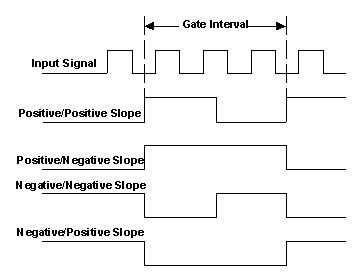
Gate Interval controlled by slope settings
In some applications, it is desirable to keep a running total count over multiple gate intervals. The Accumulate mode enables this capability. Accumulate mode, like Gated Totalize, allows an external signal to determine the gate interval. The count gate, however, can be opened and closed an indefinite number of times. Less than 0.5 microsecond of “dead time” is required between the closing of one gate interval and the beginning of the next. Data can be accurately read at any time.
The Pulse Width function provides a convenient way to automatically setup the GC2200GTX2200 for this common measurement. The pulse polarity (i.e. positive or negative) is defined by the slope selection. For example, to measure the width of a negative going pulse on Channel B, set the measurement function to “Pulse Width” and set Channel B slope to Negative. Measurement resolution, as in other time interval modes, is 10 nanoseconds for GC2210/GTX2210, and 100 picoseconds for GC2220/GC2230/GTX2220/GTX2230. The threshold levels can be set by the auto trigger function or manually.
The Auto Trigger function automatically sets the input comparator trigger levels just before EACH measurement. The GC2200/GTX2200 first measures the positive and negative peak levels applied to the active input channels. It then sets the trigger threshold levels approximately midway between the measured peaks. This process takes approximately 50 to 250 milliseconds, depending on signal amplitude and frequency. Although Auto Trigger is a very convenient feature, there are some situations where its use is inappropriate. The device driver allows Auto Trigger to be disabled and the levels to be set explicitly. For example, Auto Trigger limits the maximum measurement rate to about 20 measurements per second. When faster rates are needed, Auto Trigger must be disabled (see the discussion of the Hold function, below). Second, Auto Trigger will not operate reliably when the input signal repetition rate falls below 100 Hz. Although the basic algorithm could be extended to lower frequencies, the time required for ALL Auto Trigger operations would increase. Finally, it is inappropriate to use Auto Trigger in any measurement where signal amplitude can vary periodically, as in pulsed RF.
The Hold function captures the benefit of Auto Trigger for an application where it is continuous Auto Trigger is unsuitable, such as in Totalize mode and making high speed measurements. Trigger level “Hold” retains the last auto trigger setting until the selecting another Trigger Mode.
The steps below demonstrate the Auto Trigger algorithm:
Measure signal positive and negative peak levels.
Trigger level set half way between positive and negative peaks.
Wait 0.5 second for measurement to start, if the measurement does not start, reset and return to step 1.
If the signal is lost after the start of a measurement (frequency is less than 2 Hz), reset and return to step 1.
Complete measurement and return to step 1.
Steps 3 and 4 prevent the instrument from “hanging up” if the signal changes amplitude or disappears. Note that Auto Trigger skips step 4 in Time Interval mode, since the actual measurement time is unknown. All test programs using ANY timer/counter should have “time out” facilities to prevent the possibility of an infinite wait states.
Some Time Interval measurements, such as circuit propagation delay, are easy to set up. Other measurements can be more challenging, especially if the signal is not perfectly repetitive and if every event is unique. Measurement arming is a significant aid, since it creates a “time window”, explicitly selecting specific events. Arming is especially valuable in test systems, since it ensures repeatable as well as accurate results on every measurement. The arming window is defined by events (signal transitions) applied to the External Arm Input.
Two modes of armed operation are possible, Start Arm, and Stop Arm:
In the Start Arm mode, the arm input event opens the time window and the next start event initiates the measurement. The FIRST stop event following the start will terminate the measurement. Sometimes, it is desirable to “skip” stop events; for example when the delay from the first to the fifth pulse must be measured. Start Plus Stop Arm allows the stop event to be selected as well as the start event. See the figure below for an illustration of how Start Arm and Start Plus Stop Arm operates.
In many cases an appropriate arming signal can be found in the circuit under test: if this is not the case, either external equipment or dedicated circuitry must be used. Some useful external tools for generating the arming signals are pulse generators and oscilloscopes.
Pulse generators can provide appropriately delayed signals of variable width to facilitate both arming modes. Some oscilloscopes can provide an easily positioned arm signal from their delayed gate output. The input signal is routed to both the scope and the GC2200/GTX2200 and the delayed gate output is connected to the GC2200/GTX2200 External Arm input; the scope delay controls are then adjusted to “highlight” the appropriate portion of the signal. This technique is especially beneficial since the arm window is visible and can be precisely adjusted to select the desired event.
Frequency, Fast Frequency and Period modes can be armed for precise control over the measurement interval starting point. This is especially useful if the signal to be measured is a burst signal or it is frequency modulated. Although Armed Frequency allows the beginning of the gate interval to be defined, the end of the measurement interval is defined by the specified gate time; it cannot be set by the arming signal.
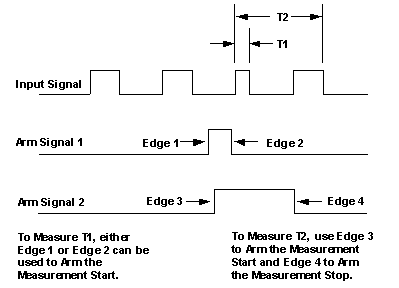
How the Arm settings affect Time Interval measurements.
The GC2200/GTX2200 features a Pace mode which ensures the acquisition of data at accurately spaced time intervals. In Paced operation, the user specifies the time that should elapse BETWEEN measurements initiations. The pace times are digitally generated on the GC2200/GTX2200 board and are accurate to within 200 us (the errors do not accumulate). The intervals can be set from 1 mSec to 3200 seconds depending on measurement mode. The minimum pace interval is 0.8 ms for Time Interval and 1.0 mSec for Frequency and Period. See the Frequency section for timing ambiguities that can occur if the signal has a low repetition rate. The shorter intervals allow the GC2200/GTX2200 to operate much like a frequency domain, digital sampling oscilloscope, while the longer intervals allow unattended acquisition of slowly changing data.
Some care must be used when selecting pacing intervals to ensure consistent timing between measurements. The Acquisition interval must be at least 1.5 ms longer than the actual gate time in Frequency and Period modes. The Acquisition interval should be at least 1.5 ms longer than the actual measurement interval in timing modes, such as Pulse Width. If these recommendations are not followed, the counter will simply “skip” measurements, and the data will be taken at uneven intervals.
In many situations it is advantageous to synchronize the start of data acquisition to an external signal. Signal applied to the External Arm input to initiate a block of paced measurements. For convenience, either a positive or negative slope can be selected as the trigger event. When triggered mode is disabled, pacing is initiated immediately after a setup or reset. For example, the GC2200/GTX2200 can be used to determine the frequency versus time performance of a VCO (voltage controlled oscillator). Triggered Acquisition allows the counter to wait until the arrival of the stimulus pulse before beginning acquisition.
The Single mode halts display update after a single measurement is made. This feature is useful when results must be recorded manually, or when a high-resolution result must be checked carefully.
Prescaling is necessary when the input frequency exceeds 10 MHz in Frequency, Period, Ratio, and AutoRatio modes (see specifications). Prescaling does not affect resolution or accuracy in any way. Prescaling can be enabled or disabled by the user, or it can be set to Auto mode. In Auto mode, the counter determines the need for prescaling automatically by making a quick frequency check prior to the each and every actual measurement. The process takes about 20 mS.
If the input frequency exceeds 10 MHz and arming is enabled, the prescaler must be explicitly turned on. This is because the counter disables the prescaler whenever arming is enabled to reduce potential measurement start point ambiguity. Armed measurements may require up to 4 Paces of the input signal before the counter starts.
The third signal input on the GC2200/GTX2200 is used for an External Clock Input. The External Clock Input employs high-speed comparators, with hysteresis, to provide external clock source signal conditioning. The input is AC coupled with input impedance of 2 KOhm. The input requires at least 150 mV rms of signal amplitude (420 mV peak to peak). Note that the external clock frequency must be within 5% of 10 MHz, or the internal circuits may malfunction, reducing resolution.
The PXI chassis has a 10 MHz clock line (PXI_CLK10) on its backplane that allows devices plugged into the non-star controller slots (slots 3 and higher) to phase-lock their oscillators to the backplane clock. When plugged into one of the non-star controller slots (slots 3 and higher), the GTX22x0 board can be programmed to use the PXI backplane clock.
The PXI chassis’ 10 MHz clock line (PXI_CLK10) t allows devices plugged into the non-star controller slots (slots 3 and higher) to phase-lock their oscillators to the backplane clock. The GTX22x0 board, when plugged into the star-controller slot (slot 2) can replace the PXI backplane clock with its much more stable oscillator and function as the PXI_CLK10 source.
Note: Valid only if the GTX22x0 board is plugged into the star-controller slot (slot 2) of the PXI chassis.
The External Arm Input (DIN-6 pin 1) is used for the function of an external arm signal input. The input stage employs high-speed comparators, with hysteresis, to provide signal conditioning. The arm function is DC coupled with input impedance of 2 KOhm with TTL level signals: i.e. the threshold voltage is approximately 1.4V.
In some situations it is advantageous to know exactly when the GC2200/GTX2200 measurement gate opens and closes. Applications would include debugging a setup in which arming is used or to verify input comparator trigger points. The “gate out” signal is available on the GC2200/GTX2200 board from the Gate Output (DIN-6, pin 4) connector. The output is TTL level, with a 100-ohm series resistor. This combination can drive a 50-ohm cable and 50-ohm termination and provide about 0.8 Volts peak to peak to the load.
The Gate Out signal is a TTL “high” during the gate interval, and low at other times. Several of the automatic functions available on the GC2200/GTX2200 can cause spurious “gate out” signals just before the expected gate. If the gate events generated by auto trigger, auto calibration and auto prescale cause a problem, they can be explicitly disabled. For example, spurious gate events may cause a scope to trigger erratically, or may prematurely trigger another instrument.
Note: An example application for the “gate out” signal would be to use it to arm a second GC2200/GTX2200. Two counters could be used to acquire sequential measurements on a complex signal. The first GC2200/GTX2200 would acquire a data point and arm the second: the second counter could then immediately capture a related signal transition. The counters could be interconnected with a simple cable.
Each of the input channels can be programmed for DC coupling or AC coupling which is the default setting after a reset.
Each of the input channels can be programmed to filter the input signal. The filter is a window in time (one shot), which starts every time the input signal crosses the trigger threshold level. The length of the window is programmable in the range of 5uS to 6400 uSec. Transitions in the input signal during this window will be ignored. Filtering is effective for input frequencies less than 20 KHz.
Note: The delay needs to be less than half of the expected frequency signal duty cycle. Filter value can be manually set when filter mode is set to FIXED. The filter value should be set according to the following equation:
Filter Value (uS)£ 1.0E + 6
ExpectedFrequency *4
Maximum Filter value in uSec can be 6400.
E.g: if the expected value is about 200Hz then filter value should be around 1250uSec.
The filter permits accurate and stable measurements of signals that have noise or glitches. Typical applications would include encoders and sensors. The filter provides a way to prevent false triggering after the initial trigger.
Programmable mode which allows the user to make measurements on the same input signal without the need to connect both inputs (when using a common input the trigger slopes for channel A and channel B cannot be the same).
Note: Valid only for GTX2210/20/30 board with firmware versions 0xCXXX and above.