The GXCNT driver contains a set of functions for the GC2200/GX2200 family of counters. Functions names that starts with the GxCnt prefix applies to all GXCNT boards (i.e. GxCntReset). The GXCNT functions are designed with consistent set of arguments and functionality. All boards have a function that initializes the GXCNT driver for a specific board, reset the board, and display the virtual panel. All the functions use handles to identify and reference a specific board and all functions return status and share the same functions to handle error codes.
The GXCNT driver supports two device drivers HW and VISA which are used to initialize, identify and control the board. The user can use the GxCntInitialize to initialize the board ‘s driver using HW and GxCntInitalizeVisa to initialize using VISA. The following describes the two different methods used:
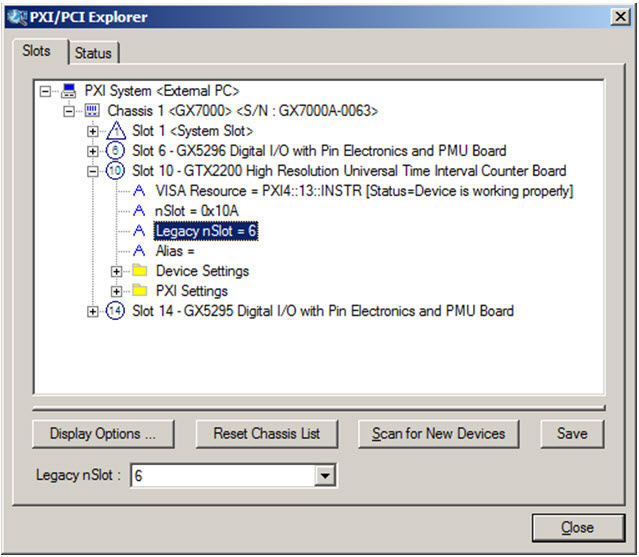
1. Marvin Test Solutions’ HW - the default device driver that is installed by the GXCNT driver. To initialize and control the board using the HW use the GxCntInitialize (nSlot, pnHandle, pnStatus) function. The function initializes the driver for the board at the specified PXI slot number (nSlot) and returns a board handle. The PXI/PCI Explorer applet in the Windows Control Panel displays the PXI slot assignments. You can specify the nSlot parameter in the following way:
A combination of chassis number (chassis # x 256) with the chassis slot number, e.g. 0x105 for chassis 1 and slot 5. Chassis number can be set by the PXI/PCI Explorer applet.
Legacy nSlot as used by earlier versions of HW/VISA. The slot number contains no chassis number and can be changed using the PXI/PCI Explorer applet: 23 in this example.
PXI/PCI Explorer
2. VISA – this is a third party library usually by National Instruments (NI-VISA). You must ensure that the VISA installed supports PXI and PCI devices (not all VISA providers supports PXI/PCI. GXCNT setup installs a VISA compatible driver for the GXCNT board in-order to be recognized by the VISA provider. Use the GXCNT function GxCntInitalizeVisa (szVisaResource, pnHandle, pnStatus) to initialize the driver board using VISA. The first argument szVisaResource is a string that is displayed by the VISA resource manager such as NI Measurement and Automation (NI_MAX). It is also displayed by Marvin Test Solutions PXI/PCI Explorer as shown in the prior figure. The VISA resource string can be specified in several ways as the following examples:
Using chassis, slot: “PXI0::CHASSIS1::SLOT5”
Using the PCI Bus/Device combination: “PXI9::13::INSTR” (bus 9, device 9).
Using alias: “COUNTER1”. Use the PXI/PCI Explorer to set the device alias.
Information about VISA is available at http://www.pxisa.org.
The GxCntInitialize function returns a handle that is required with other driver functions to program the board. This handle is usually saved in the program in a global variable for later use when calling other functions. The initialize function does not change the state of the board or its settings.
The board handle argument, nHandle , passed (by reference) to the parameter pnHandle of the GxCntInitialize or the GxCntInitalizeVisa functions is a short integer (16 bits) number. It is used by the GXCNT driver functions to identify the board being accessed by the application. Since the driver supports many boards at the same time, the nHandle argument is required to uniquely identify which board is being programmed.
The nHandle is created when the application calls the GxCntInitialize function. But there is no need to destroy the handle. Calling GxCntInitialize with the same slot number will return the same handle.
Once the board is initialized the handle can be used with other functions to program the board.
The Reset function causes the driver to change all settings to their default state. The application software issue a Reset after the initializing the Counter, but a Reset can be issued any time. All counter boards have the GxCntReset(nHandle, nStatus) function. See the Functions Reference for more information regarding the specific board.
All GXCNT functions returns a failure or success status - pnStatus - in the last parameter. A successful function call passes zero in the status parameter upon return. If the status is non-zero, then the function call fails. This parameter can be later used for error handling. When the status is error, the program can call the GxCntGetErrorString function to return a string representing the error. The GxCntGetErrorString reference contains possible error numbers and their associated error strings.
The GxCntGetDriverSummary function can be used to return the current GXCNT driver version. It can be used to differentiate between the driver versions. See the Functions Reference for more information.
Calling the GxCntPanel will display the instrument’s front panel dialog window. The panel can be used to initialize and control the board interactively. The panel function may be used by the application to allow the user to directly interact with the board.
The GxCntPanel function is also used by the GXCNTPANEL.EXE or GXCNTPANEL64.EXE panel program that is supplied with this package and provides a stand-alone Windows application that displays the instrument panel.