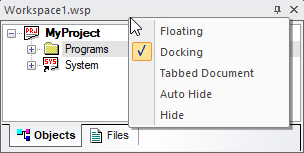
Click the Docking button to dock or Auto Hide the Window. In addition the following context menu is available to change the state of the window:
● Floating - move anywhere on your desktop above or outside the IDE main window
● Docking - Doced to the main window sides or to another docked window
● Tabbed Document - show in a tabbed window
● Auto Hide - show a tab on the side with the caption, when moving the mouse above the tab it will show the whole window
● Hide - hide/close the window
You can also change display states by using a popup menu as described in Putting a Dockable Window into the Client Area and Controlling Dockable Window States.
For more information on Dockable windows, see Dockable Windows.