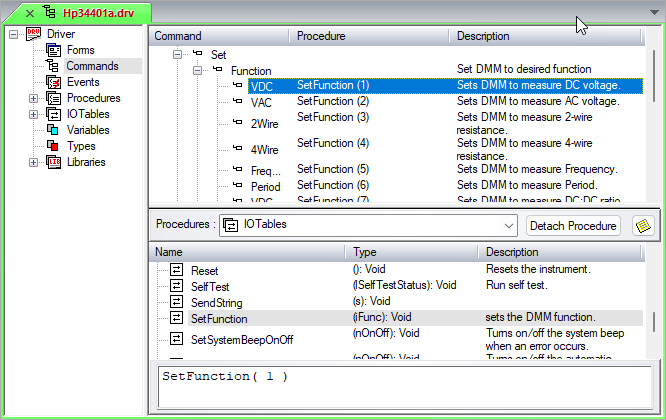
The I/O Table is used to communicate and control the device. I/O Tables generate the code required for sending or receiving data without you needing an intimate knowledge of the communications bus being used. Typically, a driver contains many I/O Tables. To provide a better way to locate the I/O Table you want to use within your code Commands that are assigned to I/O Tables are used.
Using commands you can organize I/O Tables according to functionality. By grouping I/O Tables under Commands such as Measurement commands, Setup commands and so on, you can locate the I/O Table more easily. Other benefits of using commands are to make the code more readable and for ease of self-documentation. For more information on commands, see Overview of Commands.
Before you assign an I/O Table to a command, you need to insert commands under the driver containing the I/O Table you want.
Creating a command displays the following Commands view:
This example assigns the SetFunction I/O table with a parameter of 1 to the command Set Function VDC. The SetFunction I/O table is further explained in Example: Creating a Discrete (Multifunction) I/O Tables.
To assign the SetFunction I/O Table to a command:
1. In the Commands view, select the command to which the I/O table is assigned. In this case, select VDC.
2. In the Procedures Sub-modules list, select IOTables.
3. In the Procedures list, select the I/O Table. In this case, select the SetFunction I/O Table.
4. If necessary, insert a parameter in the Parameter Replacement edit box. In this case, enter 1 between the parentheses.
You can now use the command Driver Set Function VDC in code. (See Entering Code for more information.) Doing so calls the I/O Table with a parameter value of 1. The Discrete List in the table outputs a string of VAC for the value 1.