The System module is a file that contains drivers and their configuration as reflected by a test system. It also contains commands associated with the specific configuration of the test system. The System includes information on the currently installed hardware, including the interfaces, instruments, and configuration of the computer or controller. You can put common procedures and variables from individual Drivers into the System module because you want everyone to be able to use them. These procedures and variables should be marked as Public.
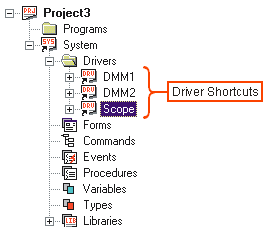
The System module contains shortcuts to the Driver modules:
These driver shortcuts point to the drivers that are currently configured in your system. Each shortcut contains the driver file name and the configuration for a given driver. The configuration is based on the subset of settings that were defined in Driver Properties – the interface settings, such as device address. This configuration would include the model name of the test instrument, as well as the parameters and values set up in Driver Properties. In the driver shortcut configuration, you can also override default settings set up in Driver Properties.
Multiple driver shortcuts can have the same driver file name. For example, in the above tree view, DMM1 and DMM2 could both point to the same driver for a Fluke 8840A DMM, FL8840A.drv. However, the two shortcuts would refer to two separate DMMs of an identical model (hence, the single driver) but of different interface configurations. For example, one physical DMM could be on GPIB bus address 1 and the other could be on GPIB bus address 2.