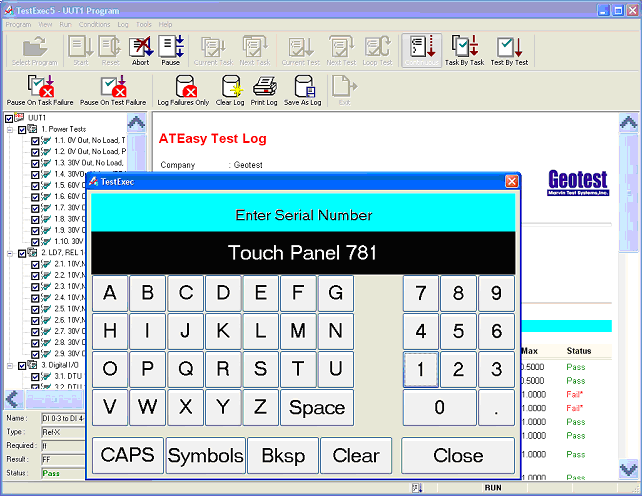
Touch Screen user interface allows operation of test set via touch-screens with a special customized toolbars.
ATEasy version 5.0 contains numerous enhancements and improvements to the test application development environment. The following lists new features available in ATEasy 5.0:
Built in support for IVI drivers. ATEasy now includes ATEasy drivers for all the IVI driver classes currently available (DC power supply, Digital multimeter, Function generator & Arb, Oscilloscope, Power meter, RF signal generator, Spectrum analyzer and Switch. ATEasy also support of importing non-class compliant IVI drivers using a new IVI Driver wizard and support both IVI driver formats: IVI-C and IVI-COM
Support for .NET components. .Net assemblies or assemblies components can be imported to ATEasy and used similar to the way you would use them from Visual Studio .NET languages. This capability provides a truly open architecture by embracing new technologies and is similar to the way COM and DLL extend ATEasy capabilities.
Import C header file (.h) - ATEasy can now import functions and type declarations directly from C/C++ header file (.h). This reduces the development cycle and eliminates any errors when calling external DLL library..
LabView® VIs – ATEasy users can now use existing LabVIEW code in their test applications. All the user needs to do is to select the VI (Virtual Instrument or LLB (library) file. ATEasy Insert LabVIEW wizard will generate an ATEasy procedure to call the VI.
Function Panel Import Wizard - Lab Windows Function Panels Drivers (.fp) import was improved and generates more accurately ATEasy driver from LabWindows drivers – this feature allows users to use these drivers without the need to rewrite them.
Summation Program Import Wizard - ATEasy now includes a Summation Import Wizard that allows import of Summation TestCase programs into ATEasy.
Upon closing of a workspace, ATEasy will display the Save Modified dialog with a list of files modified so that you can save all files or select which one to save.
Module Protection - ATEasy allows module-level protection in the development environment. Namely, it allows you to add password for different access level to each module - Program, System, Driver.
Recent page of Startup dialog have a new Other... button that allows Open dialog to open any other ATEasy file instead of just the file listed.
Form editor has Minimize/Maximize and Restore buttons.
New Conditions menu includes new condition menus: Log Failures Only, Pause Task/Test Failure, Prompt on Pause Failure, Repeat Run.
New Tag property in all controls and many classes: AApp, AForm, ADriver, AMenu, AProgram, ASystem, ATask, ATest, AUser, etc.
Two new controls added: Tab Control (ATab) and Panel Control (APanel).
Current controls enhanced. For example, the AListBox now support a list of checkboxes. Additionally, Controls now have the XP theme look and the AMenu support the new .NET style menus.
ATEasy forms now support automatic form and controls sizing. Similar to .NET controls, each control can be anchored and aligned. This allows users to implement sizable forms with minimal coding to size the controls when the form is sized.
The AForm now support container controls. Container controls contains other controls and when they are shown or hidden their controls are also shown or hidden.
AGroupbox control was modified to be a container control
AControls have new extended properties ... that allows you to automatically resize the controls when the form is sized. Each control can be aligned and encored to the form side (this is similar to .NET resizing of controls).
New method Move for the AMenu class - allow you to reorganize the menu at run-time.
New VarChangeType function. This Variant function allow you to modify and convert the variant data type.
New Help function and enumAHelpCommand enum, - allow you to open and display help files. Two help file formats are supported: HTML compiled Help (.chm) and Windows Help file (.hlp).
New Round function. This Math function allows you to round a floating point number.
Modified MsgBox function allow you to pass in the text used to label the buttons.
Bit, HiByte, LoByte, HiWord, LoWord - new integer manipulation functions
SetLogString - new function that can be used to intermediate change to test log string instead of overriding an event
GetATEasyVersion - new function that return the ATEasy version and build number
String Manipulation function were optimized for better performance
New support for COM events handlers using the AddHandler/RemoveHandler statements. This allows users to interface with COM applications that generate events.
ATEasy now supports callback procedures. ATEasy procedures can be called by an external DLL directly. This feature provides a way for an external instrument driver (i.e., DLL) to call ATEasy procedure when a certain event occurs. Windows API also uses callbacks.
Internal library offers new bit manipulation, help, log functions, and more. Also, new classes properties and methods extend the internal library further.
Support for 64 bit signed and unsigned integers.
Statements can be spanned across multiple lines by ending the line with the '\' character
C Style and multi line comments
String Literals can be defined across multiple lines
Character Data Conversion through assignment - Byte/Char array can assign to String and vice versa, Assigning Structures to Variants and vice versa.
Touch Screen user interface allows operation of test set via touch-screens with a special customized toolbars.
Users and Groups based privileges and customization; the administrator can customize the test executive per user groups without writing code. Each option and each menu command can be hidden or disabled. The toolbar buttons can be also customized per group and its buttons can be hidden or arranged. User can use the administrator set of customization and customize it further if the administrator allowed it.
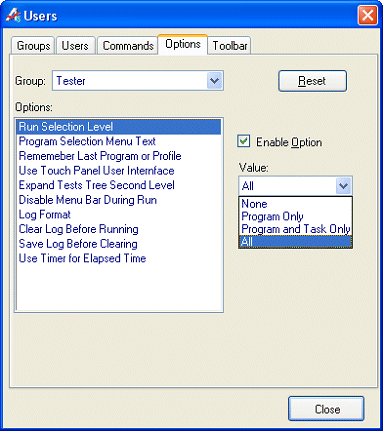
Complete customization of toolbars menu with or without using users and groups feature.
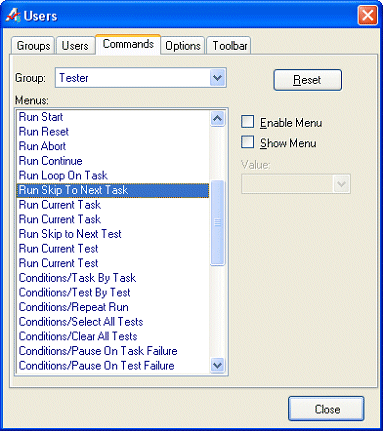
Many new options including selection of debugging level for the operator – allows the test engineer to disable selection and running of individual tests or tasks, log failures only.
New commands for better controls of the test executive options and behavior. New test conditions, option to disable menus while program is running, Windows XP style menus and much more.
On-line Help for the test executive to provide detail on how to operate and customize the test executive.
For further information, please see TestExecutive.
Fault Library provides a powerful troubleshooting tool for electronic circuits.
A Fault Editor allows program developers to define Fault Conditions to be analyzed by ATEasy during runtime.
When activated during runtime, the operator can be prompted to replace assemblies or components based on the actual failures (i.e.,“Replace U1 and Re-Test”).
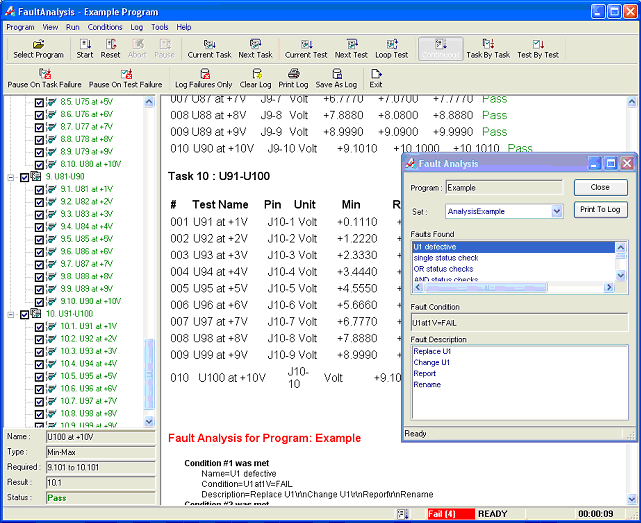
New example, FaultAnalysis, shows how to use the Fault Analysis to troubleshot a UUT.
New example, TestExecutiveUsers, shows how to use and customize the test executive for multiple users with different privileges, options, toolbars and menus.
New example, LabVIEW, shows how to use LabVIEW VI/LLB files.
New example, DotNet, shows how to use .NET assembly.
New example, AdoDB, shows how to use Active Data Objects library, to create, read and write a database.
Additional drivers (Marvin Test Solutions and other instruments vendors).