,
,  (red mark) in the Content tab of the help.
ATEasy
version 9.0 contains numerous enhancements to the test development environment,
run-time and Test Executive.
The following list describes the main changes in this version. New or
significantly modified topics/books in this on-line help are marked with
,
(red mark) in the Content tab of the help.
● Instrument, software and hardware Simulation ● Side By Side installation and run-time ● Unicode support throughout the development environment editors and run-time ● Enhanced Find and Replace for Type, ID and Value, New Find All Log, Replace All Log windows ● Multiple Objects Selection support for common operations Cut, Copy, Replace, Delete and Drag and Drop ● Support for additional and user defined Source Control Providers ● Education, Basic editions with USB multi-function board ● ~100% backward compatible, running EXE, DLL compiled with older versions and using prior versions Sources Files |
|
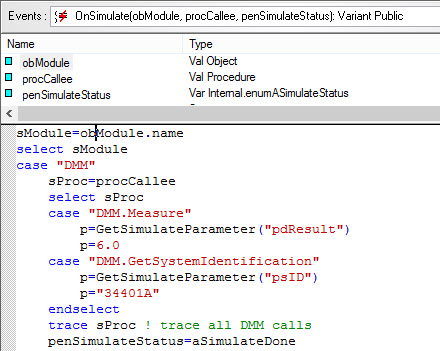
● Hardware
and software Simulation
is now built into ATEasy. Develop Run, Debug and Analyze your application
on your desktop with no or partial hardware using the new ATEasy 9 simulation.
Any exiting driver, system or program can be simulated, no source code
changes are required for existing modules to support simulation.
● Side by Side
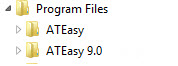
Installation and run-time. ATEasy 9 development environment and run-time
is installed next to your existing older ATEasy version. You can keep
your exiting drivers and files and You can use both development environment
and run-time at the same time. Compiled applications will use the matched
run-time version or the newest version if not available.
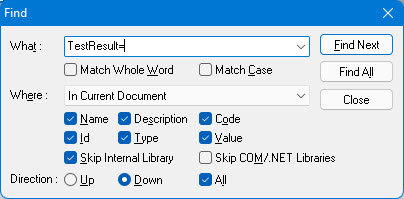
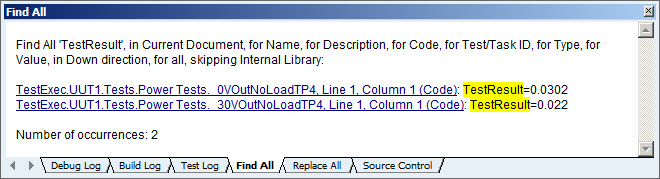
● Find and Replace
dialog boxes support Type, ID and Value
when searching and replacing. The dialog boxes contains Find
All (new) and Replace All
buttons displaying results in a new Log
Window tabs named Find
All and Replace
All. The new tabs display links to all text searched and replaced
allowing you to revisit the text by clicking on the links.
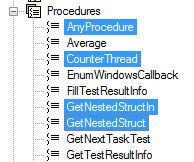
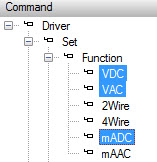
● Copy Paste,
Replace, Delete and Drag and Drop supports selection
of multiple Objects.
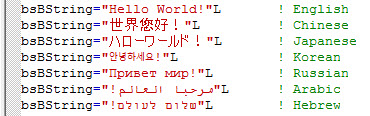
● Unicode
support throughout the development environment including the Properties
window and text/code editor, commands and form editors, find and replace
and more. Unicode text is saved to ATEasy file (binary or text) in UTF-8
to support backward and forward compatibility.
● Additional Source Control providers are supported including Microsoft Source Safe, Microsoft Team Foundation Server, Subversion, CVS, Git, SCC API providers, and more. The Source Control page in the ATEasy Options dialog box that lets users define any command line source control provider. Document shortcuts have a source control path to designate individual path for each shortcut.
● Path Variables provide dynamic path for files used throughout the development environment, including the Tools menu, documents shortcut, library, and source control.
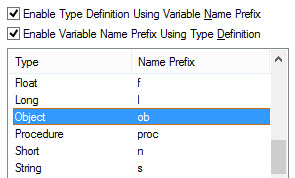
● Automatic
variable prefix and type. Variable type can be automatically set
when typing a variable name with a prefix. Changing a variable type can
set the variable prefix as well. See the Variables
Options dialog for more information.
● Support for LabVIEW 2012, 2013 and .NET 4.5.
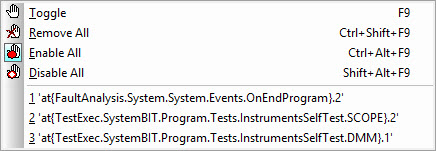
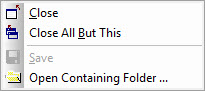
● IDE improvements
includes command to Enable
All or Disable
All breakpoints, command to Close
All Windows But This, tool tip to show document file path, document
tab modification status (*), revised startup dialog includes sortable
columns and sizable dialog, new Tools menu to open
the PXI/PCI Explorer, enum value auto increment and more.
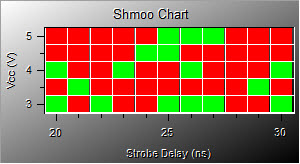
● Run-Time improvements
includes new properties and functions: AApp.ExitCode,
AApp.Simulate,
new OnSimulate()
module event, GetSimulateParameter(),
SetSimulateProcedures(),
AUsers.FileName,
AUsers.SetDefaultFileName(),
revised VarDimSize(),
AChart
Shmoo plot type, EnableShowException()
and more.
● Improvements to the Exception Dialog including Save button and version information (v9, 152b),
● New HW v4.7.2 (Marvin Test Solutions PCI/PXI explorer and hardware access driver) is included in this release to support VISA, multiple PXI chassis, USB and more. More information is available under Program Files folder, \Marvin Test Solutions\HW, ReadMe.txt.
● Simulation - new example showing how to use ATEasy simulation
● ExcelTestParameters - new example showing how to set test properties such as min or max from Excel file.
See the ATEasy ReadMe.txt for a complete list of all changes and new features included in this release.
● ATEasy 9 is compatible with 32/64 bit Windows operating systems including Windows XP, Vista, Windows 7, 8, 8.1 and Windows Server 2003, 2008 (also R2) and 2012 (also R2). Windows 9x and Windows 2K are no longer supported. No special software or hardware is required beyond Windows requirements.
● ATEasy 9 is ~100% backward compatible with prior ATEasy versions, no change in ATEasy file format. Forward compatibility is provided for version 4.0-8.0 (unless new features are used). EXE and DLL compiled with older versions of ATEasy can be used with 9.x run-time.
What's New in Version X/10.0, What's New in Version 8.0, What's New in Version 7.0, What's New in Version 6.0, What's New in Version 5.0, What's New in Version 4.0