,
,
 (red mark) in the Content tab of the
help.
(red mark) in the Content tab of the
help.ATEasy 2021 (v11),
ATEasy 2023 (v12), ATEasy
2024 (v13) and ATEasy 2026 (v14) contains
numerous enhancements to the test development environment, run-time and
Test Executive. The following
list describes the main changes in these versions. New or significantly
modified topics/books in this on-line help are marked with ,
(red mark) in the Content tab of the
help.
● Revamped IDE user interface - New tabbed user interface to include improved layout, colored tabs, multi-tab panes and improved sizing and docking. ● 64-bit support - additional 64-bit IDE and run-time, ability to mix 32 and 64-bit software components ● Code Editor - Many, many improvements, including Syntax error highlight, Beautify code, auto completion improvements, improved informational tooltip and parameter suggestion and many more. ● Support for .Net Generics ● Compile/Build - show multiple compiler errors ● ~100% backward compatible, with EXEs, DLLs compiled with older versions, and prior version source files, install side by side with your existing ATEasy version which facilitates side by side test application migration ● The ReadMe.txt file in your ATEasy folder contains detailed list of all changes. |
|
IDE:
● Workspace Folders can be created at the Workspace window root level or below. Folders can contain projects and other files providing a way to organize projects and external files used by the workspace.
● Compare Folders - new options to filter new files on the left and right folders and to continue with the operation( Compare/Copy/Delete) when file is locked or other error occurred, also improved progress reporting to the status bar during lengthy operations.
● Test Variables - can be sorted, also if not used and Project option is set, unreferenced variables generate build warnings.
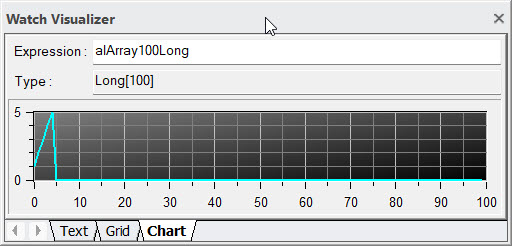
● New Watch
Visualizer dockable window provides a way to watch variables
or expression in Text, Html, Grid, and Chart views.
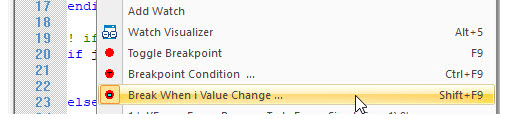
● New type of Breakpoints:
● Data Breakpoint on variable value change breakpoint.
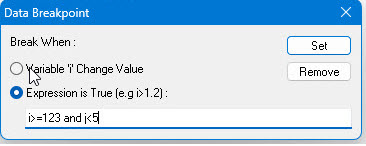
● Data Breakpoint on expression evaluated to True.
● Conditional Breakpoint on expression
evaluated to True on certain code location.
Run-Time
● Performance improvements when loading and closing applications.
● Improved .Net Generics support.
● GetDir - new constants to return common system folders.
● AForm.AutoScale - when set to True uses the System Font Size and Scale to automatically size the form and control position to match the system.
● AForm.Theme - new property and enum enumAFormDrawTheme provides an ambient property value for the form buttons (AButton) Theme property Allowing you to change all form buttons to newer theme.
● ALog.SaveAs - new support for saving test log in PDF file format.
● AButton control:
● Theme - new property to display buttons with gradient styles: Light, Dark or Glossy
● Improved layout and look of Ellipse and Rounded Rectangle
● enumADrawTheme
enum type

Test Executive/Profile/Fault Analysis Drivers
● Use .Net controls instead of the MSCOMCTL.ocx ActiveX.
● Support to Unicode tests/tasks names and other settings.
● Added support for saving test log in PDF file format.
New Drivers
● Drivers.wsp organized by manufacturer folders provide an easier way to locate the driver (improved).
● GX3216.drv - DLL driver for MTS/General Standards GX3216 DAQ PXI board.
● Keysight335xx336xx.drv - IOTable driver for Trueform Waveform Generators.
● KeysightN330Xa.drv - IOTable driver for Keysight N330Xa Series DC Electronic Load.
● KeysightN57xxN87xx.drv - IOTable driver for Keysight N5700, N8700 power supplies.
● KeysightKtRFPowerMeter.drv - Function Panel / DLL driver for Keysight power meters.
● KeithleyDmm6500.drv - IOTable driver for Keythley DMM6500 DMM.
● NorthAtlantic75G5.drv - DLL driver for North Atlantic 75G5 (Synchro/Resolver) using naibrd.dll.
● PeakSystemPCan.drv - DLL driver for PeakSystems CAN bus API.
Licensing
● New Support for Subscription Licensing (non-perpetual license).
IDE:
● Test Local Variables
- define variables for use in your test. Variables are declared in the
Tests View next to the test list. The test variables can only be used
in the test were they defined and they are removed as the test ends. Test
variables are used to reduce the use of program global variables.

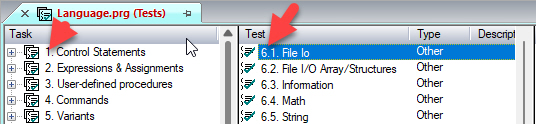
● Test Numbers
- display Task and Test numbers next to the test name in the Tests view.
The Options dialog have a new option to show or hide the Test numbers.
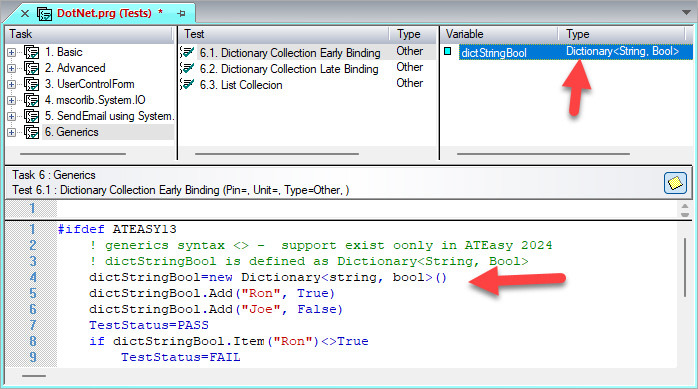
● .Net Generics
- types are displayed in the .Net library views, you can define variables
of generics types (i.e. List<String>) and the code editor supports
code completion of generics expressions.(new)
● License Setup dialog have Terminate License command for software licenses.
● Support for Subscription based license (time limited) in addition to the perpetual licensing.
Run-Time
● .Net Generics - support for .net generics early and late bind use at run-time.
● WinSock IPv6 support for all WinSock internal library functions.
● Now() function is accurate to 100nSec.
● MilliSecond() new function that return the millisecond portion of DateTime type.
● AProgram, ATask and ATest: StartTime, EndTime properties now accurate to 100nSec.
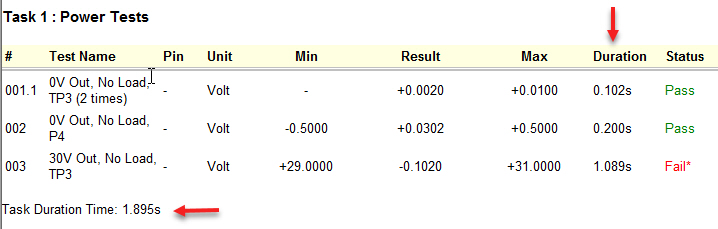
● FormatLogString() new support to display
Duration column showing the time
took to perform each test:
FormatLogString(0, "", "", aFormatLogAddDuration)
Test Executive
● Test
Log Duration column and new option Show
Log Duration to show the Duration column and the task duration
at the end of each task, This can be activate also using the following
code:
TestExec Customize Options Set (ateOptionsLogShowDuration, True)
● Test
Log Duration Filter in the test log template enable you to locate
the top tests that takes the longest time to complete.

Examples
● DotNet Example was modified to demonstrates .Net generics use.
● Python
Example and Driver - provide a way to run python scripts from
ATEasy

● Pinned
Tabs for easier locating you document tab showing the tab always
on the same location.

● Updated tool bar images and reorganized to show more frequently used button on the left and remove unused buttons.
● Improve speed for large folder comparison.
● Improved file tooltip information.
● Display green dot next to the newer file.
● After merge/copy/delete is invoked, selection is automatically moved to the next modified/missing file entry in the list.
● Reduces tab title (folder path).

● Options dialog, Files Page:
● Save
Backup On Save option. This option can be used to save a backup
file when saving a file with new changes. Files that are backed up are
project, program, system or a driver. Backup files location can be specified
to the original folder or any other folder using Path Variables. Files
are backed up using the original file name followed by the date and time
were the backup created.

● New Code editor/Variables
views context menu command, Go
to Type Definition of ... for Variables and procedures.

● Licensing
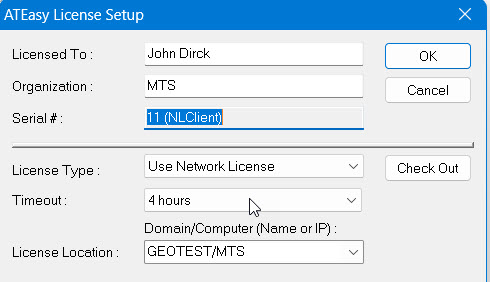
● Network licensing, extend time out up to 10 days (from 5).
● Check Out/Check In buttons in the
License Setup dialog, also display the remaining time left for checked
out licenses.
● New aPriorityError added to enumAThreadPriority used in case GetThreadPriority() receives invalid handle.
● Peek() and Poke() internal functions supports 64-bit addressing.
● Physical memory and Port I/O access using internal functions is a privileged instruction and require special access code from MTS.
● New support for inserting .Net control to a from using AForm.InsertControl method.
● Delay() internal function supports nano-seconds delays.
● #ifndef preprocessor statement.
● Tag property was added an optional parameter that indicate the ID of the tag allowing you to store multiple data tags,
● Delay() - changed the delay time type from Long to Double to support nanosecond resolution delays.
● Redesigned Test Executive tree node storage using the Program, Task or Test objects tag property to improve performance for multi-UUT parallel test
● Redesign Profile driver to support Multiple UUT
● New support to SemiEasy - Semiconductor production user interface add-on.
● Tests pane. Add Duration controls to show the time duration it took to execute the selected test.
● System/Program Run/Execution Statistics:
New Driver parameter "IniWriteStats", if set to 1 program stats will be written to the TestExec.ini located in Windows root folder.
Per Program Information includes:
Number of times the program was executed.
Number of times the program ended normally (not aborted).
Number of times the program ended with PASS status.
Total time the program ended with FAIL or ERR status.
Time spend running this program (all runs), time specified in seconds.
For the System/Test Executive:
Number of times any program was executed.
Number of times any program ended normally (not aborted).
Number of times any program ended with PASS status.
Total time any program ended with FAIL or ERR status.
Time spent by the test executive running programs, specified in seconds.
Time test executive was up and running, specified in seconds.
New Statistics
commands under TestExec Utility IniFile
Stats xxx command to get and set program and test executive
statistics data to/from the TestExec.ini file. Also included a command
to print statistics to the test log (Usually from System.OnEndProgram()).

New INI
File commands under TestExec
Utility IniFile xxx command to get and set custom program or
system data for INI file.


Is included with this release, see the HW folder ReadMe.txt for more information about the changes in this release.
New
tabbed documents interface with multiple panes instead of MDI child
interface.
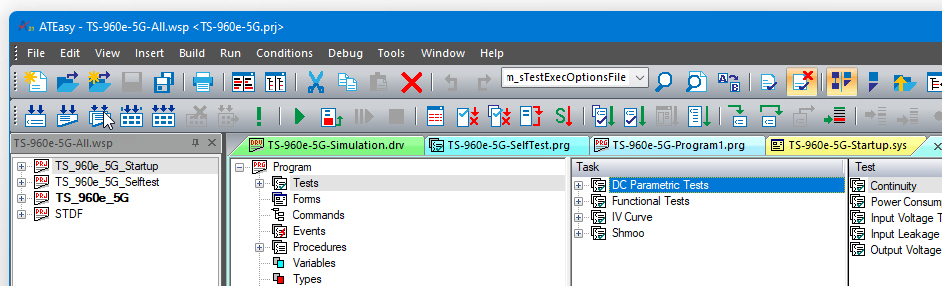
Colored tabs.
Group same document windows together and color them together (in process).
Active Tab is displayed with x and bold title to close them directly.
Tabbed documents can be dragged and ordered.
● Additional
tab panes can be created to split the main window vertically by dragging
the tab to the client area of the mainframe.

Document windows are always maximized in their tab pane.
Improved handling of sizing and docking, docking hints when dragging a window.
New menu/toolbar/commands images.
Large or small toolbar buttons size.
New Theme selection.
● New additional
x64 version of IDE and run-time to create and run 64-bit Executables or
DLLs.
● Ability to
mix call/use 32/64-bit DLLs/.Net/ActiveX from 32 or 64-bit target platforms
using the revised library properties.
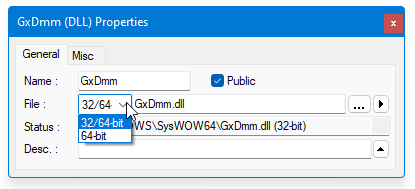
● One setup to install both IDEs (x86/x64) on x64 Windows.
● Same driver or module can be used for 32/64-bit applications.
● Highlight all
occurrences of variables/procedures/command items when placing the caret
on one.

● Highlight statement
keywords when placing caret on opening keyword.

● Highlight closing
parentheses and array index bracket when placing the caret on open parentheses
or array index bracket.

● Description
view always shows in green text color.

● New option
Show
Syntax Errors to underline compiler errors while viewing or
typing code.

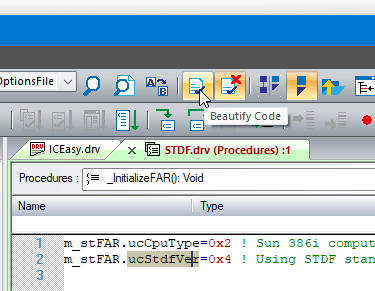
● Beautify
code while typing or scrolling or using the new Beautify Code command.

● New Standard
toolbar buttons to Beautify
selection or enable/disable
it.
● Selection can be: selected text, procedure(s), test(s), form(s), and all the way to a whole project and its documents.
● Fix statement indentation.
● Indentation while typing using <Enter> key.
● Strip/append/leave space between operators.
● Fix statements text case.
● Fix variables, procedure and commands (in process) text case.
● Auto complete statements using <Ctrl+Enter> keys.
● Improved and
added colors to tooltip for functions and commands.
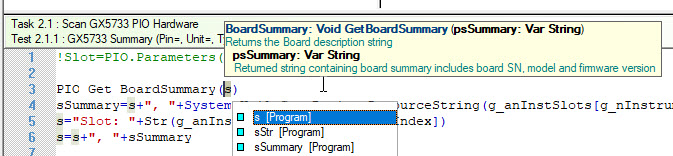
● Improved parameter
suggestion and tooltip to show automatically when caret is placed after
'(', ','.

● New Go To Command Implementation command
- can be invoked by right clicking on a command item, shows the procedure
assigned to the command.

● Compiler now
shows up to 200 errors instead of just one (new).
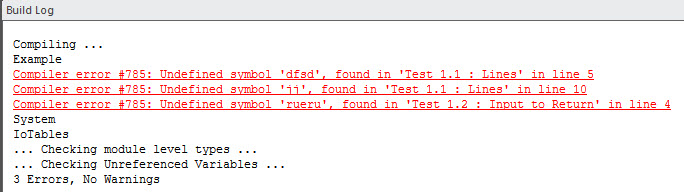
● Build log clearly highlights compiler steps.
● New Folders
or external files of any type can be inserted at workspace top level items.

● New Reorder
Alphabetically command used to reorder Variables, Types, Procedures,
Forms, IO tables, DLL Types, Procedures and Constants.
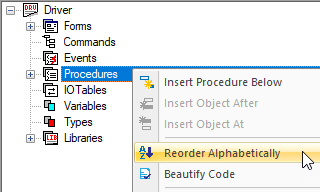
● New Filters
for Driver shortcuts, interface address in addition to interfaces filter.

● New Save and Open commands to save the monitor window records to a file.
● Text Editor page:
● Show Syntax Errors - new option to underline in red syntax errors (Default: checked).
Statement Indentation - correct indentation of the current statement (when document is modified and the user uses up/down arrows or left click in the code (Default: checked)).
Smart Spacing - correct spacing of the current statement (when document is modified and the user uses up/down arrows or left click in the code) (Default: checked).
Complete Statement<(Ctrl+Enter> - when typing <Ctrl+Enter> keys, insert a skeleton for the current statement (Default: checked).
Smart Indentation <Enter> - when typing the <Enter> enter key, indent the statement relative to the surrounding statement as needed (Default: checked).
Text Spacing: None, Strip, Append - add or remove a single space between assignment and other operators for consistency (default Strip)..
Correct Case: Statement, Symbols - correct the statement (lowercase), and symbols such as variables/procedures/commands text case to match the symbol definition.

● Other page:
● Notify Updates On Start - displays a message box when ATEasy starts if a version update is available (Default: checked).
● Check Project Before Run - check for compiler error and parse the whole project before we start running (Default: checked).
New pane to show a red flag image in the status bar when a new version update is available, double clicking on the flag invokes the Check For Update command.
Swap button used to swap the right and left folders path.
Faster files comparison using file size/modified time, and new command/option Compare File Content (default) to compare using file content if files size are the same.
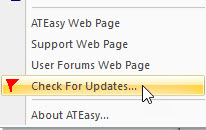
ATEasy Web Page command.
Support Web Page command.
User Forums Web Page command.
Check
for Updates... command - check web for version update. If a
newer version is available; information about the current and newer
version is displayed with an option to download the update setup.
32 and 64-bit versions of run-time.
Load and use 32/64-bit DLLs/ActiveX/.Net (no controls) with 32/64-bit EXE or DLL.
APointer data type that is 32 or 64-bit size to match the IDE/application 32 or-64 bit size
AForm.OnMove(): new event.
Pos(): New optional parameters to perform Reverse find and ignore case.
EnumConst(): New function to return enum constant name, description or value.
AX64 and AX86: preprocessor constants used to determine at compile time the compiler type used.
License activation/termination/moving
using MTS web service using user email, password and license serial
number.
.

Allow using license server on a VM using MTS web licensing service.
Allow using ATEasy on a VM using MTS web licensing service.
Improve on premise licensing log.
Reduced x10 overhead of test executive.
New option to set how many runs when using Repeat Run.
New Option to set delay between runs when using Repeat Run.
● Installation folders:
● \Program Files\Marvin Test Solutions\ATEasy\202x for x86 Windows for 32-bit ATEasy and on x64 Windows for 64-bit ATEasy.
● \Program Files (x86)\Marvin Test Solutions\ATEasy\202x for 32-bit ATEasy running on x64 Windows.
● No asking for installation folders or for program group.
● No /TARGETDIR setup command line option.
● Shared using symbolic links for Examples and Drivers folders since same driver/module can be used for 32/64-bit applications.
● Windows Startup menu group now shows under: Marvin Test Solutions ATEasy 2021 or 2023 for ATEasy 2023.
● HW 4.9.8 is included with this release - see HW readme.txt for list of changes. For ATEasy 2023 HW v5.0.2.0. is included.
● ATEasy 202x are compatible with 32/64 bit Windows operating systems including Windows XP (SP3), Vista, Windows 7, 8, 8.1, 10, 11 and Windows Server 2003, 2008 (also R2), 2012 (also R2) and 2022. Windows 9x and Windows 2K are no longer supported. No special software or hardware is required beyond Windows requirements.
● ATEasy 202x are ~100% backward compatible with prior ATEasy versions, no change in ATEasy file format. Forward compatibility is provided for version 4.0-8.0 (unless new features are used). EXE and DLL compiled with older versions of ATEasy can be used with this version run-time.
See the ATEasy ReadMe.txt for a complete list of all changes and new features included in this release.
What's New in Version X, What's New in Version 9.0, What's New in Version 8.0, What's New in Version 7.0, What's New in Version 6.0, What's New in Version 5.0, What's New in Version 4.0